

Introduction
In the world of modern data engineering, flexibility is everything. Pipelines evolve constantly—new requirements emerge, logic changes, and debugging becomes part of daily life. One underrated but incredibly powerful feature in Microsoft Fabric Data Pipelines is the ability to disable activities.
At first glance, disabling an activity might seem like a minor convenience. In reality, it can dramatically improve how you test, debug, deploy, and manage pipelines in production.
This article walks you through what disabling activities means, when to use it, and how it fits into a robust data engineering workflow.
What Does “Disabling an Activity” Mean?
In Fabric Data Pipelines, an activity represents a specific task—such as:
Copying data
Running a notebook
Executing a stored procedure
Triggering another pipeline
When you disable an activity, you are essentially telling the pipeline:
“Skip this step during execution, but keep it in the pipeline design.”
The activity remains visible, configurable, and reusable—but it won’t execute when the pipeline runs.
Why Disabling Activities Matters
Let’s be honest—no pipeline is perfect from day one. Disabling activities gives you control without destruction.
1. Safe Debugging Without Breaking Flow
Imagine you have a 10-step pipeline, and step 6 is failing. Instead of deleting it, you can:
Disable step 6
Run the pipeline
Validate downstream steps
This allows you to isolate issues without disrupting the entire workflow.
2. Incremental Development
When building pipelines, you rarely complete everything at once.
Disabling allows you to:
Build pipelines step-by-step
Test partial implementations
Avoid executing unfinished logic
It’s like commenting out code, but in a visual pipeline environment.
3. Temporary Feature Toggles
Sometimes business logic changes temporarily:
A data source is unavailable
A transformation is under review
A dependency is being upgraded
Instead of rewriting the pipeline, you can simply disable specific activities until they’re ready again.
4. Cost and Resource Optimization
Certain activities—especially Spark notebooks or large data copies—can consume significant compute.
By disabling non-essential steps, you can:
Reduce unnecessary compute usage
Save capacity consumption
Focus only on critical workloads
This is particularly important in a shared-capacity environment like Fabric.
Common Real-World Use Cases
Let’s move beyond theory and look at practical scenarios.
Scenario 1: Skipping a Faulty Data Source
Your pipeline pulls data from multiple sources, but one API is down.
✔ Disable the activity pulling from that API
✔ Let the rest of the pipeline run
Result: Partial success instead of total failure.
Scenario 2: Testing Downstream Transformations
You want to validate transformations without re-ingesting data.
✔ Disable ingestion activities
✔ Run transformation steps only
Result: Faster testing cycles.
Scenario 3: Controlled Production Deployment
You’ve added a new feature to your pipeline but aren’t ready to release it.
✔ Deploy with the activity disabled
✔ Enable it later when ready
Result: Safer, staged releases.
Scenario 4: A/B Logic Testing
You’re comparing two approaches:
Old transformation logic
New optimized version
✔ Disable one version at a time
✔ Compare outputs
Result: Better decision-making with minimal disruption.
How Disabling Works in Practice
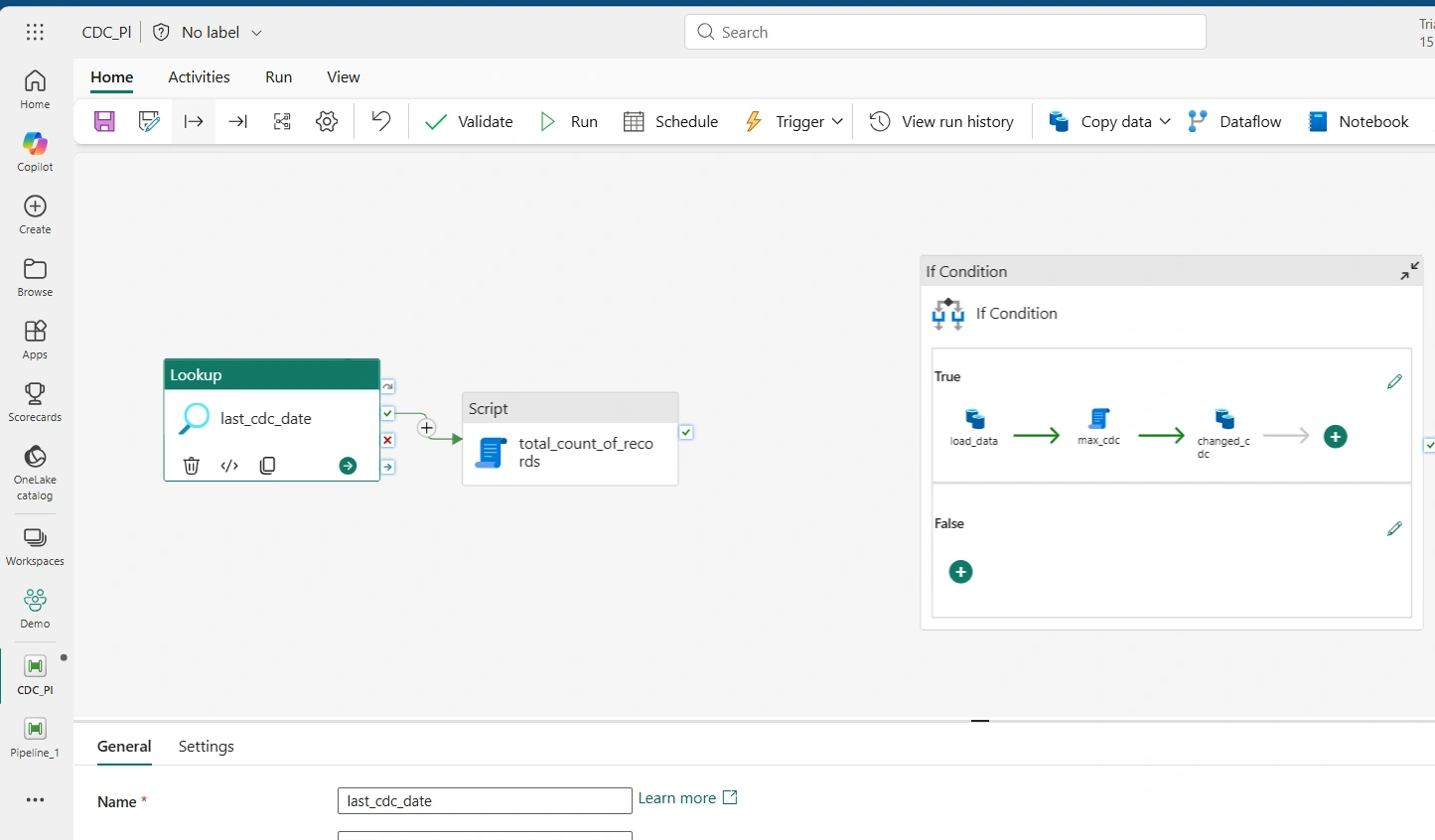
In Fabric’s pipeline UI as seen below, there are three pipeline activities (Lookup, Script and If Condition). The If Condition is currently detached from the other activities
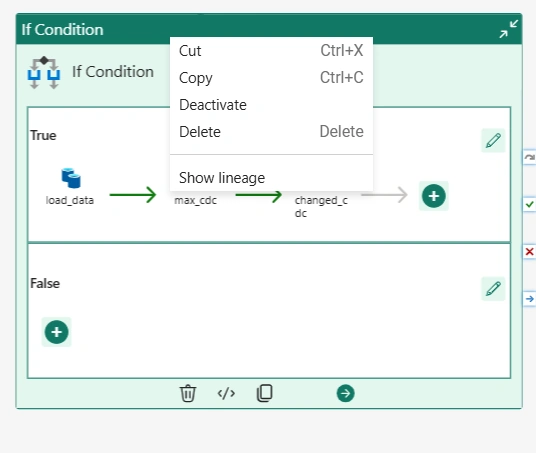
For this article, we would deactivate the If Condition such that when the pipeline runs, the If Condition activity is skipped. To deactivate, right-click on the If Condition and select Deactivate as seen below
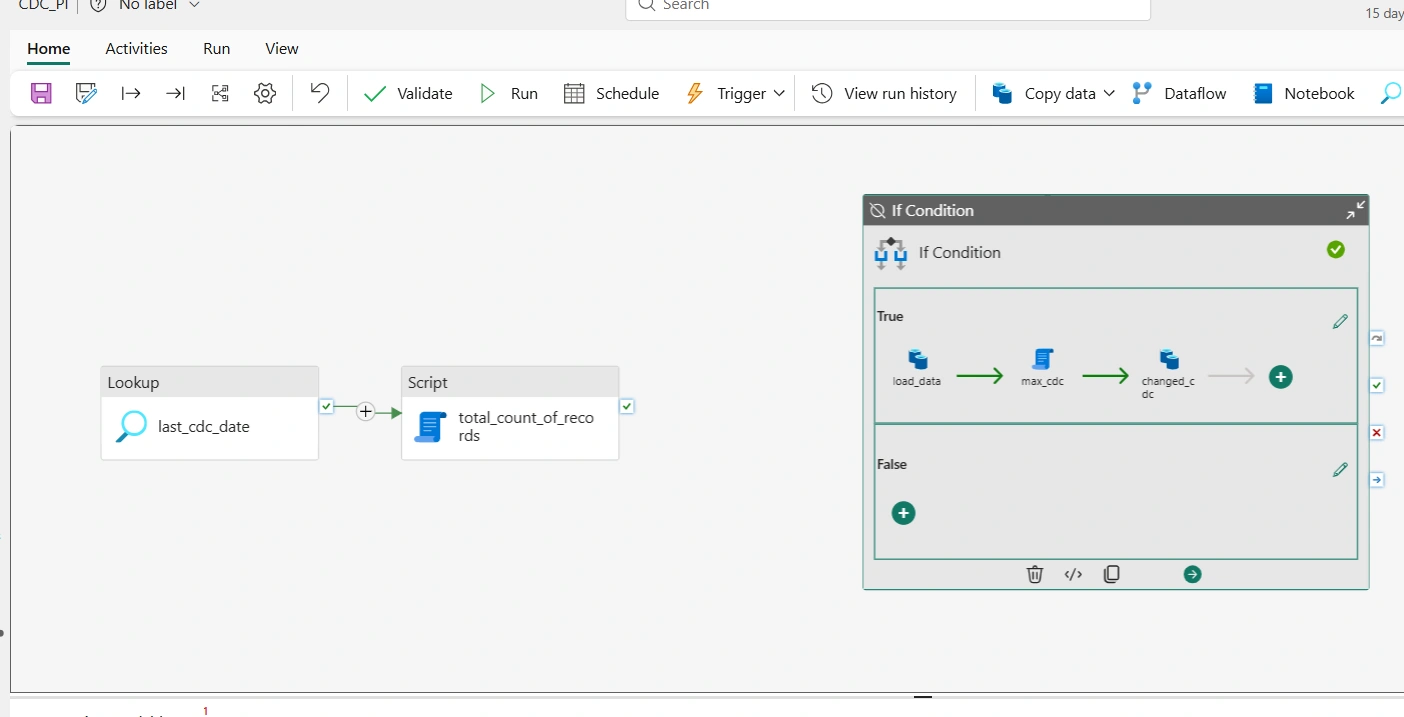
As seen below, the If Condition is now deactivated,
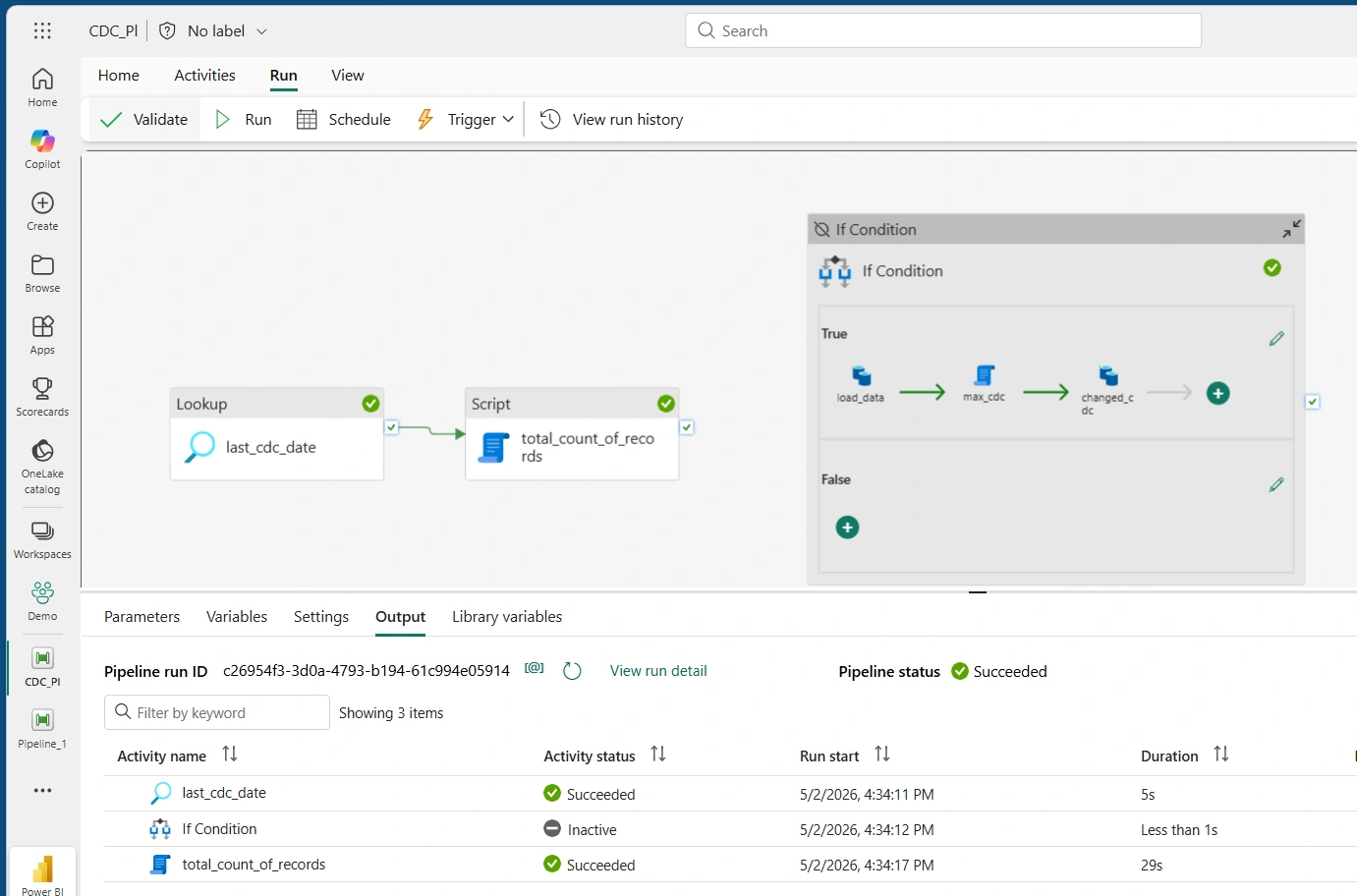
Next, run the pipeline. As seen in the screenshot below, the Lookup and the Script activities executed successfully while the If Condition is skipped
Common Pitfalls to Avoid
Even though it’s simple, misuse can cause issues.
Forgetting an activity is disabled → Missing data
Breaking dependency chains
Using it instead of proper error handling
Leaving “temporary” changes forever
Disabling vs Deleting: A Strategic Choice
| Action | When to Use |
|---|---|
| Disable | Temporary change, testing, debugging |
| Delete | Permanent removal, cleanup |
| Parameterize | Dynamic control at runtime |
Think of disabling as a pause button, not a solution.
In conclusion, Disabling activities in Microsoft Fabric Data Pipelines is one of those features that seems small—but has a massive impact when used correctly.
It enables:
Faster debugging
Safer deployments
Flexible development
Better cost control
For modern data engineers, it’s not just a convenience—it’s a core workflow tool.
Join the conversation! Your thoughts help the community grow.