

Introduction
Usually, in our web applications, we need to display a confirmation popup to the user before allowing him/her to delete any record from the table. When the user allows the application to delete the record by clicking on the yes button, the logic behind deletion executes and deletes the record. Just think about if your application does not display any confirmation popup to the user and he/she deletes the records accidentally, what will happen? It’s always a best practice to show a confirmation popup while developing an application.
Through this article, we will cover the following topics,
- What are entry Components in Angular?
- How to show Confirmation Dialog before deleting a record from the table?
- How to pass a data object to pop up in case we need to show any data over it?
Output

Application with Modal popup will look like below,
Before implementation, you need to know the prerequisites. First, you need to setup Angular Material with your Angular application. Just go to this official guide, install necessary packages for Angular Material and set up the application in order to use Angular Material Components.
Import and export the necessary modules from material.module.ts and add this material module in imports array of main module; i.e. app.module.ts in my case. For your reference, I have attached the material module file with this article.
Now we will build an Angular component (user-posts.component.ts) and a service (post.service.ts) where we will call JSONPlaceHolder API to get posts data and will show the data as a list in user-posts component view. A list displaying records will have two more buttons (Delete & Update). On clicking on Delete button, the user will see a confirmation popup with two options (YES & NO) just to allow application whether the selected record will be deleted from the list or not.
Using the code
Component Template (user-posts.component.html)
- <ul class="list-group">
- <li *ngFor="let post of userPosts" class="list-group-item">
- <button (click)="updatePost(post)" class="btn btn-default btn-sm">Update</button>
- <button (click)="deletePostConfirm(post)" class="btn btn-default btn-sm">Delete</button>
- <a [routerLink]="['/userposts',post.id]">{{post.id}}</a> - {{post.title}}
- </li>
- </ul>
Post Service (post.service.ts)
- import { Injectable } from "@angular/core";
- import { HttpClient } from "@angular/common/http";
- import { Observable, throwError } from "rxjs";
- import { delay, catchError } from "rxjs/operators";
- import { IPost } from "../Resolver/user-posts.resolve";
- import { AppError } from "./../common/app-error";
- import { NotFoundError } from "../common/not-found-error";
- @Injectable({
- providedIn: "root"
- })
- export class PostService {
- private url = "http://jsonplaceholder.typicode.com/posts";
- constructor(private http: HttpClient) {}
- getPosts(): Observable<IPost[]> {
- return this.http.get<IPost[]>(this.url).pipe(delay(1000));
- }
- deletePost(id) {
- return this.http.delete(this.url + "/" + id).pipe(
- catchError((err: Response) => {
- if (err.status === 404) return throwError(new NotFoundError(err));
- return throwError(new AppError(err));
- })
- );
- }
- }
In the above service, I have configured the injector with provider at the service level itself using the provided metadata options of Injectable decorator. However we can configure injectors with providers at three different levels of the Angular application. For more details, read here.
Now we will create a confirmation component that will display as a Modal popup when we will click on Delete button.
Delete Confirmation Component Code (detete-confirmation.component.ts)
- import { Component, Inject } from '@angular/core';
- @Component({
- selector: 'app-delete-confirmation',
- template: `
- <h1 mat-dialog-title>Are you want to delete?</h1>
- <mat-dialog-actions>
- <button mat-raised-button [mat-dialog-close]="true">YES</button>
- <button mat-raised-button [mat-dialog-close]="false">NO</button>
- </mat-dialog-actions>
- `
- })
- export class DeleteConfirmationComponent{
- constructor(){
- }
- }
Component Code (user-posts.component.ts)
- import { Component, OnInit } from "@angular/core";
- import { ActivatedRoute } from "@angular/router";
- import { MatDialog } from '@angular/material';
- import { PostService } from "./../services/post.service";
- import { DeleteConfirmationComponent } from './detete-confirmation.component';
- import { AppError } from "./../common/app-error";
- import { NotFoundError } from "../common/not-found-error";
- import { IPost } from "./../Resolver/user-posts.resolve";
- @Component({
- selector: "app-user-posts",
- templateUrl: "./user-posts.component.html",
- styleUrls: ["./user-posts.component.css"]
- })
- export class UserPostsComponent implements OnInit {
- userPosts: IPost[] = [];
- constructor(
- private postService: PostService,
- private route: ActivatedRoute,
- private dialog: MatDialog
- ) {}
- ngOnInit() {
- this.userPosts = this.route.snapshot.data.userposts;

- console.log(this.userPosts.length);
- }
- deletePostConfirm(post) {
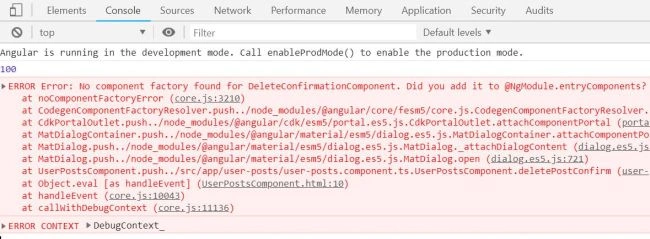
- const dialogRef=this.dialog.open(DeleteConfirmationComponent); //Open MatDialog and load component dynamically
- //Need to subscribe afterClosed event of MatDialog
- dialogRef.afterClosed().subscribe(confirmresult=>{
- console.log(confirmresult);
- if(confirmresult){ //if dialog result is yes, delete post
- this.deletePost(post);
- console.log("Delete confirm is approved by user.");
- }
- else{ //if dialog result is no, DO NOT delete post
- console.log("Delete confirm is cancelled by user.");
- }
- })
- }
- private deletePost(post){
- this.postService
- .deletePost(post.id)
- //this.postService.deletePost(300)
- .subscribe(
- response => {
- let indexOfItem = this.userPosts.indexOf(post);
- this.userPosts.splice(indexOfItem, 1);
- console.log(this.userPosts.length);
- },
- (error: AppError) => {
- if (error instanceof NotFoundError) {
- console.log("This post has already been deleted.", error);
- } else {
- console.log("Unexpected Exception occurred: ", error);
- }
- }
- );
- }
- }
Join the conversation! Your thoughts help the community grow.