

This article shows how to show our records in a tree view using ASP.NET C#.
The following is my Data table design.
Image 1
The following are the records in my Data Table: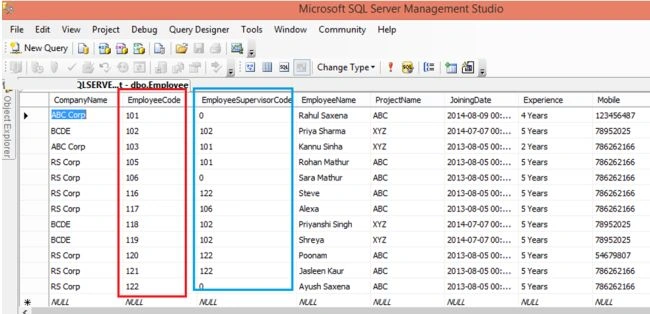
Image 2
Here I have Employees and their SupervisorEmployee relationship.
The following is my aspx code:
- <%@ Page Language="C#" AutoEventWireup="true" CodeFile="Default.aspx.cs" Inherits="_Default" %>
- <!DOCTYPE html PUBLIC "-//W3C//DTD XHTML 1.0 Transitional//EN" "http://www.w3.org/TR/xhtml1/DTD/xhtml1-transitional.dtd">
- <html xmlns="http://www.w3.org/1999/xhtml">
- <head runat="server">
- <title>Tree View Example in ASP.NET C#</title>
- </head>
- <body>
- <form id="form1" runat="server">
- <table cellpadding="4" cellspacing="4" width="50%" align="center" style="background-color: SkyBlue;">
- <tr>
- <td align="center" style="font-family: Times New Roman; font-size: 14pt; color: Green;">
- <h3>
- Team Leader and their Team Employee Information</h3>
- </td>
- </tr>
- <tr>
- <td style="background: #F5F5F5; padding-left: 30px;">
- <asp:TreeView ID="TreeView1" runat="server" ImageSet="XPFileExplorer" NodeIndent="15">
- <HoverNodeStyle Font-Underline="True" ForeColor="#6666AA" />
- <NodeStyle Font-Names="Tahoma" Font-Size="8pt" ForeColor="Black" HorizontalPadding="2px"
- NodeSpacing="0px" VerticalPadding="2px"></NodeStyle>
- <ParentNodeStyle Font-Bold="False" />
- <SelectedNodeStyle BackColor="#B5B5B5" Font-Underline="False" HorizontalPadding="0px"
- VerticalPadding="0px" />
- </asp:TreeView>
- </td>
- </tr>
- </table>
- </form>
- </body>
- </html>
- using System;
- using System.Configuration;
- using System.Data;
- using System.Linq;
- using System.Web;
- using System.Web.Security;
- using System.Web.UI;
- using System.Web.UI.HtmlControls;
- using System.Web.UI.WebControls;
- using System.Web.UI.WebControls.WebParts;
- using System.Xml.Linq;
- using System.Data.SqlClient;
- using System.Configuration;
- public partial class _Default : System.Web.UI.Page
- {
- protected void Page_Load(object sender, EventArgs e)
- {
- if (!this.IsPostBack)
- {
- DataTable dt = this.GetData("SELECT EmployeeCode, EmployeeName FROM Employee Where EmployeeSupervisorCode=0");
- this.PopulateTreeView(dt, 0, null);
- }
- }
- private void PopulateTreeView(DataTable dtParent, int parentId, TreeNode treeNode)
- {
- foreach (DataRow row in dtParent.Rows)
- {
- TreeNode child = new TreeNode
- {
- Text = row["EmployeeName"].ToString(),
- Value = row["EmployeeCode"].ToString()
- };
- if (parentId == 0)
- {
- TreeView1.Nodes.Add(child);
- DataTable dtChild = this.GetData("SELECT EmployeeCode, (EmployeeName+ ', '+ Experience + ', '+ Address) As EmployeeName FROM Employee WHERE EmployeeSupervisorCode = " + child.Value);
- PopulateTreeView(dtChild, int.Parse(child.Value), child);
- }
- else
- {
- treeNode.ChildNodes.Add(child);
- }
- }
- }
- private DataTable GetData(string query)
- {
- DataTable dt = new DataTable();
- string constr = @"Server=MyPC\SqlServer2k8;database=Test;Integrated Security=true;";
- using (SqlConnection con = new SqlConnection(constr))
- {
- using (SqlCommand cmd = new SqlCommand(query))
- {
- using (SqlDataAdapter sda = new SqlDataAdapter())
- {
- cmd.CommandType = CommandType.Text;
- cmd.Connection = con;
- sda.SelectCommand = cmd;
- sda.Fill(dt);
- }
- }
- return dt;
- }
- }
- }

Image 3
Laugh OutPosted Feb 12, 2021, 7:47 PM
Is it possible to change the design of the Tree View to as same the one in Windows Form Tree View?