

This article will teach you how to show the tool tip for HTML control; usually, when the user hovers, the control tool tip appears for a few seconds and disappears when the cursor is moved away from the control.
WinJS is an open-source JavaScript library to build HTML, CSS, and JavaScript applications for your websites and for the Universal Windows App.
Let’s see the steps
Here's an article on how to create new Windows 10 universal Java Script project
Now your solution looks like the following image,
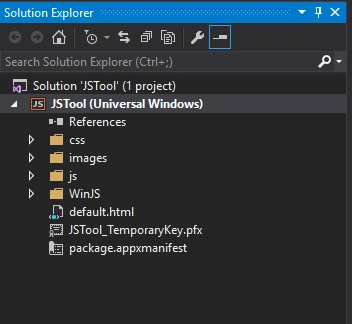
You can see all the required default files. Windows 10 offers you the option to build apps using WinJs also,
- CSS: This folder contains the default styles. You can write your own style in this file.
- Images: This folder contains images, icons,logo, etc. You can add your image or any files required.
- JS: This folder contains script files. You can add your required script files in this folder.
- WinJS: This folder contains all WinJS script and CSS files.
- Default.html: This file is the default file to design the UI and also your logic.
- Package.appxmanifest: This file contain the application properties like App capabilities, App logo, etc. Double click this file and see the GUI like the following image, there you can set the app related properties.
Next open default.html file and write the below code inside the body tag.
- <button id="btnTooltip"data-win-control="WinJS.UI.Tooltip"data-win-options="{
- innerHTML : ' Welcome to C# Corner and https://windowsapptutorials.wordpress.com/' }">
- Tool Tip Button
- </button>

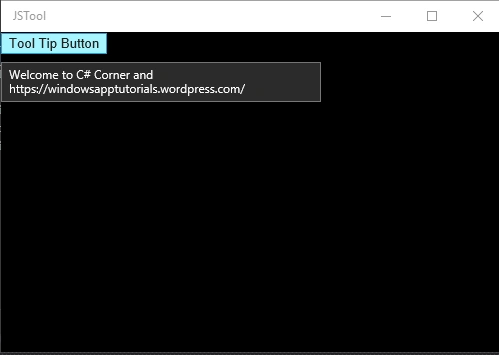
Now run the application and see the output looks like the following image,
Read more articles on Windows 10:
Gowtham RajamanickamPosted Apr 20, 2016, 8:36 AM
good share
Shubham KumarPosted Feb 26, 2016, 5:41 AM
nice article
Suresh MPosted Feb 25, 2016, 11:01 PM
Thank you
Asfend YarPosted Feb 25, 2016, 9:38 AM
Sir try to add some gif pictures so that it's easy for me to understand your article completely,By the way it's a good stuff in your article.
Asfend YarPosted Feb 25, 2016, 9:35 AM
great job
Sibeesh VenuPosted Feb 25, 2016, 12:43 AM
Nice Share
Mohammed IbrahimPosted Feb 24, 2016, 3:57 PM
nice