Sometimes we might need to display multiple columns under a single column within a GridView, like we normally do in an Excel file; something like the following snippet:
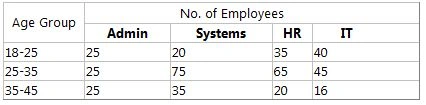
For doing such things we can use GridView's RowDataBound event for formatting the header row of the GridView. I think looking at the snippet you all might see what basically we are going to do. So without wasting any time I'll be providing you with the source code and the code snippet.
The following is the design source code for that.
- <%@ Page Language="C#" AutoEventWireup="true" CodeFile="Default.aspx.cs" Inherits="_Default" %>
-
- <!DOCTYPE html PUBLIC "-//W3C//DTD XHTML 1.0 Transitional//EN" "http://www.w3.org/TR/xhtml1/DTD/xhtml1-transitional.dtd">
- <html xmlns="http://www.w3.org/1999/xhtml">
- <head runat="server">
- <title></title>
- </head>
- <body>
- <form id="form1" runat="server">
- <asp:GridView ID="GridView1" runat="server"
- onrowdatabound="GridView1_RowDataBound">
- </asp:GridView>
- <div>
- </div>
- </form>
- </body>
- </html>
The following is the code file snippet for it. Here we are using static values within a datatable and finally binding that datatable to the GridView.
- using System;
- using System.Collections.Generic;
- using System.Linq;
- using System.Web;
- using System.Web.UI;
- using System.Web.UI.WebControls;
- using System.Data;
- using System.Data.SqlClient;
-
- public partial class _Default : System.Web.UI.Page
- {
- static DataTable dt = null;
- protected void Page_Load(object sender, EventArgs e)
- {
- if (!IsPostBack)
- CreateDataTable();
- }
-
- private void CreateDataTable()
- {
-
- if (dt == null)
- {
- string[] cols = { "Age Group", "Admin", "Systems", "HR", "IT" };
- string[,] data = { { "18-25", "25", "20", "35", "40" }, { "25-35", "25", "75", "65", "45" }, { "35-45", "25", "35", "20", "16" } };
- dt = new DataTable();
- foreach (string str in cols)
- dt.Columns.Add(str);
- for (int i = 0; i < 3; i++)
- {
- DataRow dr = dt.NewRow();
- for (int j = 0; j < 5; j++)
- {
- dr[j] = data[i, j];
- }
- dt.Rows.Add(dr);
- }
- }
- GridView1.DataSource = dt;
- GridView1.DataBind();
- }
-
- protected void GridView1_RowDataBound(object sender, GridViewRowEventArgs e)
- {
- GridViewRow gvRow = e.Row;
- if (gvRow.RowType == DataControlRowType.Header)
- {
- if (gvRow.Cells[0].Text == "Age Group")
- {
- gvRow.Cells.Remove(gvRow.Cells[0]);
- GridViewRow gvHeader = new GridViewRow(0, 0, DataControlRowType.Header, DataControlRowState.Insert);
- TableCell headerCell0 = new TableCell()
- {
- Text="Age Group",
- HorizontalAlign=HorizontalAlign.Center,
- RowSpan=2
- };
- TableCell headerCell1 = new TableCell()
- {
- Text="No. Of Employees",
- HorizontalAlign=HorizontalAlign.Center,
- ColumnSpan=4
- };
- gvHeader.Cells.Add(headerCell0);
- gvHeader.Cells.Add(headerCell1);
- GridView1.Controls[0].Controls.AddAt(0, gvHeader);
- }
- }
- }
- }
The following is the output for it.

Hope you all have enjoyed the code and it may help you in your project.


Chukwuma EsogaPosted May 6, 2019, 11:05 PM
Thanks for the article. It proved really useful. I do need so extra help in extending some functionality on it
Yan AungPosted Feb 21, 2019, 3:35 AM
Thank you for your useful article, Sir!
bavya sriPosted Jul 25, 2017, 2:42 AM
It is very usefull
rahul manePosted Jul 21, 2016, 5:38 AM
If i use this Group Columns in Asp.net Gridview Header Row & Display Multiple Columns Under Single Column and if i try to save that grid data into database it not save last row data what i will do please reply it's urgent
Sachin MandavkarPosted Jul 19, 2013, 1:20 AM
Very Useful Article... Thanks SIR.