

Pre-requisite to understand this
Computer Networks – Understanding LAN, WAN, and Internet basics
Firewall – Device or software that filters network traffic
IP Addressing – Used to identify devices on a network
TCP/IP & Ports – How applications communicate over networks
Client–Server Model – Clients request services, servers respond
Network Security Basics – Threats like hacking, malware, and attacks
Introduction
A DMZ (Demilitarized Zone) in networking is a separate network segment that sits between an organization’s internal network and the public internet. Its main purpose is to host systems that must be accessible from the internet such as web servers or mail servers while preventing direct access to the internal network. By isolating these public-facing services, a DMZ significantly reduces the risk of attackers reaching critical internal systems. It acts as a security buffer, enforcing strict traffic control and minimizing potential damage in case of compromise.
What problem can we solve with this?
Without a DMZ, exposing internal servers directly to the internet creates a single point of failure. If an attacker compromises one service, they can potentially access the entire internal network. A DMZ solves this by isolating public services, applying tighter security rules, and limiting lateral movement.
A DMZ protects sensitive systems like databases, internal applications, and employee devices from external threats. Even if a DMZ server is hacked, attackers are trapped in a controlled zone. This architecture also improves monitoring, logging, and compliance with security standards. DMZs are widely used in enterprises to reduce attack surface and enforce defense-in-depth strategies.
Problems solved:
Prevents direct internet access to internal network
Limits damage from compromised public servers
Reduces attack surface
Enforces layered security (defense in depth)
Enables better monitoring and access control
How to implement / use DMZ?
A DMZ is implemented by creating a separate network segment using one or more firewalls. Public-facing servers are placed inside the DMZ, while internal systems remain protected behind an additional firewall layer. Firewall rules strictly control traffic flow: internet users can access DMZ services, but cannot reach internal systems directly. Internal servers can only communicate with DMZ systems on specific ports when required. Network administrators carefully design routing, NAT, and access policies to ensure minimal exposure.
Implementation steps:
Use one firewall with three interfaces or two firewalls
Create a separate subnet for DMZ
Place public servers in the DMZ
Apply strict firewall rules
Monitor and log DMZ traffic
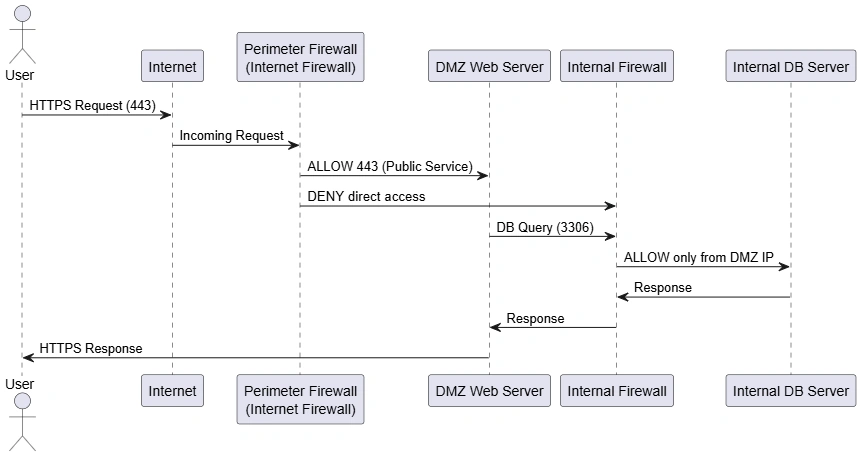
DMZ – Sequence Diagram
This sequence diagram shows how a request flows through a DMZ-based network. A user sends a request over the internet, which reaches the firewall. The firewall allows only specific ports (like HTTPS) to the DMZ web server. If the web server needs data, it makes a controlled request to the internal database through the firewall. The firewall enforces strict rules, allowing only authorized traffic. At no point does the user directly access the internal network. This ensures controlled access and minimizes security risks.
Key points:
Internet traffic never reaches internal servers directly
Firewall enforces port-level security
DMZ acts as an intermediary
Internal resources remain hidden
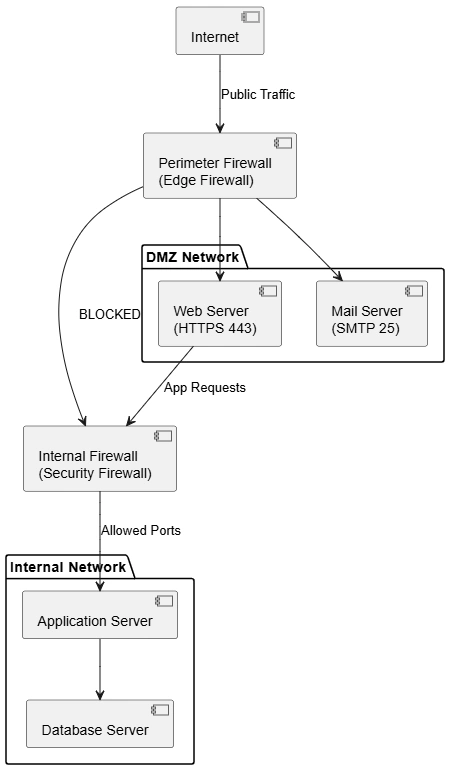
DMZ – Component Diagram
This component diagram illustrates the logical structure of a DMZ architecture. The firewall acts as a gatekeeper between the internet, DMZ, and internal network. Public-facing services such as web and mail servers reside in the DMZ. Internal components like application and database servers are isolated. Only specific components are allowed to communicate, based on defined security policies. This modular design helps enforce separation of concerns and improves system security.
Key points:
Clear separation of networks
Firewall controls component interaction
Public services isolated from sensitive systems
Supports scalable security architecture
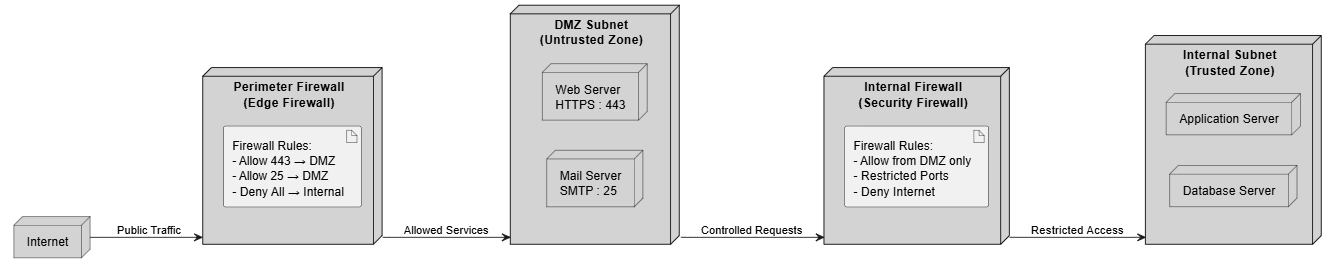
DMZ – Deployment Diagram
The deployment diagram shows the physical or virtual placement of systems in a DMZ setup. The firewall connects the internet to two separate subnets: DMZ and internal. DMZ hosts servers that must be accessible externally, while internal subnet hosts critical systems. This physical separation enhances security and makes policy enforcement easier. It also supports virtualization and cloud-based deployments.
Key points:
Separate subnets for DMZ and internal network
Physical/logical isolation
Easier enforcement of security policies
Suitable for on-premise and cloud setups
Advantages
Enhanced security – Limits exposure of internal systems
Attack containment – Compromised DMZ servers are isolated
Controlled access – Strict firewall rules
Improved monitoring – Easier to log and detect threats
Compliance friendly – Meets security standards
Summary
A DMZ is a critical network security design that provides a protective buffer between the internet and internal systems. By isolating public-facing services, it minimizes risk, controls access, and enhances visibility into network traffic. Using firewalls, subnets, and strict security policies, a DMZ enforces defense in depth and prevents attackers from reaching sensitive resources. Whether in enterprise data centers or cloud environments, DMZs remain a foundational security architecture for protecting modern networks.
Join the conversation! Your thoughts help the community grow.