

Pre-requisites to understand this
Basic understanding of Linux (processes, ports, SSH)
Familiarity with AWS EC2
Basic knowledge of Docker
Images
Containers
Dockerfile
IP, ports
HTTP/HTTPS
CI/CD basics
Git and source code repositories
Introduction
AWS EC2 (Amazon Elastic Compute Cloud) is a core service provided by Amazon Web Services that allows you to rent virtual servers (called instances) in the cloud. These servers can be used to run applications, websites, databases, APIs, or any compute workload without needing to buy or maintain physical hardware. EC2 provides flexible, scalable, and on-demand computing capacity.
Docker deployment on EC2 is a common and powerful approach to running applications in the cloud. In this model, Amazon EC2 provides virtual machines, and Docker provides application containerization. The application is packaged along with its dependencies into Docker images, ensuring consistent behavior across environments. EC2 gives full control over infrastructure, while Docker simplifies application lifecycle management such as build, ship, and run.
What problem we can solve with this?
Traditional deployments often suffer from inconsistencies between environments (development, testing, production). Docker deployment on EC2 solves these issues by standardizing application runtime environments and simplifying scalability and maintenance.
Problems solved:
Environment mismatch (“works on my machine” issue)
Manual dependency installation
Complex deployment steps
Application conflicts on the same server
Difficult rollbacks
Poor scalability without orchestration
How to implement/use this?
Docker deployment on EC2 involves provisioning an EC2 instance, installing Docker, building or pulling Docker images, and running containers.
High-level steps:
Create an EC2 instance
Install Docker on EC2
Pull from Docker Hub / ECR
Run Docker container
Expose application using EC2 Security Groups
(Optional) Add Load Balancer / Auto Scaling
Docker Deployment Flow (Sequence Diagram)
This sequence diagram explains how an application is deployed using Docker on EC2.
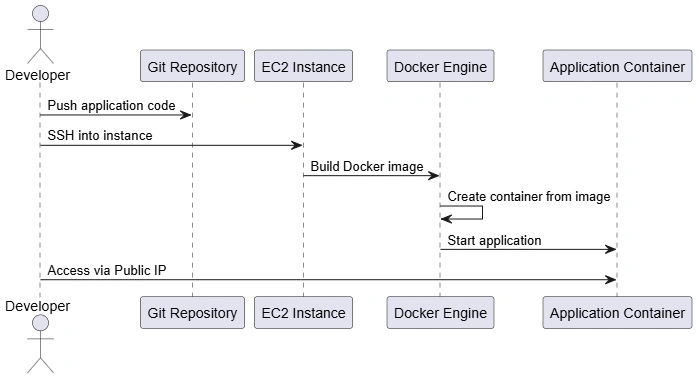
Step-by-step explanation:
Developer pushes code to a Git repository
Developer connects to EC2 using SSH
Docker engine on EC2:
Builds an image from Dockerfile
Creates a container from the image
Container starts the application
Application is accessed using EC2 Public IP and exposed port
Docker Deployment Architecture (Component Diagram)
This component diagram represents the structural architecture of Docker deployment on EC2.
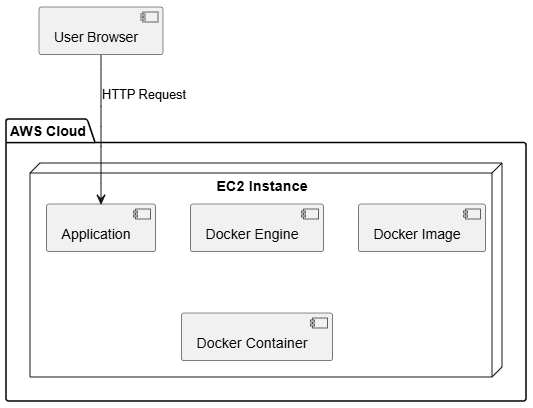
Components explained:
| Component | What it is | Role in Docker Deployment on EC2 | Example |
|---|---|---|---|
| User Browser | Client application (browser or API client) | Sends HTTP/HTTPS requests to access the application | Chrome browser calling http://ec2-ip:8080 |
| EC2 Instance | Virtual server in AWS cloud | Hosts Docker Engine and provides compute, storage, and networking | t2.micro EC2 instance |
| Docker Engine | Container runtime installed on EC2 | Builds images, creates containers, starts/stops containers | dockered service |
| Docker Image | Read-only template with app & dependencies | Acts as a blueprint to create containers | nginx:latest, my-app:v1 |
| Docker Container | Running instance of a Docker image | Executes the application in an isolated environment | Running Nginx container |
| Application | Business logic or service | Handles user requests and returns responses | REST API, Web UI |
Key architectural insights:
Application is isolated inside a container
Docker engine controls lifecycle
EC2 provides compute and networking
Advantages
Environment consistency
Faster deployments
Easy rollback using image versions
Isolation between applications
Better resource utilization
Works well with CI/CD pipelines
Full control over infrastructure
Cost-effective for small to medium workloads
Summary
Docker deployment on EC2 combines the flexibility of virtual machines with the portability of containers. It allows teams to package applications once and deploy them reliably across environments. While it requires some infrastructure management, it provides full control and is ideal for teams not ready for full container orchestration platforms like Kubernetes. This approach is widely used for production systems, microservices, and legacy application modernization.
Join the conversation! Your thoughts help the community grow.