

Introduction
First of all, I would like to thank my colleague because I learned of this through my colleague Venkatesh. Thank you for this man.
Step 1. How is it useful?
- You can sort the object based on the URL parameter.
- You can sort the object at runtime.
- You can sort both asc and desc at runtime.
- Property can be passed as a string to sort the object.
- Absolutely sorting at runtime.
- Reduced a lot of code.
- It is written in a generic way to reuse it.
Step 2. What is a Sorting Mechanism?
Sorting is a fundamental operation in computer science and programming, crucial for organizing and retrieving data efficiently. Here's an overview of sorting mechanisms commonly used in programming.
- Ascending
- Descending
Step 3. Namespaces Used
Namespaces in programming languages like C# and Java provide a way to organize and manage code. They serve as containers for classes, interfaces, structures, enumerations, and delegates, helping avoid naming conflicts and providing a clear hierarchical structure to the codebase.
Example
using System;
using System.Collections.Generic;
using System.Reflection;
using System.Web;
Step 4. How to use Dynamic sorting?
Dynamic sorting is a powerful technique in programming, especially in scenarios where you want to sort data based on user input or runtime conditions. Here are some common scenarios and use cases where dynamic sorting is highly beneficial.
Example
protected void Page_Load(object sender, EventArgs e)
{
    SortStudents();
}
Step 5. Sorting Dynamically based on the object property
Sorting dynamically based on object properties is a common requirement in programming. This technique allows developers to sort a collection of objects based on a specific property, which could be a string, number, date, or any other data type. Here's how you can sort a list of objects dynamically in C# based on their properties.
Example
private void SortStudents()
{
    Students students = new Students();

    // Add students to the list
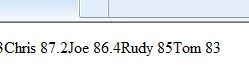
    students.Add(new Student("Tom", 83));
    students.Add(new Student("Joe", 86.4));
    students.Add(new Student("Rudy", 85));
    students.Add(new Student("Chris", 87.2));
    // Sorting by name dynamically.
    students = (Students)DynamicSort1<Student>(students, "Name", "asc");
    students.Print();
    // Sorting by grade dynamically.
    students = (Students)DynamicSort1<Student>(students, "Grade", "desc");
    students.Print();
}

Tom MohanPosted Mar 12, 2015, 12:34 PM
Nice