

If you are going to use DataGrid then here we need to edit, update, delete data in DataGrid. Suppose in that table which data you are using in DataGrid, there are so many records that on one page all of the records can not come, then here paging plays an important role to show our data in a manner in DataGrid.
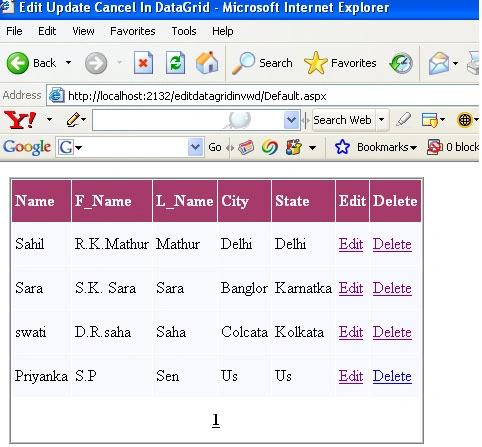
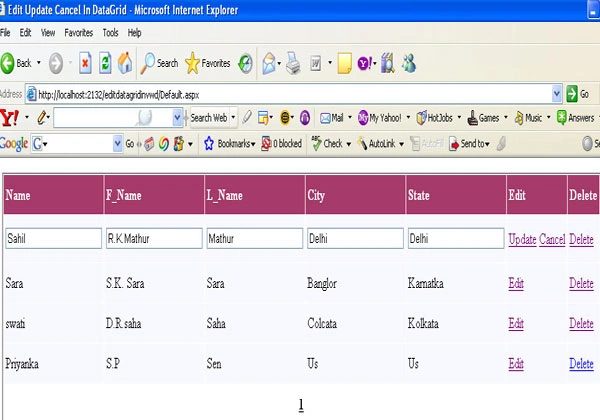
So in this article I am going to show how to edit, delete and update data in DataGrid and paging too.
This is the aspx code:
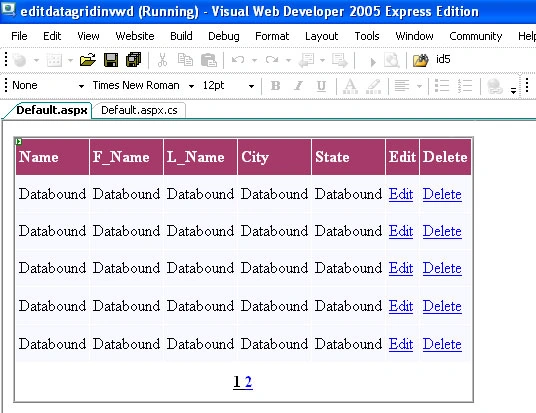
From Here we can design our web form. We use a DataGrid on webForm. Here we set all the property as we have to perform the operation with in DataGrid.
<%@ Page Language="C#" AutoEventWireup="true" CodeFile="Default.aspx.cs" Inherits="_Default" Debug="true" %>
<!DOCTYPE html PUBLIC "-//W3C//DTD XHTML 1.0 Transitional//EN" "http://www.w3.org/TR/xhtml1/DTD/xhtml1-transitional.dtd">
<html xmlns="http://www.w3.org/1999/xhtml" >
<head runat="server">
<title>Edit Update Cancel In DataGrid</title>
</head>
<body>
<form id="form1" runat="server">
<div>
<asp:DataGrid ID="gridedit" runat="server" DataKeyField="id" BorderStyle="Ridge" GridLines="None" BorderWidth="2px" BorderColor="White" BackColor="White" CellPadding= "3" CellSpacing="1" AllowSorting="True" PagerStyle- HorizontalAlign= "Center" HorizontalAlign="Left" OnEditCommand="editgrid_click" OnCancelCommand= "gridcancel_click" OnPageIndexChanged="gridedit_PageIndexChanged" OnUpdateCommand="updategrid_UpdateCommand" Height="267px" PageSize=5 AllowPaging="true" OnDeleteCommand= "gridedit_DeleteCommand" AutoGenerateColumns="false" Width="50%">
<FooterStyle ForeColor="Black" BackColor="#C6C3C6"></FooterStyle>
<HeaderStyle Font-Bold="True" ForeColor="#FFFFFF"
BackColor="#A53A6A"></HeaderStyle>
<FooterStyle BackColor="beige" />
<PagerStyle Font-Bold="true" Mode=NumericPages Font-Underline="true"/>
<asp:BoundColumn DataField=id HeaderText="ID">
<ItemStyle BackColor="graytext" />
<HeaderStyle BackColor="graytext" />
</asp:BoundColumn>
<asp:BoundColumn DataField=name HeaderText="Name">
<ItemStyle BackColor=GhostWhite />
</asp:BoundColumn>
<asp:BoundColumn DataField=F_name HeaderText="F_Name">
<ItemStyle BackColor=GhostWhite />
</asp:BoundColumn>
<asp:BoundColumn DataField=l_name HeaderText="L_Name">
<ItemStyle BackColor=GhostWhite />
</asp:BoundColumn>
<asp:BoundColumn DataField=City HeaderText="City">
<ItemStyle BackColor=GhostWhite />
</asp:BoundColumn>
<asp:BoundColumn DataField=State HeaderText="State">
<ItemStyle BackColor=GhostWhite />
</asp:BoundColumn>
<asp:EditCommandColumn CancelText="Cancel" EditText="Edit"
UpdateText="Update" HeaderText="Edit">
<ItemStyle BackColor=GhostWhite />
</asp:EditCommandColumn>
<asp:ButtonColumn CommandName="Delete" HeaderText="Delete" Text="Delete">
<ItemStyle BackColor=GhostWhite />
</asp:ButtonColumn>
Join the conversation! Your thoughts help the community grow.