
In this article I would like to share the procedure to enable the Tree View in SharePoint site
What a Tree View is
The Tree View is an extra navigation option that provides a hierarchical view of all sites, lists and libraries in the site, including any sites below the current site level.
How to enable the Tree View
Use the following procedure to show the Tree View.
Step 1
Go to your site and click on settings as shown below:
Step 2
On the settings page select “Tree View” from the look and feel section.
Step 3
When you click on the “Tree View”, you will be navigated to Tree View settings page as shown below. There you can enable the Tree View: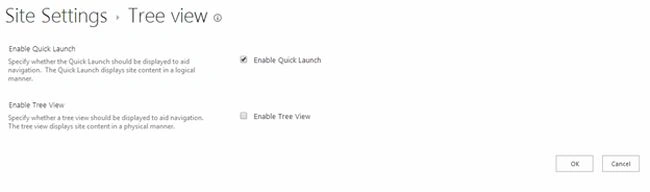
Step 4
Then check the “Enable Tree View” and click on “Ok” to save the settings.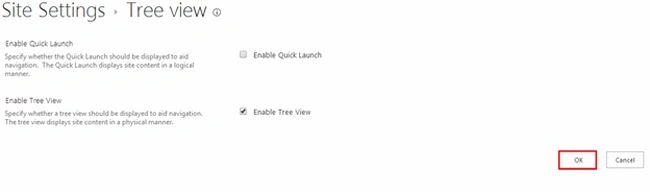
Finally you will get the Tree View for your site as shown below: 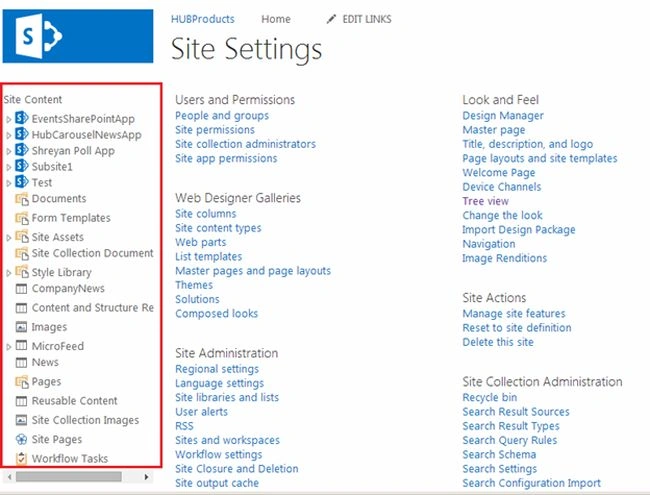
Summary
In this article we explored how to show the Tree View in a SharePoint Site.

Join the conversation! Your thoughts help the community grow.