

Reference Part 1: Getting Started with Playwright MCP: AI-Powered Test Automation Without Code (Architecture, Setup & Guide)
Introduction
In Part 1, we covered the foundational concepts — what MCP is, how Playwright MCP works, its architecture, and how it compares to Playwright CLI. We also set up Playwright MCP in VS Code, explored all available tools and capabilities, walked through the AI testing workflow, and listed supported clients.
In this article (Part 2), we focus on the enterprise angle — building a structured adoption roadmap for your organization, designing authentication and configuration strategies, deploying Playwright MCP to Docker and Kubernetes for CI/CD, and covering best practices, security considerations, and common challenges.
Part 1: Concepts, architecture, Playwright MCP vs CLI, setup, tools, workflow, and supported clients
Part 2 (this article): Organizational framework, CI/CD integration, best practices, and challenges
Table of Contents
Building an Organizational AI Testing Framework
CI/CD Integration & Kubernetes Deployment
Best Practices
Challenges and Solutions
Conclusion
Building an Organizational AI Testing Framework
This is where the real value lies. Here's a structured 4-phase roadmap for adopting Playwright MCP as your organization's AI testing framework.
Diagram — Adoption Roadmap:
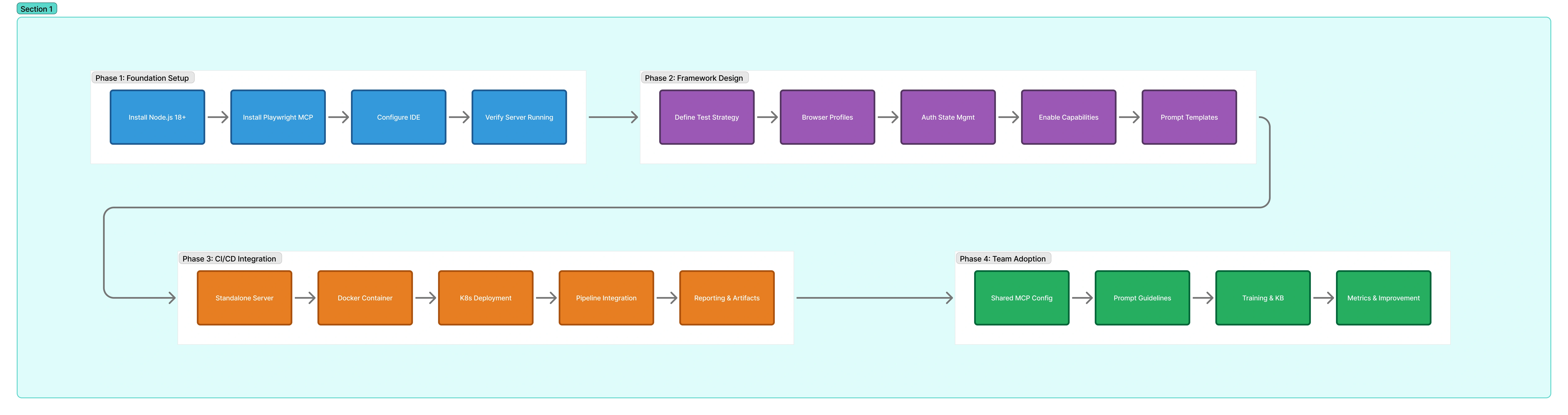
Phase 1: Foundation Setup
| Step | Action | Details |
|---|---|---|
| 1.1 | Install Node.js 18+ | Required runtime for MCP server |
| 1.2 | Install Playwright MCP | npx @playwright/mcp@latest |
| 1.3 | Configure IDE | VS Code, Cursor, or Windsurf with MCP config |
| 1.4 | Verify server | Ctrl+Shift+P → MCP: List Servers → playwright ● Running |
Phase 2: Framework Design
2.1 Browser Profile Management
| Mode | Config | Best For |
|---|---|---|
| Persistent | Default (no flag) | Day-to-day use — login once, reuse session |
| Isolated | --isolated | Clean-slate testing without leftover state |
| Browser Extension | --extension | Reuse your existing Chrome/Edge login session |
2.2 Authentication State Management
# Step 1: Save login state manually
npx playwright codegen --save-storage=auth.json https://your-app.com
# Step 2: Configure MCP to load it
{
"servers": {
"playwright": {
"command": "npx",
"args": [
"@playwright/mcp@latest",
"--isolated",
"--storage-state=./auth.json"
]
}
}
}2.3 Configuration File for Complex Setups
{
  "browser": {
    "browserName": "chromium",
    "isolated": false,
    "contextOptions": {
      "ignoreHTTPSErrors": true,
      "viewport": { "width": 1280, "height": 720 }
    },
    "launchOptions": {
      "headless": false
    }
  },
  "outputDir": ".playwright-mcp",
  "outputMode": "file",
  "capabilities": ["vision", "pdf", "devtools", "testing"],
  "timeouts": {
    "action": 10000,
    "navigation": 60000
  }
}
2.4 Prompt Templates Library
Create reusable prompt templates for common testing scenarios:
prompts/smoke-test.md
Navigate to {{APP_URL}}. Verify the login page loads.
Enter username "{{USERNAME}}" and password "{{PASSWORD}}".
Click Sign In. Verify the dashboard loads successfully.
Take a screenshot and report any console errors.
prompts/regression-check.md
Navigate to {{APP_URL}}/settings.
Verify all navigation links are present: Home, Profile, Settings, Logout.
Click each link and verify it loads without errors.
Report any 404s or console errors.
Phase 3: CI/CD Integration
Details covered in the next section below.
Phase 4: Team Adoption
| Step | Action |
|---|---|
| 4.1 | Shared Config — Commit .vscode/mcp.json to every repository |
| 4.2 | Prompt Engineering Guidelines — Document effective prompts |
| 4.3 | Training — Run workshops for QA workflows |
| 4.4 | Metrics — Track time saved, coverage, defects |
CI/CD Integration & Kubernetes Deployment
Standalone MCP Server Mode
npx @playwright/mcp@latest --port 8931 --headlessRemote Connection Config
{
  "mcpServers": {
    "playwright": {
      "url": "http://localhost:8931/mcp"
    }
  }
}
Architecture for Remote MCP
 Developer Laptop (VS Code)
         │
         │  MCP config → url: http://playwright-mcp.internal:8931/mcp
         │
         ▼
 ┌─────────────────────────────┐
 │   Kubernetes Cluster        │
 │                             │
 │  playwright-mcp (Pod)       │
 │  Runs: Chromium headless    │
 │  Port: 8931 (HTTP/MCP)     │
 │                             │
 │  ✅ Reaches internal apps   │
 │  ✅ Reaches staging/dev     │
 │  ✅ No local browser needed │
 └─────────────────────────────┘
Docker Deployment
FROM mcr.microsoft.com/playwright:v1.52.0-noble
RUN npm install -g @playwright/mcp@latest
EXPOSE 8931
CMD ["npx", "@playwright/mcp@latest", "--port", "8931", "--headless"]
Kubernetes Deployment
apiVersion: apps/v1
kind: Deployment
metadata:
  name: playwright-mcp
spec:
  replicas: 1
  selector:
    matchLabels:
      app: playwright-mcp
  template:
    metadata:
      labels:
        app: playwright-mcp
    spec:
      containers:
        - name: playwright-mcp
          image: your-registry/playwright-mcp:latest
          ports:
            - containerPort: 8931
          resources:
            requests:
              cpu: "500m"
              memory: "1Gi"
            limits:
              cpu: "2"
              memory: "4Gi"
---
apiVersion: v1
kind: Service
metadata:
  name: playwright-mcp
spec:
  selector:
    app: playwright-mcp
  ports:
    - port: 8931
      targetPort: 8931
Use Cases for Remote Deployment
Internal app testing
Shared browser environments
Linux-based execution
CI pipeline automation
Best Practices
Test Design
Start with accessibility snapshots
Use isolated mode
Save authentication state
Enable codegen
Team Adoption
Commit MCP config to git
Create prompt libraries
Start with exploratory testing
Use MCP for generation, SDK for execution
Production Readiness
Monitor resource usage
Use connection pooling
Handle errors gracefully
Isolate test contexts
Security Considerations
Playwright MCP is NOT a security boundary
Use
--allowed-originsUse
--blocked-originsNever store credentials in prompts
Challenges and Solutions
| Challenge | Possible Cause | Solution |
|---|---|---|
| MCP Server won't start | Playwright not installed | Verify with npx @playwright/mcp@latest --version |
| Clients can't connect | Server not running | Check MCP server & firewall |
| AI misinterprets pages | Complex UI | Use --snapshot-mode incremental |
| Actions too slow | Timeout issues | Increase timeout values |
| Login state not preserved | Isolated mode | Use storage state |
| Debugging complex | Multiple layers | Enable --caps=devtools |
| Tests not deterministic | AI variability | Use explicit prompts or SDK |
Conclusion
Playwright MCP represents a paradigm shift in test automation. Instead of writing and maintaining test scripts, teams can now describe what they want to test in natural language and let AI agents handle the execution.
Key Advantages
Lower barrier to entry
Self-healing tests
Faster exploratory testing
Code generation
Framework consolidation
Recommended Strategy
Exploratory Testing → MCP
Bug Investigation → MCP
Test Generation → MCP
CI/CD Regression → Playwright SDK
Performance Testing → CLI
Join the conversation! Your thoughts help the community grow.