

Entity Framework Core (EF Core) is a powerful Object-Relational Mapper (ORM) that enables .NET developers to work with databases using C# classes rather than writing SQL queries manually. Among the ways to work with EF Core, the Code First approach is one of the most widely used in modern application development.
In the Code First approach, the database is created and managed entirely from C# code. Developers first design domain models (classes), and Entity Framework Core automatically generates the database schema from those classes. Any future changes to the models are applied to the database using migrations, ensuring the application and database stay in sync.
This article explains the Code First approach in EF Core in a fully descriptive manner, covering concepts, workflow, components, and real-world usage.
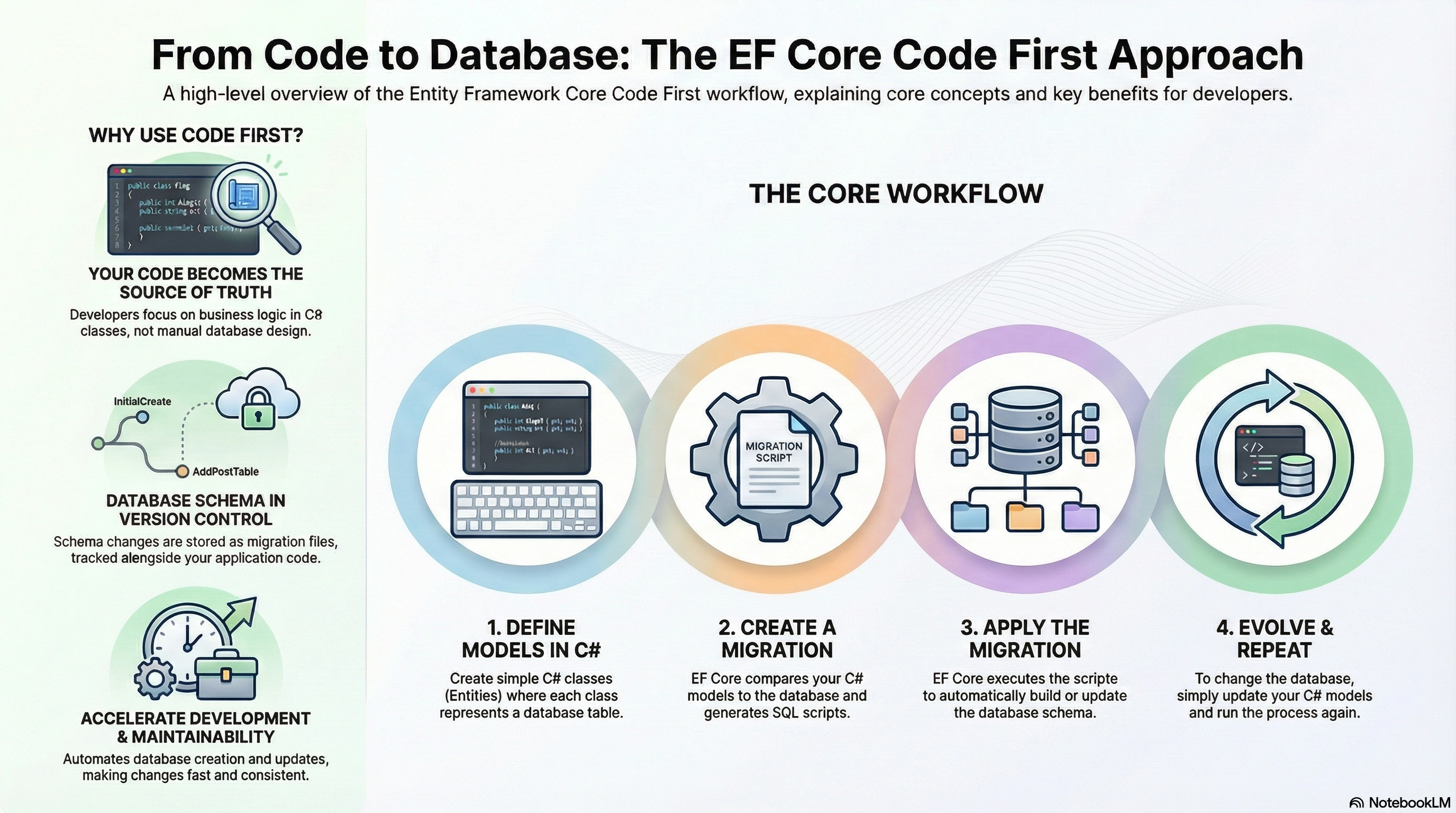
What Is the Code First Approach in EF Core?
The Code First approach means:
You start with C# classes (entities)
EF Core generates tables, columns, relationships, and constraints
The database structure is derived directly from your code
Changes in code are reflected in the database using migrations
In this approach, code is the source of truth, not the database.
Why Use the Code First Approach?
The Code First approach is preferred in many projects because:
Strong Domain-Driven Design: Developers focus on business models instead of database structure.
Better Maintainability: Changes in requirements are handled easily by updating classes.
Version Control Friendly: Database changes are tracked as migration files in source control.
Faster Development: No need to manually create or modify database tables.
Consistency Across Environments: The same schema is applied in development, testing, and production.
How the Code First Workflow Works
The Code First workflow follows a clear sequence:
Create entity classes
Configure the DbContext
Add EF Core packages
Configure database connection
Create migrations
Apply migrations to the database
Update models and re-apply migrations when needed
EF Core takes care of generating SQL behind the scenes.
Step 1: Creating Entity Classes
Entity classes represent tables in the database.
Each property represents a column.
Example: Student Entity
public class Student
{
    public int Id { get; set; }
    public string FullName { get; set; }
    public int Age { get; set; }
    public DateTime CreatedDate { get; set; }
}
How EF Core Interprets This
Student→ Table nameId→ Primary KeyFullName,Age,CreatedDate→ ColumnsData types are inferred automatically
EF Core follows convention-based mapping unless configured otherwise.
Step 2: Creating the DbContext Class
The DbContext is the central class in EF Core.
It manages database connections, change tracking, and queries.
Example: ApplicationDbContext
public class ApplicationDbContext : DbContext
{
    public ApplicationDbContext(DbContextOptions<ApplicationDbContext> options)
        : base(options)
    {
    }

    public DbSet<Student> Students { get; set; }
}
Role of DbContext
Acts as a bridge between the application and the database
Keeps track of entity changes
Executes SQL commands
Applies migrations
Manages transactions
Each DbSet<T> represents a database table.
Step 3: Installing Required EF Core Packages
To use Code First, EF Core packages are required.
Common packages:
Microsoft.EntityFrameworkCoreMicrosoft.EntityFrameworkCore.SqlServerMicrosoft.EntityFrameworkCore.Tools
These packages enable:
Database provider support
Migrations
Schema generation
Command-line tooling
Step 4: Configuring Database Connection
The database connection is usually stored in configuration files.
Example: appsettings.json
"ConnectionStrings": {
  "DefaultConnection":
  "Server=.;Database=SchoolDb;Trusted_Connection=True;TrustServerCertificate=True;"
}
Registering DbContext
builder.Services.AddDbContext<ApplicationDbContext>(options =>
    options.UseSqlServer(builder.Configuration.GetConnectionString("DefaultConnection")));
EF Core now knows where and how to create the database.
Step 5: Creating the Initial Migration
A migration represents a snapshot of the database schema at a point in time.
When you create a migration:
EF Core compares current models with the previous snapshot
Generates SQL instructions
Stores them in a migration file
Example command:
Add-Migration InitialCreateThis creates files that describe:
Table creation
Column definitions
Primary keys
Constraints
Step 6: Applying Migration to the Database
To create or update the database:
Update-DatabaseEF Core executes generated SQL and creates:
Database
Tables
Relationships
No manual SQL is required.
Understanding Migrations in Code First
Migrations are the backbone of the Code First approach.
What Migrations Handle
Creating tables
Adding or removing columns
Changing data types
Adding indexes
Managing relationships
Example: Adding a New Column
public class Student
{
    public int Id { get; set; }
    public string FullName { get; set; }
    public int Age { get; set; }
    public string Email { get; set; }
}
Steps:
Update the model
Create migration
Apply migration
EF Core updates the database safely.
Configuring Models Using Data Annotations
Data Annotations allow simple configuration directly in entity classes.
Example
public class Student
{
    [Key]
    public int Id { get; set; }

    [Required]
    [MaxLength(100)]
    public string FullName { get; set; }

    public int Age { get; set; }
}
What This Does
Mark's primary key
Makes
FullNamerequiredLimits column length
Data annotations are simple but limited.
Using Fluent API for Advanced Configuration
Fluent API provides fine-grained control over model configuration.
Example
protected override void OnModelCreating(ModelBuilder modelBuilder)
{
    modelBuilder.Entity<Student>(entity =>
    {
        entity.HasKey(s => s.Id);
        entity.Property(s => s.FullName)
              .IsRequired()
              .HasMaxLength(100);
    });
}
When Fluent API Is Preferred
Complex relationships
Composite keys
Table naming
Index creation
Advanced constraints
Fluent API overrides conventions and annotations.
Handling Relationships in Code First
EF Core supports relationships naturally.
One-to-Many Example
public class Course
{
    public int Id { get; set; }
    public string Name { get; set; }
    public List<Student> Students { get; set; }
}
EF Core automatically:
Creates foreign keys
Maintains referential integrity
Handles cascade delete (configurable)
Change Tracking in Code First
EF Core tracks changes automatically:
New entities → Insert
Modified entities → Update
Removed entities → Delete
Example:
var student = context.Students.Find(1);
student.Age = 25;
context.SaveChanges();
EF Core generates the required SQL update.
Advantages of the Code First Approach
Clean and maintainable domain models
Database versioning through migrations
No dependency on existing database
Faster feature changes
Better collaboration in teams
Easy rollback and schema history
Challenges of Code First Approach
Requires understanding of migrations
Large schema changes need careful planning
Not ideal for legacy databases
Schema changes must be managed carefully in production
Best Practices for Code First
Keep entity classes clean
Use migrations frequently
Review migration scripts before applying
Use Fluent API for complex rules
Avoid large schema changes in a single migration
Back up the production database before migration
When to Use Code First
Code First is ideal when:
Building new applications
Domain-driven design is important
The schema evolves frequently
Agile development is followed
Full control over models is required
Thank you for reading this detailed guide on Entity Framework Core – Code First Approach.
Understanding Code First helps you build maintainable, scalable, and professional .NET applications with confidence.
Join the conversation! Your thoughts help the community grow.