

Entity Framework Core (EF Core) is a modern Object-Relational Mapper (ORM) that enables .NET developers to work with databases using C# objects instead of writing raw SQL for every operation. One of the widely used workflows in EF Core—especially in enterprise and legacy systems—is the Database First approach.
In the Database First approach, the database already exists, and EF Core generates C# entity classes and DbContext directly from that database. This approach is ideal when working with existing databases, legacy systems, or database-driven environments where the schema is managed by DBAs.
This article explains the Database First approach in EF Core in a fully descriptive manner, covering concepts, workflow, tools, generated code, advantages, limitations, and best practices.
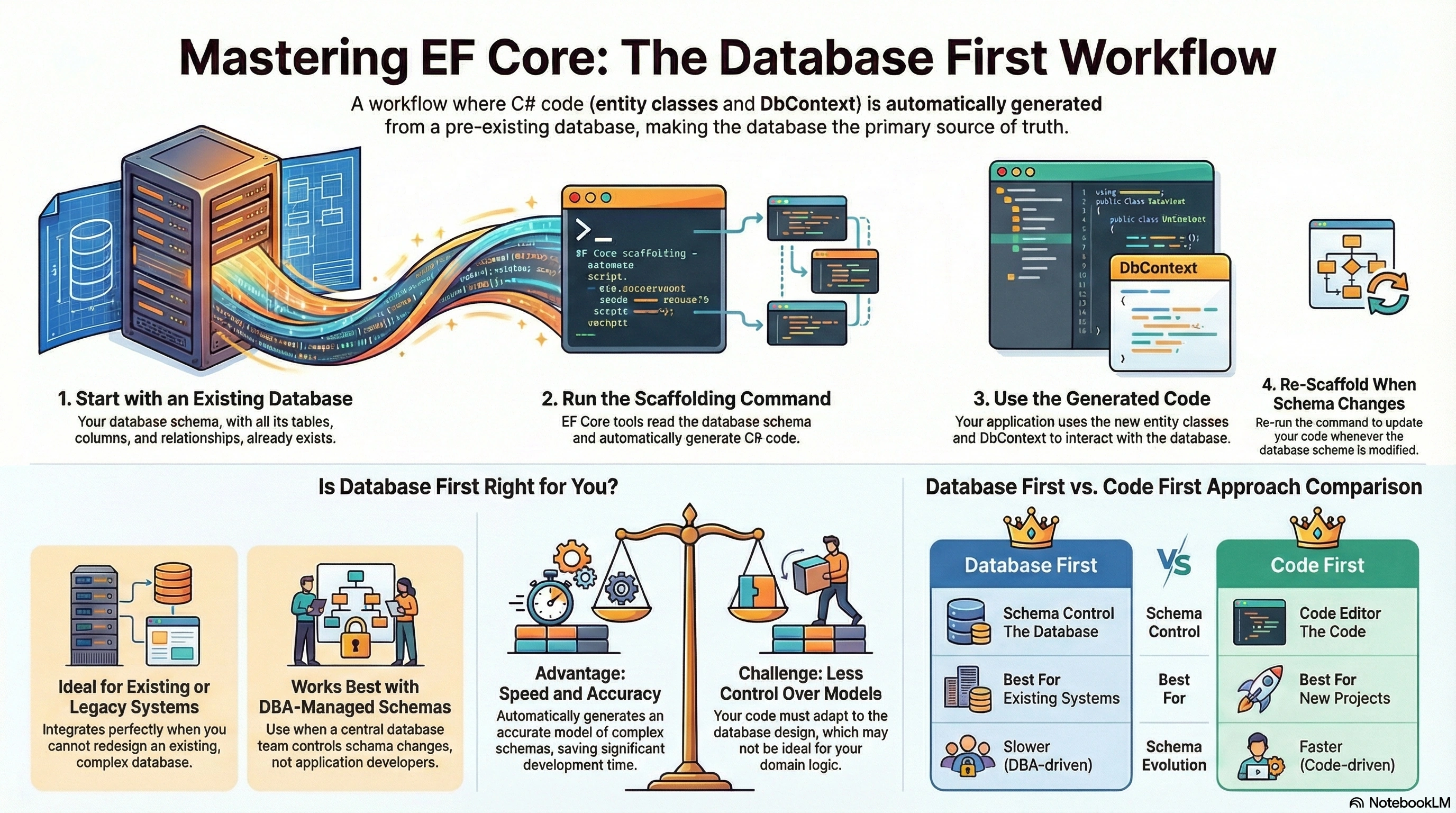
What Is the Database First Approach?
The Database First approach means:
The database is created first
Tables, columns, keys, and relationships already exist
EF Core generates entity classes and DbContext from the database
The database remains the primary source of truth
In this approach, code adapts to the database, not the other way around.
When and Why Database First Is Used
The Database First approach is commonly used in the following situations:
Existing or Legacy Databases: Many organizations already have large databases that cannot be redesigned.
Database Managed by DBAs: Schema changes are controlled centrally, not by application developers.
Large Enterprise Systems: Multiple applications may depend on the same database.
Stored Procedures and Views: Database First works well when business logic exists inside the database.
Reporting and Analytics Systems: Where database structure is complex and optimized for querying.
How the Database First Workflow Works
The Database First workflow follows these steps:
Create or identify an existing database
Install EF Core database provider and tools
Generate models and DbContext from the database (scaffolding)
Use generated entities in the application
Re-scaffold when database schema changes
EF Core automatically maps database objects to C# code.
Step 1: Existing Database Structure
In Database First, the database already contains:
Tables
Columns
Primary keys
Foreign keys
Indexes
Constraints
Views (optional)
Example database objects:
StudentstableCoursestableEnrollmentstable
EF Core reads this schema to generate code.
Step 2: Installing Required EF Core Packages
To work with Database First, the following packages are typically required:
Microsoft.EntityFrameworkCoreMicrosoft.EntityFrameworkCore.SqlServerMicrosoft.EntityFrameworkCore.Tools
These packages enable:
Database connection
Reverse engineering (scaffolding)
Model generation
DbContext creation
Step 3: Scaffolding the Database
Scaffolding is the process of generating C# classes from an existing database.
A single command reads:
Table definitions
Column data types
Relationships
Constraints
And produces:
Entity classes
DbContext class
This process is automatic and saves a significant amount of development time.
What EF Core Generates in Database First
After scaffolding, EF Core creates two main components:
1. Entity Classes
Each database table becomes a C# class.
Example (Generated Entity):
public partial class Student
{
    public int StudentId { get; set; }
    public string FullName { get; set; }
    public int? Age { get; set; }

    public virtual ICollection<Enrollment> Enrollments { get; set; }
}
Key characteristics:
Property names map to column names
Nullable columns become nullable properties
Navigation properties represent relationships
Classes are marked as
partialfor extensibility
2. DbContext Class
The DbContext represents the database session.
Example:
public partial class SchoolDbContext : DbContext
{
    public virtual DbSet<Student> Students { get; set; }
    public virtual DbSet<Course> Courses { get; set; }
}
Responsibilities of DbContext:
Database connection management
Entity tracking
Query execution
Relationship handling
Transaction management
Handling Relationships in Database First
EF Core automatically detects relationships using:
Foreign keys
Primary keys
Constraints
Supported Relationships
One-to-One
One-to-Many
Many-to-Many
EF Core generates navigation properties so developers can work with related data naturally.
Example:
student.EnrollmentsThis represents rows related through foreign keys.
Working with Database Views and Stored Procedures
Database First supports:
Database views (read-only entities)
Stored procedures (manual mapping)
Views are useful for:
Reporting
Aggregated data
Complex joins
Stored procedures are often used for:
Performance-critical logic
Security-controlled operations
Legacy business rules
Updating Database Changes (Re-Scaffolding)
When the database schema changes:
New columns added
Tables modified
Relationships updated
The application must regenerate models using re-scaffolding.
Important points:
Re-scaffolding overwrites generated files
Custom logic should never be added directly to generated classes
Partial classes should be used for extensions
Using Partial Classes for Safety
EF Core generates entities as partial classes.
This allows developers to:
Add validation logic
Add helper methods
Extend functionality
Without losing changes when re-scaffolding.
Example:
public partial class Student
{
    public bool IsAdult()
    {
        return Age >= 18;
    }
}
Advantages of the Database First Approach
Perfect for existing databases
No risk of schema mismatch
Faster onboarding for legacy systems
Works well with DB-centric teams
Accurate mapping of complex schemas
Supports views and stored procedures naturally
Challenges of the Database First Approach
Less control over domain models
Re-scaffolding can overwrite files
Schema changes require coordination with DBAs
Not ideal for rapid schema evolution
Code readability depends on database design
Best Practices for Database First
Never modify generated files directly
Use partial classes for extensions
Separate the DbContext into a data layer
Keep connection strings secure
Document database changes clearly
Re-scaffold carefully in production systems
Use version control to track generated code
When Database First Is the Right Choice
Database First is ideal when:
Database already exists
Multiple systems share the same database
Schema is managed by a DBA team
Stored procedures and views are heavily used
Data structure is stable and well-defined
Database First vs Code First
| Aspect | Database First | Code First |
|---|---|---|
| Schema control | Database | Code |
| Best for | Existing systems | New projects |
| Schema evolution | Slower | Faster |
| DBA involvement | High | Low |
| Flexibility | Moderate | High |
The Database First approach in Entity Framework Core is a powerful and practical solution for working with existing databases. It allows developers to quickly generate models, respect established schemas, and integrate .NET applications into legacy or enterprise environments without redesigning the database.
By understanding how scaffolding works, how EF Core maps tables to entities, and how to safely extend generated code, developers can build stable, maintainable, and scalable applications using the Database First approach.
Mastering both Database First and Code First approaches gives .NET developers the flexibility to handle any real-world project with confidence.
Thank you for reading this detailed guide on Entity Framework Core – Database First Approach.
Understanding Database First enables developers to work effectively with existing systems and enterprise databases while still leveraging the power of EF Core.
Join the conversation! Your thoughts help the community grow.