The Power of Eventing in Distributed Systems
In the world of modern software development, applications are rarely monolithic giants. Instead, they are composed of many small, interconnected services working together to form a cohesive system. This shift to microservices and cloud-native architectures has unlocked immense benefits in terms of scalability, resilience, and independent deployment. However, it has also introduced a new set of challenges, particularly around how these services communicate with one another.
Traditionally, services communicate synchronously, much like a direct phone call. A service (the client) makes a request to another service (the server) and then waits for a response before it can continue. This tight coupling creates a brittle system. If the server is slow or unavailable, the client is blocked, potentially causing a cascade of failures throughout the application. It also makes it difficult to scale services independently. If a single service is under heavy load, it can become a bottleneck for the entire system.
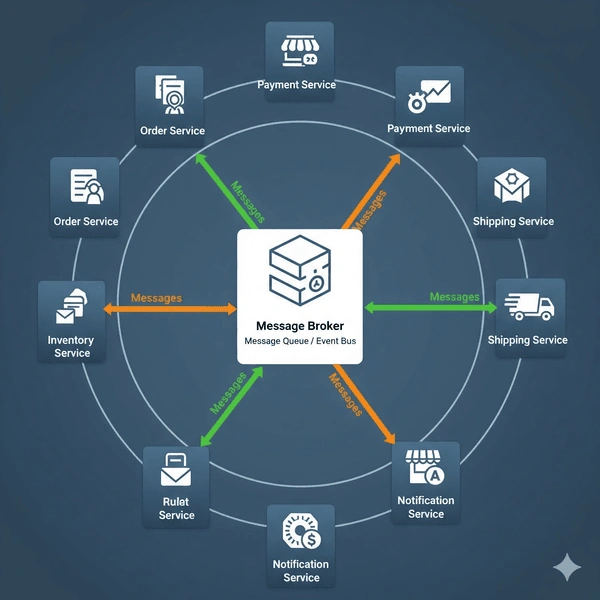
This is where the Eventing pattern comes in. Instead of a direct, synchronous call, services communicate asynchronously by sending messages to a central intermediary known as a message broker or event bus. A service (the producer) publishes an event (a message) to the broker, and any interested services (the consumers) can subscribe to and process that event at their own pace. This pattern transforms communication from a direct phone call into a voicemail system. The producer leaves a message and moves on, without waiting for the consumer to be available. This fundamental change is the key to building loosely coupled, highly scalable, and resilient systems.
The Problem .NET Aspire Solves in Eventing
While the eventing pattern is powerful, implementing it in a development environment can be cumbersome. Developers often face a series of manual, repetitive tasks:
Running the Message Broker: You need to download, install, and run a message broker (like RabbitMQ or Kafka) locally, often using Docker Compose files.
Managing Connection Strings: You have to manually configure connection strings and environment variables for each service, making sure they correctly point to the message broker's local address and port.
Handling Client Libraries: You need to correctly set up client libraries for your chosen broker in each project, including managing their lifecycle and disposal.
Observability Setup: Configuring logging, metrics, and distributed tracing for asynchronous communication across multiple services is complex and often requires manual boilerplate code.
These setup tasks add friction and cognitive load, distracting developers from writing business logic. .NET Aspire was created to solve these exact problems. It provides a code-first, opinionated framework for building cloud-native applications, and its approach to eventing is a perfect example of its value proposition.
.NET Aspire's Code-First Orchestration
At the heart of Aspire's orchestration is the AppHost project. This is a special project in your solution that acts as the control plane for your entire distributed application. Instead of relying on complex YAML or JSON files, you use C# code to define and orchestrate all of your application's resources—including message brokers.
This code-first approach offers a number of significant advantages:
Integrated with Your IDE: You get full IntelliSense, type safety, and debugging support, making it much easier to define your application's architecture.
Centralized Configuration: All your resources and their dependencies are defined in one place, providing a clear, high-level view of your application's topology.
Automatic Container Management: When you define a resource like RabbitMQ, Aspire automatically uses Docker to pull and run the container, managing its lifecycle for you. This eliminates the need for manual docker compose up commands.
Seamless Dependency Injection: Aspire automatically manages and injects the correct connection strings and configuration into the services that need them. This is a game-changer for developer productivity, as you never have to manually copy-paste connection strings or worry about hard-coded credentials.
By abstracting away these complexities, Aspire allows you to focus on the core business logic of your eventing solution.
Implementing Eventing with Aspire: A Step-by-Step Guide
Let's walk through a practical example of how to implement eventing with RabbitMQ and .NET Aspire.
Step 1. Add the Aspire Component
Aspire provides a set of component NuGet packages for various services. These packages are not just client libraries; they also integrate with the Aspire ecosystem to provide health checks, telemetry, and standardized configuration.
First, add the appropriate package to your AppHost project:
dotnet add package Aspire.RabbitMQ.Client --prerelease
Next, add the same package to the projects that will produce or consume messages (e.g., your API service or a worker service):
dotnet add package Aspire.RabbitMQ.Client --prerelease
Step 2. Orchestrate in the AppHost
This is where the magic happens. Open the Program.cs file in your AppHost project and add a new RabbitMQ resource.
var builder = DistributedApplication.CreateBuilder(args);

// Add the RabbitMQ container as a managed resource
var messageBroker = builder.AddRabbitMQ("my-rabbitmq");

// Define your services
var apiService = builder.AddProject<Projects.MyApiService>("api-service")
                        .WithReference(messageBroker); // The API service needs access to the broker

var workerService = builder.AddProject<Projects.MyWorkerService>("worker-service")
                           .WithReference(messageBroker); // The worker service also needs access

builder.Build().Run();
Here, we've declared a resource named "my-rabbitmq". We then use the .WithReference() method to tell Aspire that our api-service and worker-service projects depend on this message broker. Aspire will automatically ensure that the my-rabbitmq container is started and that the necessary configuration is injected into the dependent services.
Step 3. Create a Message Producer
Now, let's look at the C# code in our MyApiService to publish a message. Thanks to Aspire, we don't need to manually configure the ConnectionFactory. Aspire handles this for us and makes the connection available via dependency injection.
public class OrderController : ControllerBase
{
    private readonly ILogger<OrderController> _logger;
    private readonly IConnection _connection;

    public OrderController(ILogger<OrderController> logger, IConnection connection)
    {
        _logger = logger;
        _connection = connection;
    }

    [HttpPost("submit-order")]
    public IActionResult SubmitOrder([FromBody] Order order)
    {
        _logger.LogInformation("Processing new order: {OrderId}", order.Id);

        using (var channel = _connection.CreateModel())
        {
            channel.QueueDeclare(queue: "order-queue",
                                 durable: false,
                                 exclusive: false,
                                 autoDelete: false,
                                 arguments: null);

            var body = Encoding.UTF8.GetBytes(JsonSerializer.Serialize(order));

            channel.BasicPublish(exchange: string.Empty,
                                 routingKey: "order-queue",
                                 basicProperties: null,
                                 body: body);
        }

        _logger.LogInformation("Order {OrderId} published to message queue.", order.Id);

        return Ok("Order submitted. It will be processed asynchronously.");
    }
}
The IConnection object is resolved directly by the DI container, and it's already configured to connect to the RabbitMQ container orchestrated by Aspire.
Step 4. Create a Message Consumer
In a separate project, like MyWorkerService, we can create a consumer that listens for and processes messages. A common pattern for this is to use a BackgroundService.
public class OrderProcessorService : BackgroundService
{
    private readonly ILogger<OrderProcessorService> _logger;
    private readonly IConnection _connection;

    public OrderProcessorService(ILogger<OrderProcessorService> logger, IConnection connection)
    {
        _logger = logger;
        _connection = connection;
    }

    protected override Task ExecuteAsync(CancellationToken stoppingToken)
    {
        using (var channel = _connection.CreateModel())
        {
            channel.QueueDeclare(queue: "order-queue",
                                 durable: false,
                                 exclusive: false,
                                 autoDelete: false,
                                 arguments: null);

            var consumer = new EventingBasicConsumer(channel);
            consumer.Received += (model, ea) =>
            {
                var body = ea.Body.ToArray();
                var message = Encoding.UTF8.GetString(body);
                _logger.LogInformation("Received message: {Message}", message);

                // Process the order here...
            };

            channel.BasicConsume(queue: "order-queue",
                                 autoAck: true,
                                 consumer: consumer);

            // Wait for the background service to stop
            while (!stoppingToken.IsCancellationRequested)
            {
                Task.Delay(1000, stoppingToken).Wait();
            }
        }

        return Task.CompletedTask;
    }
}
Again, the IConnection is seamlessly injected. This code is purely focused on the logic of consuming and processing the message, with no boilerplate for connection management.,
Advanced Topics and Aspire's Built-in Benefits
Beyond simple orchestration, Aspire provides powerful features that are especially beneficial for eventing.
Observability
Aspire is built on OpenTelemetry and provides a centralized Dashboard for monitoring your entire application. For event-based systems, this is a game-changer. The dashboard automatically collects and visualizes:
Logs: You can see logs from both your producer and consumer services in a single place.
Metrics: Monitor the health and performance of your message broker, such as connection counts, message rates, and queue sizes.
Distributed Tracing: Aspire automatically correlates traces across different services, even when communication is asynchronous. You can trace an event from the moment it's published by the producer, through the message broker, and into the consumer, making it easy to debug complex workflows.
Resilience and Health Checks
The Aspire components for messaging systems automatically add health checks. The AppHost can monitor the status of your RabbitMQ or Kafka container, and the Aspire dashboard provides a clear visual indicator if a resource is unhealthy. This is crucial for building resilient systems, as you can quickly identify and address issues before they cause cascading failures.
Choosing the Right Message Broker
Aspire's flexible component model allows you to easily swap message brokers. While RabbitMQ (AMQP) is an excellent choice for general-purpose messaging, other systems like Kafka excel at different use cases.
RabbitMQ: Best for traditional message queues, where messages are consumed once by a single client and then discarded. It's a great choice for tasks like order processing, email notifications, and task queues.
Kafka: Ideal for high-throughput, fault-tolerant event streaming. Kafka treats messages as a distributed, append-only log, allowing multiple consumers to read from the same stream at different offsets. It's often used for real-time analytics, data pipelines, and change data capture.
Aspire's abstraction layer makes experimenting with these different brokers a breeze. You simply change a line of code in your AppHost, and Aspire handles the rest.
Conclusion
Eventing is a fundamental pattern for building modern, resilient, and scalable applications. However, the complexities of setting up and managing message brokers have often been a barrier to entry. .NET Aspire completely changes this narrative.
By leveraging the AppHost's code-first orchestration, Aspire transforms the complex task of eventing into a streamlined, developer-friendly process. It eliminates boilerplate code, automates container management, simplifies dependency injection, and provides a unified observability experience out of the box. With .NET Aspire, developers can focus on building powerful, loosely coupled systems that are ready for the demands of the cloud, without getting bogged down in the intricacies of infrastructure setup.


Join the conversation! Your thoughts help the community grow.