

Introduction
EXCEPT operator was introduced in SQL Server in 2005. The EXCEPT operator returns all of the distinct rows from the query to the left of the EXCEPT operator when there are no matching rows in the right query. EXCEPT is similar as NOT IN with DISTINCT queries. The EXCEPT operator is equivalent of the Left Anti Semi Join.
NOT IN will return all rows from left hand side table which are not present in right hand side table but it will not remove duplicate rows from the result.
Let us take an example:
- CREATE TABLE# NewData(ID INT, Name[nvarchar](30));
- CREATE TABLE# ExistingData(ID INT, Name[nvarchar](30));
- INSERT INTO# NewData
- (ID, Name)
- VALUES
- (8, 'Pankaj'), (9, 'Rahul'), (10, 'Sanjeev'), (1, 'Sandeep'), (3, 'Priya'), (8, 'Deepak');
- INSERT INTO# ExistingData
- (ID, Name)
- VALUES
- (1, 'Sandeep'), (2, 'Neeraj'), (3, 'Priya'), (4, 'Omi'), (5, 'Divyanshu');
- --EXCEPT filters
- for DISTINCT values
- SELECT nc.ID FROM# NewData AS nc
- EXCEPT
- SELECT ec.ID FROM# ExistingData AS ec
- --NOT IN returns all values without filtering
- SELECT nc.ID FROM# NewData AS nc
- WHERE ID NOT IN(SELECT ec.ID FROM# ExistingData AS ec)
- DROP TABLE# NewData;
- DROP TABLE# ExistingData;
Output:
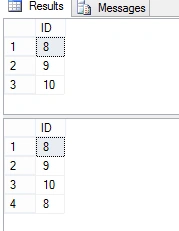
In above result first table is result of EXIST operator and second table is result of NOT IN operator. It is clear that EXIST operator always return the distinct result but NOT IN doesn’t remove duplicate value.
Let’s check the execution plan of both query.
Execution Plan
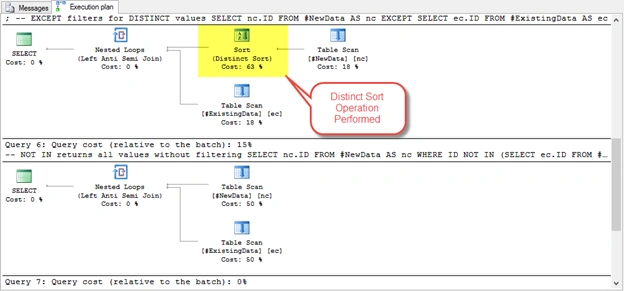
Execution plan of EXIST and NOTIN is almost similar, difference is that EXIST perform distinct sort for left side table.
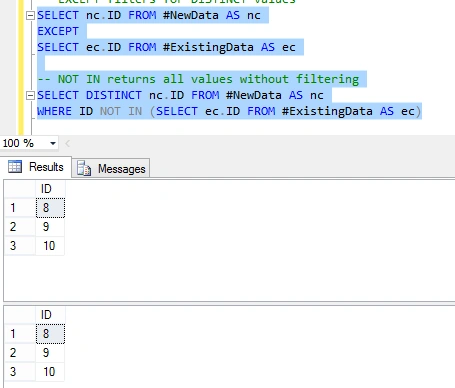
If we performed the NOTIN operation with DISTINCT command then both query produce same result.
Example 1
- SELECT nc.ID FROM# NewData AS nc
- EXCEPT
- SELECT ec.ID FROM# ExistingData AS ec
- --NOT IN returns all values without filtering
- SELECT DISTINCT nc.ID FROM# NewData AS nc
- WHERE ID NOT IN(SELECT ec.ID FROM# ExistingData AS ec)
Output
Example 2
Now try to execute the following query and examine the output.
- --EXCEPT filters for DISTINCT values
- SELECT * FROM# NewData AS nc
- EXCEPT
- SELECT ec.ID FROM# ExistingData AS ec
- --NOT IN returns all values without filtering
- SELECT * FROM# NewData AS nc
- WHERE ID NOT IN(SELECT ec.ID FROM# ExistingData AS ec)
Output

When we execute above query, SQL Server throw an error that “All queries combined using a UNION, INTERSECT or EXCEPT operator must have an equal number of expressions in their target lists”. This error indicate that number of column for both table (outer table and inner table) must be equal.
Example 3
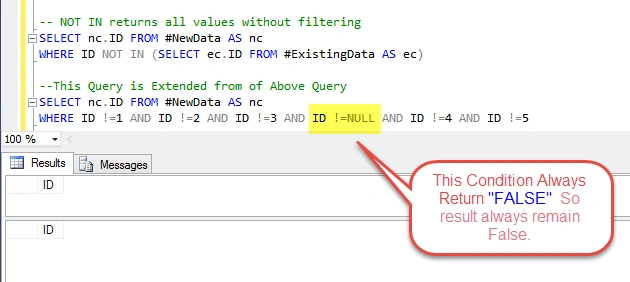
Now first insert some NULL values for both columns in “#ExistingData” table and after that execute both query and examine the result.
- CREATE TABLE# NewData(ID INT, Name[nvarchar](30));
- CREATE TABLE# ExistingData(ID INT, Name[nvarchar](30));
- INSERT INTO# NewData
- (ID, Name)
- VALUES
- (8, 'Pankaj'), (9, 'Rahul'), (10, 'Sanjeev'), (1, 'Sandeep'), (3, 'Priya'), (8, 'Deepak');
- INSERT INTO# ExistingData
- (ID, Name)
- VALUES
- (1, 'Sandeep'), (2, 'Neeraj'), (3, 'Priya'), (NULL, NULL), (4, 'Omi'), (5, 'Divyanshu');
- --EXCEPT filters
- for DISTINCT values
- SELECT nc.ID FROM# NewData AS nc
- EXCEPT
- SELECT ec.ID FROM# ExistingData AS ec
- --NOT IN returns all values without filtering
- SELECT nc.ID FROM# NewData AS nc
- WHERE ID NOT IN(SELECT ec.ID FROM# ExistingData AS ec)
- DROP TABLE# NewData;
- DROP TABLE# ExistingData;
Output:

Manoj KallaPosted Jan 30, 2016, 11:39 AM
Good one,
Nigel FernandesPosted Jan 25, 2016, 12:20 AM
Interesting
Raja TPosted Jan 24, 2016, 11:11 PM
Nice, Thank you for sharing..
Humayun Kabir MamunPosted Jan 24, 2016, 10:51 PM
Nice...
Shashangka ShekharPosted Jan 23, 2016, 2:09 PM
Nicely explained, thanks.
Pankaj Kumar ChoudharyPosted Jan 23, 2016, 10:41 AM
Thanks Shweta Lodha mam..............
Pankaj Kumar ChoudharyPosted Jan 23, 2016, 10:40 AM
Thanks Manas Mohapatra.......
Pankaj Kumar ChoudharyPosted Jan 23, 2016, 10:40 AM
Thanks Shubham Kumar Sir............
Pankaj Kumar ChoudharyPosted Jan 23, 2016, 10:39 AM
Thanks Ranjit Powar......
Pankaj Kumar ChoudharyPosted Jan 23, 2016, 10:39 AM
Thanks Gowtham K Sir..........
Manas MohapatraPosted Jan 23, 2016, 8:11 AM
Nice explanation
Shweta LodhaPosted Jan 23, 2016, 6:50 AM
Great explanation
Shubham KumarPosted Jan 22, 2016, 11:42 PM
simply i don't know about that yet
Ranjit PowarPosted Jan 22, 2016, 9:46 PM
Good work
Gowtham KPosted Jan 22, 2016, 9:14 PM
Good One ,Thanks for sharing:)