

Introduction
.NET provides a structured way of handling the runtime errors. Business logic and error handling code is separate. The errors that occur during the execution of a program are called the runtime errors or the exceptions. Some of the examples of runtime erros are Division by Zero, Stack overflow, Invalid type casting, and File not found.Object-Oriented way of error handling is,
- Classes to handle different types of errors.
- FileNotFoundException class to represent, if the file not found.
- IOException class to represent, if the file is already open.
- SecurityException class to represent, if the caller does not have permission to access the file.
- Easy to program and extend
Runtime errors occur during the execution of a program. Some exceptions are given below,
- Division by 0 exception occurs, when the denominator is zero.
- Stack overflow exception occurs, when there is no memory available to allocate on stack.
- File not found exception can occur, when we try to access a file from a particular location, where it does not exit.
These exceptions abnormally terminate a program. To avoid this, C# provides an in-built feature that is called an exception handling mechanism.
Exception handling mechanism provides a way to respond to the run time errors in the program by transferring control to special code called handler. This feature allows a clean separation between error detection code or business logic and error handling code.
The exception handling mechanism in C# provides try and catch blocks to effectively handle it.
Let's see how to handle an exception practically.
- For this, create new C# console project, as shown below.

- Let's write a code for reading a text file for the specific path, as shown below.
- The file path is shown below.
- Now, let’s try to read this sample file, using C# code, as given below.
- using System;
- using System.IO;
- namespace ConsoleApplication1 {
- class Program {
- static void Main(string[] args) {
- StreamReader strmRdr = new StreamReader(@ "E:\Exception Handling\sample.txt");
- Console.WriteLine(strmRdr.ReadToEnd()); //Read the file to the end
- strmRdr.Close(); //after reading close the file
- Console.ReadLine();
- }
- }
- }


- Let's implement one exception to this reading code. Let’s change the file name so that in the file path, we can make it not exist and change the code, as shown below, and see what happens.
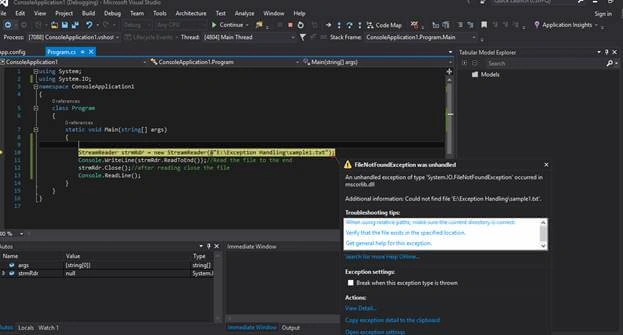
As you see here, you will be getting an Exception System.IO.FileNotFoundException.
- Now, we will see how to handle this. Using try catch, rewrite the code, as shown below.
- try {
- StreamReader strmRdr = new StreamReader(@ "E:\Exception Handling\sample1.txt");
- Console.WriteLine(strmRdr.ReadToEnd()); //Read the file to the end
- strmRdr.Close(); //after reading close the file
- Console.ReadLine();
- } catch (Exception ex) {
- Console.WriteLine(ex.Message);
- }

Here, we will get the exact exception and the application will not crash.
It is not a good way because here, we are displaying all the error messages which sometimes the user can’t understand. The hackers may use this information hack.
Thus, we need to hide all these things and we have to display an error message in a better way. Exception is actually a class, which is derived from System.Exception class. This class has several useful properties, which provide valuable information about the exception.
There are two main methods in this exception.
Message
Gets message that describes the current exception.Stack Trace
Provides the call stack to the line number in the method, where the exception occurred


Amit KumarPosted Mar 2, 2017, 3:32 AM
Nice explanation, I think FornatException should be FormatException it is typo mistake.
Abhilash J APosted Mar 1, 2017, 11:07 PM
Sir, thank you for the information provided.
Vishal PrajapatiPosted Feb 28, 2017, 2:33 AM
Good explanation....