What is Elmah
According to Scott Mitchell, Error Logging Modules And Handlers (ELMAH) offers another approach to log runtime errors in a production environment. ELMAH is a free, open source error logging library that includes features like error filtering and the ability to view the error log from a web page, as an RSS feed, or to download it as a comma-delimited file.
What we will achieve through Elmah
Logging of nearly all unhandled exceptions.
Email notification of each error at the time error occurs.
View the error log from a web page.
RSS feed .
Step 1: Create a MVC web Application
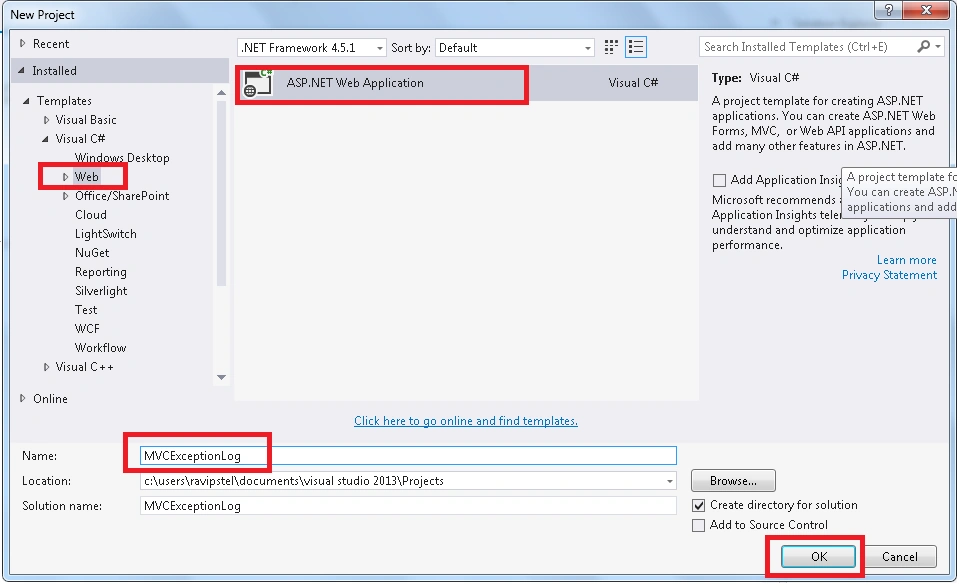
Open Visual Studio create new project or press CTRL +SHIFT +N. Go to Web tab, select ASP.NET Web Application template. Give name as MVCExceptionLog as in the following screenshot,

Step 2: Add Elmah Package from Nuget,
Right click on project solution go to Manage NuGetPackages for Solution, click on it and search elmah and install it,

Step 3: Now open web config file and add the following code inside <system.web> </system.web>,
- <!--add this-->
- < httpHandlers >
- < add verb = "POST,GET,HEAD"path = "elmah.axd"type = "Elmah.ErrorLogPageFactory, Elmah" / >
- < /httpHandlers>
- <!--add this-->
Also, add the following code inside <system.webServer></system.webServer>,
- <!--add this-->
- < handlers >
- < add name = "Elmah"verb = "POST,GET,HEAD"path = "elmah.axd"type = "Elmah.ErrorLogPageFactory, Elmah" / >
- < /handlers>
- <!--add this-->
Step 4: Create table and Stored Procedure,
Here I am using SQL Server database to log the exception. I have already created database SQL Server named ExceptionLog. Open SQL Server Management Studio, run the following code in ExceptionLog database one by one.
For Table
- CREATE TABLE[dbo].[ELMAH_Error]
- (
-
- [ErrorId][uniqueidentifier] NOT NULL,
-
- [Application][nvarchar](60) NOT NULL,
-
- [Host][nvarchar](50) NOT NULL,
-
- [Type][nvarchar](100) NOT NULL,
-
- [Source][nvarchar](60) NOT NULL,
-
- [Message][nvarchar](500) NOT NULL,
-
- [User][nvarchar](50) NOT NULL,
-
- [StatusCode][int] NOT NULL,
-
- [TimeUtc][datetime] NOT NULL,
-
- [Sequence][int] IDENTITY(1, 1) NOT NULL,
-
- [AllXml][ntext] NOT NULL
-
- )
Stored procedure
- Create PROCEDURE[dbo].[ELMAH_GetErrorsXml]
-
- (
- @Application NVARCHAR(60),
- @PageIndex INT = 0,
- @PageSize INT = 15,
- @TotalCount INT OUTPUT
-
- )
-
- AS
-
- SET NOCOUNT ON
-
- DECLARE @FirstTimeUTC DATETIME
- DECLARE @FirstSequence INT
- DECLARE @StartRow INT
- DECLARE @StartRowIndex INT
- SELECT
-
- @TotalCount = COUNT(1)
-
- FROM
-
- [ELMAH_Error]
-
- WHERE
-
- [Application] = @Application
- SET @StartRowIndex = @PageIndex * @PageSize + 1
- IF @StartRowIndex <= @TotalCount
-
- BEGIN
-
- SET ROWCOUNT @StartRowIndex
-
- SELECT
-
- @FirstTimeUTC = [TimeUtc],
-
- @FirstSequence = [Sequence]
-
- FROM
-
- [ELMAH_Error]
-
- WHERE
-
- [Application] = @Application
-
- ORDER BY
-
- [TimeUtc] DESC,
- [Sequence] DESC
-
- END
-
- ELSE
-
- BEGIN
-
- SET @PageSize = 0
-
- END
-
- SET ROWCOUNT @PageSize
-
- SELECT
-
- errorId = [ErrorId],
-
- application = [Application],
- host = [Host],
- type = [Type],
- source = [Source],
- message = [Message],
- [user] = [User],
- statusCode = [StatusCode],
- time = CONVERT(VARCHAR(50), [TimeUtc], 126) + 'Z'
-
- FROM
-
- [ELMAH_Error] error
-
- WHERE
-
- [Application] = @Application
-
- AND
-
- [TimeUtc] <= @FirstTimeUTC
-
- AND
-
- [Sequence] <= @FirstSequence
-
- ORDER BY
-
- [TimeUtc] DESC,
-
- [Sequence] DESC
-
- FOR
-
- XML AUTO
- Create PROCEDURE[dbo].[ELMAH_GetErrorXml]
-
- (
-
- @Application NVARCHAR(60),
- @ErrorId UNIQUEIDENTIFIER
-
- )
-
- AS
-
- SET NOCOUNT ON
- SELECT
-
- [AllXml]
- FROM
-
- [ELMAH_Error]
- WHERE
-
- [ErrorId] = @ErrorId
- AND
- [Application] = @Application
- Create PROCEDURE[dbo].[ELMAH_LogError]
-
- (
-
- @ErrorId UNIQUEIDENTIFIER,
- @Application NVARCHAR(60),
- @Host NVARCHAR(30),
- @Type NVARCHAR(100),
- @Source NVARCHAR(60),
- @Message NVARCHAR(500),
- @User NVARCHAR(50),
- @AllXml NTEXT,
- @StatusCode INT,
- @TimeUtc DATETIME
-
- )
-
- AS
-
- SET NOCOUNT ON
-
- INSERT
-
- INTO
-
- [ELMAH_Error]
- (
-
- [ErrorId],
- [Application],
- [Host],
- [Type],
- [Source],
- [Message],
- [User],
- [AllXml],
- [StatusCode],
- [TimeUtc]
-
- )
-
- VALUES
-
- (
-
- @ErrorId,
- @Application,
- @Host,
- @Type,
- @Source,
- @Message,
- @User,
- @AllXml,
- @StatusCode,
- @TimeUtc
-
- )
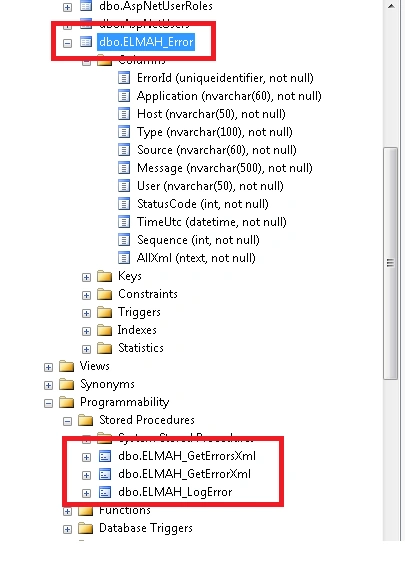
After creating the database table and stored procedure. The schema will look like the following:
Now again open web config file, add the following code inside in <configuration>,
- </configuration>
- <elmah>
- <!--. If allowRemoteAccess value is set to 0, then the error log web page can only be viewed locally. If allowRemoteAccess attribute is set to 1 then the error log web page is enabled for both remote and local visitors.-->
- <!--add this-->
- <security allowRemoteAccess="0" />
- <!-- DefaultConnection is the name of database connection string -->
- <errorLog type="Elmah.SqlErrorLog, Elmah" connectionStringName="DefaultConnection" />
- <!--add this-->
- </elmah>
Now my final webconfig file look like the following,
- <?xml version="1.0" encoding="utf-8"?>
- <!--
- For more information on how to configure your ASP.NET application, please visit
- http://go.microsoft.com/fwlink/?LinkId=301880
- -->
- <configuration>
- <configSections>
-
- <section name="entityFramework" type="System.Data.Entity.Internal.ConfigFile.EntityFrameworkSection, EntityFramework, Version=6.0.0.0, Culture=neutral, PublicKeyToken=b77a5c561934e089" requirePermission="false" />
- <sectionGroup name="elmah">
- <section name="security" requirePermission="false" type="Elmah.SecuritySectionHandler, Elmah" />
- <section name="errorLog" requirePermission="false" type="Elmah.ErrorLogSectionHandler, Elmah" />
- <section name="errorMail" requirePermission="false" type="Elmah.ErrorMailSectionHandler, Elmah" />
- <section name="errorFilter" requirePermission="false" type="Elmah.ErrorFilterSectionHandler, Elmah" />
- </sectionGroup>
- </configSections>
- <connectionStrings>
- <add name="DefaultConnection" connectionString="Data Source=.;Initial Catalog=ExceptionLog;Integrated Security=True" providerName="System.Data.SqlClient" />
- </connectionStrings>
- <appSettings>
- <add key="webpages:Version" value="3.0.0.0" />
- <add key="webpages:Enabled" value="false" />
- <add key="ClientValidationEnabled" value="true" />
- <add key="UnobtrusiveJavaScriptEnabled" value="true" />
- <add key="elmah.mvc.disableHandler" value="false" />
- <add key="elmah.mvc.disableHandleErrorFilter" value="false" />
- <add key="elmah.mvc.requiresAuthentication" value="false" />
- <add key="elmah.mvc.IgnoreDefaultRoute" value="false" />
- <add key="elmah.mvc.allowedRoles" value="*" />
- <add key="elmah.mvc.allowedUsers" value="*" />
- <add key="elmah.mvc.route" value="elmah" />
- <add key="elmah.mvc.UserAuthCaseSensitive" value="true" />
- </appSettings>
- <system.web>
- <authentication mode="None" />
- <compilation debug="true" targetFramework="4.5.1" />
- <httpRuntime targetFramework="4.5.1" />
-
-
- <httpHandlers>
- <add verb="POST,GET,HEAD" path="elmah.axd" type="Elmah.ErrorLogPageFactory, Elmah" />
- </httpHandlers>
-
-
- <httpModules>
- <add name="ErrorLog" type="Elmah.ErrorLogModule, Elmah" />
- <add name="ErrorMail" type="Elmah.ErrorMailModule, Elmah" />
- <add name="ErrorFilter" type="Elmah.ErrorFilterModule, Elmah" />
- </httpModules>
- </system.web>
- <system.webServer>
-
- <handlers>
- <add name="Elmah" verb="POST,GET,HEAD" path="elmah.axd" type="Elmah.ErrorLogPageFactory, Elmah" />
- </handlers>
-
- <modules>
- <remove name="FormsAuthentication" />
- <add name="ErrorLog" type="Elmah.ErrorLogModule, Elmah" preCondition="managedHandler" />
- <add name="ErrorMail" type="Elmah.ErrorMailModule, Elmah" preCondition="managedHandler" />
- <add name="ErrorFilter" type="Elmah.ErrorFilterModule, Elmah" preCondition="managedHandler" />
- </modules>
- <validation validateIntegratedModeConfiguration="false" />
-
- </system.webServer>
- <runtime>
- <assemblyBinding xmlns="urn:schemas-microsoft-com:asm.v1">
- <dependentAssembly>
- <assemblyIdentity name="Microsoft.Owin" publicKeyToken="31bf3856ad364e35" />
- <bindingRedirect oldVersion="0.0.0.0-3.0.0.0" newVersion="3.0.0.0" />
- </dependentAssembly>
- <dependentAssembly>
- <assemblyIdentity name="Microsoft.Owin.Security.OAuth" publicKeyToken="31bf3856ad364e35" />
- <bindingRedirect oldVersion="0.0.0.0-3.0.0.0" newVersion="3.0.0.0" />
- </dependentAssembly>
- <dependentAssembly>
- <assemblyIdentity name="Microsoft.Owin.Security.Cookies" publicKeyToken="31bf3856ad364e35" />
- <bindingRedirect oldVersion="0.0.0.0-3.0.0.0" newVersion="3.0.0.0" />
- </dependentAssembly>
- <dependentAssembly>
- <assemblyIdentity name="Microsoft.Owin.Security" publicKeyToken="31bf3856ad364e35" />
- <bindingRedirect oldVersion="0.0.0.0-3.0.0.0" newVersion="3.0.0.0" />
- </dependentAssembly>
- <dependentAssembly>
- <assemblyIdentity name="Newtonsoft.Json" culture="neutral" publicKeyToken="30ad4fe6b2a6aeed" />
- <bindingRedirect oldVersion="0.0.0.0-6.0.0.0" newVersion="6.0.0.0" />
- </dependentAssembly>
- <dependentAssembly>
- <assemblyIdentity name="System.Web.Helpers" publicKeyToken="31bf3856ad364e35" />
- <bindingRedirect oldVersion="1.0.0.0-3.0.0.0" newVersion="3.0.0.0" />
- </dependentAssembly>
- <dependentAssembly>
- <assemblyIdentity name="System.Web.Mvc" publicKeyToken="31bf3856ad364e35" />
- <bindingRedirect oldVersion="0.0.0.0-5.2.2.0" newVersion="5.2.2.0" />
- </dependentAssembly>
- <dependentAssembly>
- <assemblyIdentity name="System.Web.Optimization" publicKeyToken="31bf3856ad364e35" />
- <bindingRedirect oldVersion="1.0.0.0-1.1.0.0" newVersion="1.1.0.0" />
- </dependentAssembly>
- <dependentAssembly>
- <assemblyIdentity name="System.Web.WebPages" publicKeyToken="31bf3856ad364e35" />
- <bindingRedirect oldVersion="1.0.0.0-3.0.0.0" newVersion="3.0.0.0" />
- </dependentAssembly>
- <dependentAssembly>
- <assemblyIdentity name="WebGrease" publicKeyToken="31bf3856ad364e35" />
- <bindingRedirect oldVersion="0.0.0.0-1.5.2.14234" newVersion="1.5.2.14234" />
- </dependentAssembly>
- </assemblyBinding>
- </runtime>
- <entityFramework>
- <defaultConnectionFactory type="System.Data.Entity.Infrastructure.LocalDbConnectionFactory, EntityFramework">
- <parameters>
- <parameter value="mssqllocaldb" />
- </parameters>
- </defaultConnectionFactory>
- <providers>
- <provider invariantName="System.Data.SqlClient" type="System.Data.Entity.SqlServer.SqlProviderServices, EntityFramework.SqlServer" />
- </providers>
- </entityFramework>
- <elmah>
-
-
-
- <security allowRemoteAccess="0" />
- <errorLog type="Elmah.SqlErrorLog, Elmah" connectionStringName="DefaultConnection" />
-
- </elmah>
-
- </configuration>
Step 5: Let us create some exception
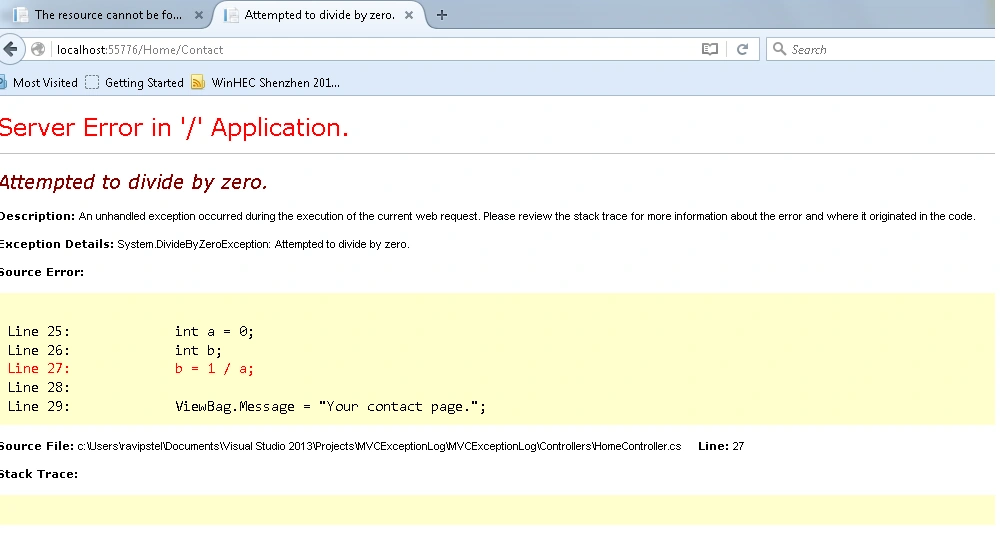
- Suppose I want to open a page that are not in our application. Let us say About2 page: localhost:55776/Home/About2
- Create divide by zero exception in contact page
- using System;
- using System.Collections.Generic;
- using System.Linq;
- using System.Web;
- using System.Web.Mvc;
- namespace MVCExceptionLog.Controllers
- {
- public class HomeController: Controller
- {
- public ActionResult Index()
- {
- return View();
- }
- public ActionResult About()
- {
- ViewBag.Message = "Your application description page.";
- return View();
- }
- public ActionResult Contact()
- {
- int a = 0;
- int b;
- b = 1 / a;
- ViewBag.Message = "Your contact page.";
- return View();
- }
- }
- }
Step 5: Run the application,
Click on F5 and register a user.

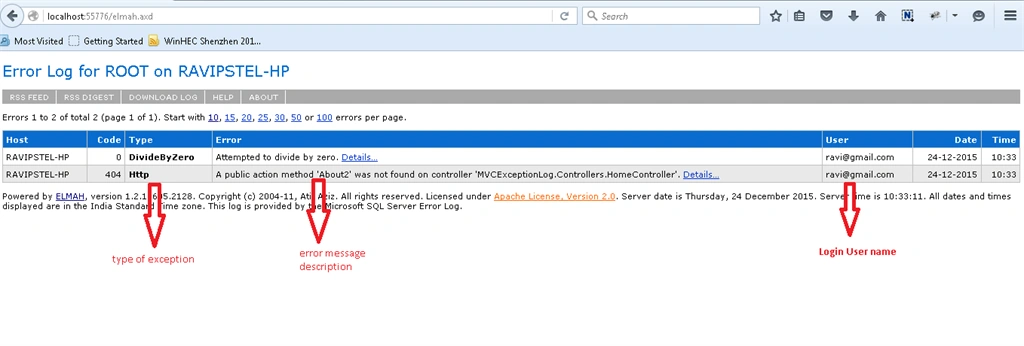
Step 6: View the Error Log from a Web Page,
You can view the error log web page through the url localhost:portno/elmah.axd like, localhost:55776/elmah.axd.
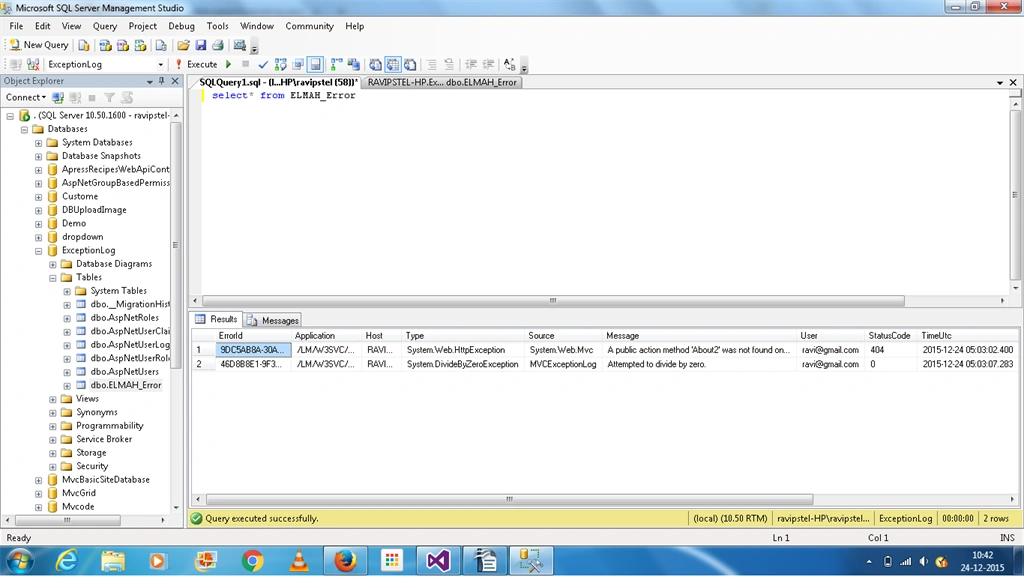
Check the error log in database.
Point of Interest
In this article we learned how to log Exception in SQL Server and view error log details from web page.



Vishal IPosted Jan 21, 2020, 12:20 PM
Hello, I have implemented this elmah error log , it working in my local but while i publish it it shows "login failed for user...."
Pankaj NegiPosted Jan 23, 2019, 7:43 AM
Hi Ravi, I am implemented this article. It's worked for me in database log maintain but it is not showing on Elmah.axd. Please suggest what should i missing.
Pankaj NegiPosted Jan 23, 2019, 7:42 AM
Hi Ravi, Iam implemented this article
Mayur PadhiyarPosted Dec 27, 2018, 5:29 AM
Hello as I have implemented elmah in one of my application and it is running fine as expected now the requirement is I have to give the feature to the client that user will start and stop error logging by himself either give in UI or give permission to change in web.config file. So how can I set dynamically OFF or ON elmah error logging? Please give suggestion on this!
vaibhav pancholiPosted May 18, 2018, 2:18 AM
How can i use mongodb database with elmah
ANIYAN CPosted Jan 8, 2018, 4:29 AM
Can I implement it in a Web API project?
Dhruvin ShahPosted Jul 10, 2017, 8:02 AM
Will it work on Simple asp.net web application
Naveen NautiyalPosted Jun 14, 2017, 5:02 AM
I have implemented this in my project and its working.
Rehan HaquePosted Apr 18, 2017, 7:19 AM
I cannot see the errors in sql server on executing select * though i can see on elmah.axd in browser , where and how is the stored procedure getting executed?
Mayur PadhiyarPosted Feb 22, 2017, 1:40 AM
Very Helpful and amazing just need to add one thing about to set connection string that is like defaultconnection string of entity framework connectionstring. Those whose application is not running please change your connection string and make it like this. <add name="ExceptionLogEntities" connectionString="Data Source=yourenginename;Initial Catalog=ExceptionLog;Integrated Security=True" providerName="System.Data.SqlClient" /> if use id and password there just add it and your application will run. Please note the database by default used in this demo is mdf file and the entity framework database has only Elmah_Error table. So you can not see user field and related information in Elmah_Error table. The reason is by detault when you create any application it will create mdf files inside the App_Data and use that mdf files to store and retrieve the information for existing application and the database which we are using for elmah is different that we have created in the sql server as queries given in the demo. So both database are different. Don't forget to use your connectionstring inplace of default connection string in <errorLog type="Elmah.SqlErrorLog, Elmah" connectionStringName="DefaultConnection" /> in DefaultConnection use your connectionstring that you have just created.
Nabil NawazPosted Jan 8, 2017, 4:30 AM
I've implemented this project this is great, everything is working good. I'm facing a problem. i create table and stored procedures of ELMAH database in my own database. i'm using entity framework in my project, when i pass the connection string name to ELMAH in webconfig it gives me error about "metadata" which is in entity framework connection string. how can i use elmah to use Entityframework connection string ? i changed my Entityframework connectionstring to ADO connectionstring then things were working but was not able to login and perform any database action.
Ravi PatelPosted Dec 31, 2015, 12:51 AM
thanks Kabir
Humayun Kabir MamunPosted Dec 28, 2015, 1:51 AM
Nice...
Ravi PatelPosted Dec 26, 2015, 1:19 AM
thanks Santhakumar sir
Santhakumar MunuswamyPosted Dec 25, 2015, 3:23 PM
Thanks for nice article. Keep it up
Ravi PatelPosted Dec 25, 2015, 10:16 AM
thanks all..
Sibeesh VenuPosted Dec 25, 2015, 10:14 AM
Nice Share
Gowtham KPosted Dec 25, 2015, 10:13 AM
Good One, Thanks for sharing
Ankur MistryPosted Dec 25, 2015, 10:13 AM
Helpful, thanks for sharing