Introduction
Entity Framework Core (EF Core) introduced powerful set-based bulk operations through two new methods: ExecuteUpdate and ExecuteDelete. These methods allow developers to perform large-scale updates or deletions directly in the database using LINQ queries. Unlike traditional approaches, you don’t need to load entities into memory, track their state, or call SaveChanges(). Instead, the operations are executed at the database level, making them highly efficient for scenarios involving multiple rows. This feature significantly improves performance and reduces overhead when working with large datasets.
With EF Core 10, the API has become even more streamlined and developer-friendly. This article explores what these improvements are, why they’re important, and provides practical guidance on how to use them effectively.
Why Bulk Operations?
Before EF Core 7, performing updates or deletions on large sets of data was cumbersome and inefficient. The typical workflow involved:
Loading rows into memory by querying the database.
Modifying or marking entities for update or deletion.
Calling SaveChanges(), which would issue one UPDATE or DELETE statement per entity.
This approach doesn’t scale well. It’s slow, consumes significant memory, and introduces overhead because EF Core must materialize and track every entity in the change tracker.
EF Core 7 changed the game with ExecuteUpdate and ExecuteDelete. These methods allow you to express bulk operations as a single LINQ query that EF translates into one SQL UPDATE or DELETE statement executed directly in the database. No entity tracking, no loading into memory, and no need to call SaveChanges(). The result? Massive performance improvements and reduced resource usage for large-scale data modifications.
ExecuteDelete: bulk deletes, set‑based
Imagine you need to remove all orders where the total amount falls below a specific threshold. Using the traditional SaveChanges() approach, you would typically follow these steps:
Retrieve the matching orders from the database and load them into memory.
Mark each entity for deletion by iterating through the collection.
Call SaveChanges(), which then issues an individual DELETE statement for every single row.
await foreach (var order in context.Orders.Where(b => b.TotalValue < 2000).AsAsyncEnumerable())
{
    context.Orders.Remove(order);
}

await context.SaveChangesAsync();
When you inspect the SQL generated by EF, you’ll notice that it issues a separate DELETE statement for every individual item that meets the condition. This row-by-row approach is highly inefficient, especially when dealing with large datasets.
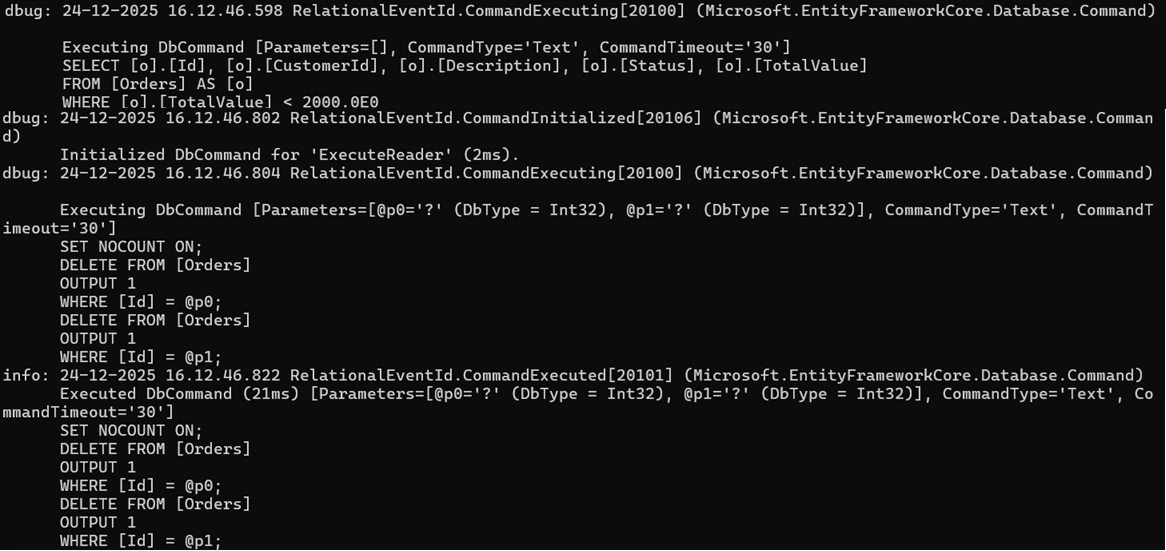
The same task can be accomplished using the ExecuteDelete method as follows:
var query = context.Orders
                .Where(o=>o.TotalValue < 2000)
                .ExecuteDelete();

When Should You Use Bulk Operations?
Bulk operations are ideal in scenarios where:
You need to remove a large number of rows based on a condition that can be expressed in LINQ. For example, deleting records that meet specific criteria without loading them into memory.
You are performing maintenance tasks such as cleaning up archived data or pruning soft-deleted rows. These operations often involve large datasets and benefit greatly from the efficiency of set-based commands.
ExecuteUpdate: bulk updates, set based
Instead of deleting these orders, suppose we want to update a property to indicate that they should be hidden (soft-deleted) rather than removed. The ExecuteUpdate method offers an efficient way to achieve this by translating a LINQ expression into a single SQL UPDATE statement executed directly in the database. This approach eliminates the need to load entities into memory or call SaveChanges(), making it ideal for bulk updates.
await foreach (var order in context.Orders.Where(b => b.TotalValue < 2000).AsAsyncEnumerable())
{
    order.Status = 0;
}

await context.SaveChangesAsync();
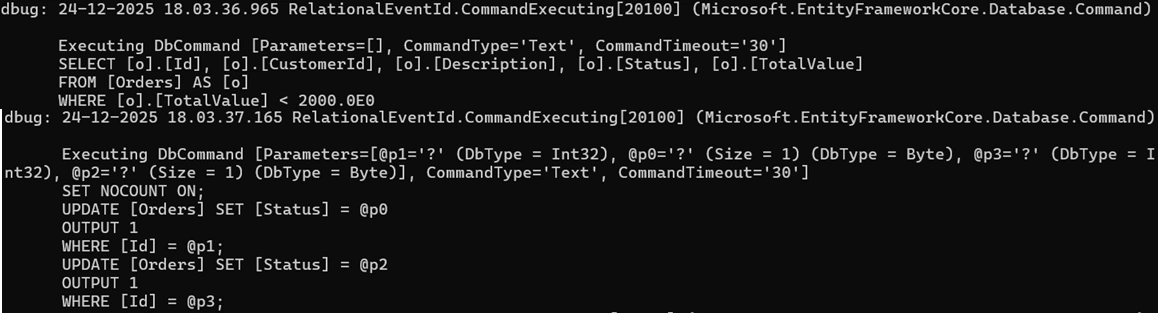
When you inspect the SQL generated by EF, you’ll notice that it issues a separate UPDATE statement for every individual item that meets the condition. This row-by-row approach is highly inefficient, especially when dealing with large datasets.
var query = context.Orders
                .Where(o=>o.TotalValue < 2000)
                .ExecuteUpdate(
                    setters => setters.SetProperty(b => b.Status, 0)
                );
Updating multiple properties
ExecuteUpdate enables updating multiple properties within a single operation. For instance, if you need to set the Status property to 0 and simultaneously reset the TotalValue to zero, you can achieve this by chaining additional SetProperty calls in the same invocation.
var query = context.Orders
                .Where(o=>o.TotalValue < 2000)
                .ExecuteUpdate(
                    setters => setters
                        .SetProperty(b => b.Status, (byte?) 0)
                        .SetProperty(b => b.TotalValue, 0)
                );
EF Core 10 Enhancement
Starting with EF Core 10, the setters parameter is now a standard delegate rather than an expression tree. This change allows you to use regular control flow constructs—such as if statements and loops—to conditionally add setters.
var descriptionChanged = true;
await context.Orders
    .ExecuteUpdateAsync(s =>
    {
        s.SetProperty(b => b.Status, (byte?)1);
        if (descriptionChanged)
        {
            s.SetProperty(b => b.Description, "New Description");
        }
    });
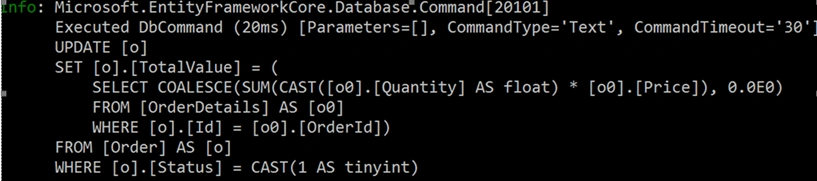
Prior to EF Core 10 (with .NET 10), ExecuteUpdate does not allow referencing navigation properties within the SetProperty lambda. For instance, suppose we want to update each Order’s TotalValue with the sum of its OrderDetail items’ Quantity * Price. We might attempt to use ExecuteUpdate like this.
var query = context.Order
        .Where(p=>p.Status == 1)
            .ExecuteUpdate(setter =>
                setter.SetProperty(
                    p=>p.TotalValue,
                    q=>q.OrderDetails.Sum(t=>t.Quantity* t.Price)
                )
            );
Good News, it is allow with EF Core 10 (with .NET 10). Following is equivalent SQL
Change Tracking & state consistency
ExecuteUpdate and ExecuteDelete behave fundamentally differently from typical EF Core operations. These methods apply changes immediately when invoked, rather than being deferred until SaveChanges.
While a single ExecuteUpdate or ExecuteDelete call can modify or remove many rows in one go, you cannot batch multiple such operations and commit them together later. Each call runs as an independent database command.
Additionally, these functions operate completely outside EF Core’s change tracker. They neither read nor update tracked entities, meaning EF has no awareness of the changes made. As a result, any in-memory entities may become stale and require manual refresh or reloading to stay consistent with the database.
Transactions
ExecuteUpdate and ExecuteDelete execute immediately when called, but they still participate in any ambient transactions, just like other EF Core commands.
You can:
Wrap them in an explicit transaction using BeginTransaction() for full control.
Rely on EF Core’s default transactional behavior when combining these operations with tracked changes applied via SaveChanges().
Keep in mind that these bulk operations do not require SaveChanges()—they commit as soon as they run. However, if you mix them with tracked entity updates, ensure everything is within the same transaction for consistency.
using (var transaction = context.Database.BeginTransaction())
{
    context.Orders.ExecuteUpdate(/* some update */);
    context.OrderDetails.ExecuteUpdate(/* another update */);

    ...
}
Limitations
Supported Operations: Currently, only update and delete operations are supported. For inserts, you must use DbSet<TEntity>.Add (or AddRange) and then call SaveChanges() to persist the new entities.
No Batching Support: Multiple calls to these methods cannot be combined into a single batch. Each invocation triggers its own separate round trip to the database.
Provider Support: Currently, these methods are supported only by relational database providers.
Cascade Behaviors & Triggers: Since these operations bypass EF Core’s change tracker, any EF-configured cascade rules, events, or interceptors tied to tracked changes will not be triggered. However, database-level foreign key cascades and triggers will still execute as expected. To avoid foreign key violations, ensure that dependent entities are deleted before their principals when performing bulk deletes.
Summary
ExecuteUpdate and ExecuteDelete provide set-based, high-performance bulk modifications in EF Core. Instead of iterating over individual entities and applying changes one by one, these methods translate your update or delete logic into a single SQL command that operates on multiple rows simultaneously. This approach offers significant benefits:Efficiency, Scalability and Simplicity. By leveraging these methods, you can achieve database-level operations while still working within EF Core’s LINQ-based syntax.


Join the conversation! Your thoughts help the community grow.