

C# naming conventions are an important part of C# coding standards and best practice when you are developing a .NET applications. .NET naming conventions are standards how the naming of variables, methods, classes, and other code elements should be defined. In this article, let us learn C# naming conventions.
Terminology
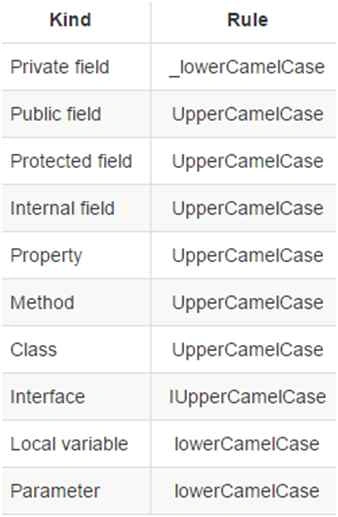
There are following three terminologies are used to declare C# and .NET naming standards.
- Camel Case (camelCase): In this standard, the first letter of the word always in small letter and after that each word starts with a capital letter.
- Pascal Case (PascalCase): In this the first letter of every word is in capital letter.
- Underscore Prefix (_underScore): For underscore ( __ ), the word after _ use camelCase terminology.
Native DataType
Always use native datatype instead of .NET CTS type. For example, use int instead of Int32 or Int64.
//Good
private int _salary = 100;

//Bad
private Int16 _salary = 100;
private Int32 _salary=100;
Class
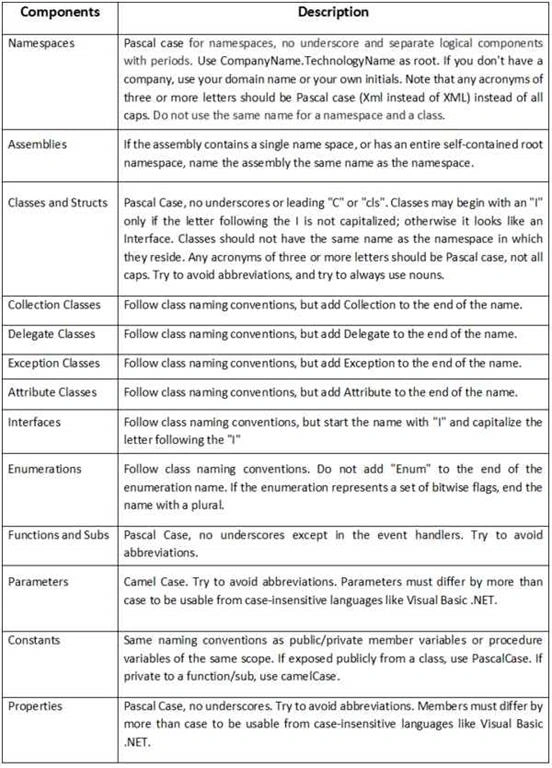
Always use PascalCase for class names. Try to use noun or noun phrase for class name. Do not give prefixes. Do not use underscores.
public partial class About : Page
{
   //...
}
Methods
Always use PascalCase for method names. Use maximum 7 parameters in a method.
public string GetPosts(string postId)
{
   //...
}
Note: Don't use name as all character in CAPS.
Arguments and Local Variable
Always use camelCase with method arguments and local variables. Don't use Hungarian notation for variables.
public string GetPosts(string postId
{
   int numberOfPost = 0;
}
Note: Don't use abbreviations for any words and don't use underscore ( _ ) in between any name.
Property
Use PascalCase for property. Never use Get and Set as prefix with property name.
private int _salary = 100;
public int Salary
{
    get
    {
        return _salary;
    }
    set
    {
        _salary = value;
    }
}
Note: Don't use name with start with numeric character.
Interface
Always use letter "I" as prefix with name of interface. After letter I, use PascalCase.
public interface IUser
{
   /// <summary>
   /// Check user is exists or not
   /// </summary>
   /// <returns>return bool value</returns>
   bool ValidateUser();
}
Private Member Variable
Always try to use camelCase terminology prefix with underscore ( _ ).
private int _salary = 100;
Public Member Variable
Always use PascalCase for public member variable,
public int Salary = 100;
Member variable
Declare member variable at the top of the class, If class has static member then it will come at the top most and after that other member variable.
public class Account
{
    public static string BankName;
    public static decimal Reserves;
    public string Number
    {
        get;
        set;
    }
    public DateTime DateOpened
    {
        get;
        set;
    }
    public DateTime DateClosed
    {
        get;
        set;
    }
    public decimal Balance
    {
        get;
        set;
    }
    // Constructor
    public Account()
    {
        // ...
    }
}
Enum
Always use PascalCasing as default naming standard.
- Use a singular type name for an enumeration unless its values are bit fields.
- Use a plural type name for an enumeration with bit fields as values, also called flags enum.
- Do not use an "Enum" suffix in enum type names.
- Do not use "Flag" or "Flags" suffixes in enum type names.
- Do not use a prefix on enumeration value names.
enum MailType
{
   Html,
   PlainText,
   Attachment
}
Namespace
Always use PascalCase for namespace.
namespace NextProgramming.Domain
Standard Abbreviation for Standard Controls.
Join the conversation! Your thoughts help the community grow.