Microsoft’s announcement at Ignite recently about integrating SQL databases into Microsoft Fabric has created a buzz among data professionals. This feature bridges the gap between transactional data processing and analytics offering a unified platform for data management. In this article, I have tried to cover and experiment with the practicality of the feature and basic implementation steps to get the look & feel of utilizing SQL databases within Microsoft Fabric.
What’s New? SQL Databases in Fabric
The integration of SQL databases into Fabric introduces a robust way to manage and analyze your data. With this update, organizations can leverage SQL's traditional capabilities in a modern environment, streamlining both OLTP and OLAP. This feature supports efficient data storage, query execution, and analytics, all within the Fabric ecosystem.
Internals…. In a nutshell
Instead of the traditional data and log (‘.mdf’ and ‘.ldf’) files that you see for SQL databases, the Fabric SQL databases work a bit differently. It employs a cloud-native approach to manage the data behind each SQL database.
- Data Storage: Data is stored in OneLake, in an analytics-ready format (using Parquet or Delta tables). This design facilitates seamless integration with various fabric services, enabling analytics, data engineering, data science, and other visualization tasks.
- Log Storage: Specific details about log storage in Fabric are not explicitly documented or released to public consumption yet, it's likely that transaction logs are managed within the Fabric infrastructure, ensuring data integrity and supporting transactional operations.
Getting Started with Demo
Administrators must enable the feature in the fabric Admin Portal. This step ensures that only authorized users or groups have access, allowing organizations to test the functionality before a broader rollout.
Steps to Enable SQL Databases
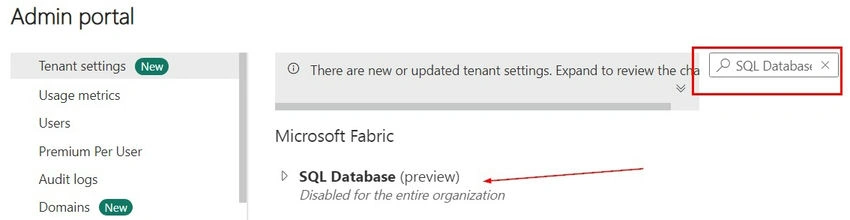
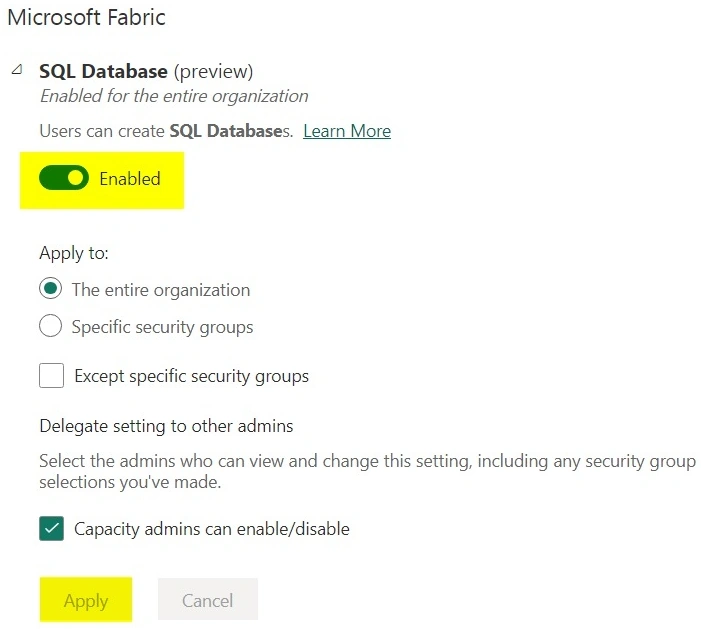
Once enabled go to the workspace where you want the database to be created.
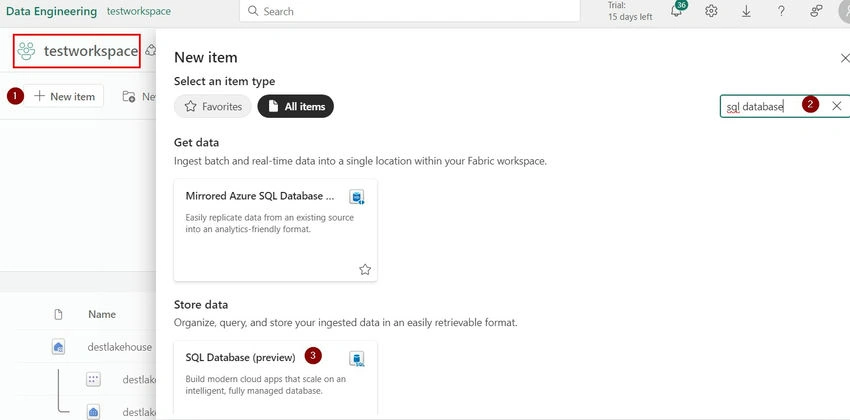
Create and configure the SQL Database
The SQL database is now ready to store data, enabling transactional and analytical operations.
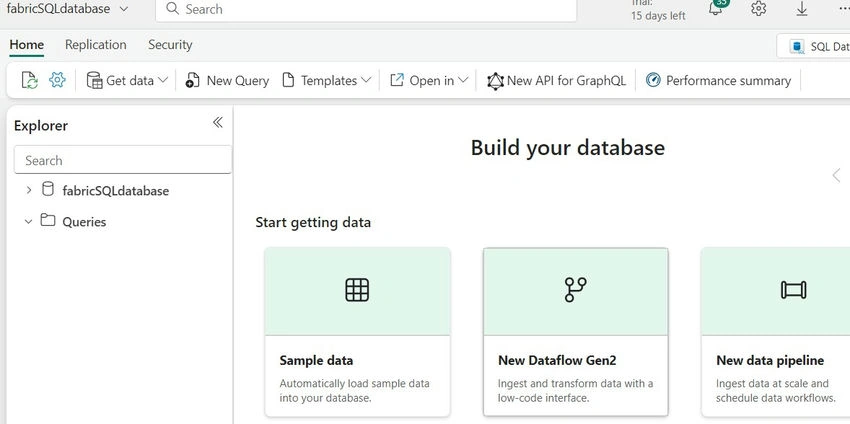
Loading Data into Fabric SQL Databases
Fabric supports two primary methods for populating SQL databases: Dataflows and Copy Jobs in pipelines.
Using Dataflows
Additionally, dataflows enable data ingestion and transformation using Power Query Online. We can check importing sample data into the database.
- Connect to a data source like SQL Server, Excel, Text, CSV, Sharepoint, etc. I am connecting to my Azure SQL database which I had already.
- Select the tables to import (‘BusinessData’ in this case).
- Configure the destination as the Fabric SQL database and initiate the data flow.
Using Copy Jobs (alternate option)
For straightforward data transfer, Copy Jobs are an excellent option.
- Select the source database and tables.
- Set the destination as the Fabric SQL database, authenticate, and run the job.
Exploring and Querying the SQL Database
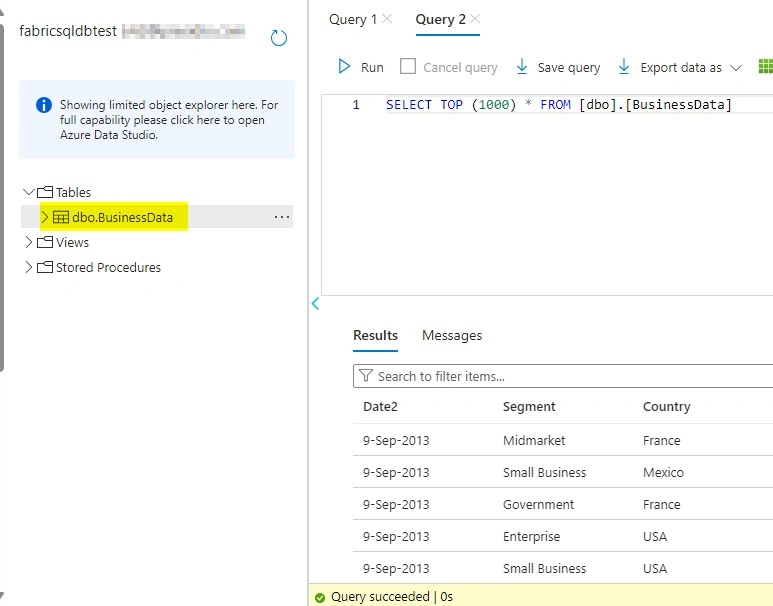
After loading data, you can interact with the database using Fabric’s query editor.
Exploration Tips
- Access the list of tables in the Tables section.
- Write and execute SQL queries (e.g., SELECT * FROM dbo.BussinessData).
- Create views, stored procedures, and functions for enhanced functionality.
Creating a View Example.
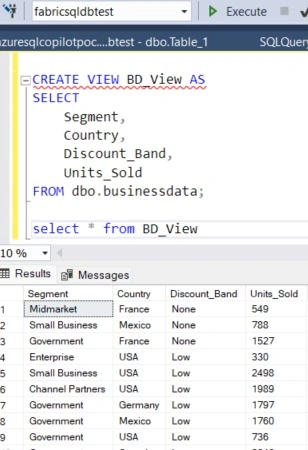
Integrating Development Tools
Fabric SQL databases integrate seamlessly with tools like Visual Studio Code and SQL Server Management Studio (SSMS).
Using Visual Studio Code
- Connect via the Fabric interface to browse tables and run queries.
- Install necessary extensions for enhanced development.
Using SSMS
- Copy the Fabric database’s connection string.
- Authenticate using Azure Active Directory credentials.
- Perform advanced database management tasks.
Conclusion
The integration of SQL databases into Microsoft Fabric represents a significant leap in data platform capabilities. By uniting transactional and analytical operations, Fabric simplifies workflows and enhances scalability. Whether you’re managing data, running queries, or leveraging development tools, this feature empowers organizations to build efficient and collaborative data solutions.
References: Official Microsoft Documentation and Ignite release news.


Join the conversation! Your thoughts help the community grow.