

We can have any type of column in a Grid View by using a Template column like Link, Drop Down, Radio button and check box list. So how to export all those into a PDF file? We will learn how to do that here.
I got a business requirement to design a form as in the following and export this into a PDF.
The following is my SQL Server Table in Design mode: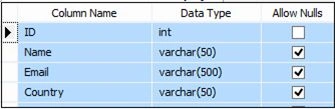
Script of my table
- CREATE TABLE [dbo].[Employee]
- (
- [ID] [int] IDENTITY(1, 1) NOT NULL,
- [Name] [varchar](50) NULL,
- [Email] [varchar](500) NULL,
- [Country] [varchar](50) NULL
- ) ON [PRIMARY] GO
Here, to export the Grid View Data to a PDF we need to add a reference of iTextSharp as in the following: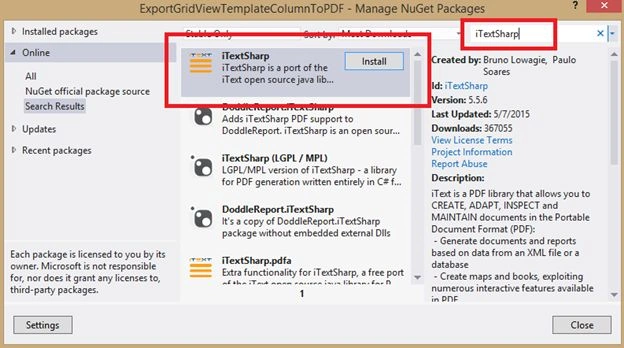
aspx code
Now the following is my aspx code:
- <%@ Page Language="C#" AutoEventWireup="true" CodeBehind="Default.aspx.cs" Inherits="ExportGridViewTemplateColumnToPDF.Default" %>
- <!DOCTYPE html>
- <html
- xmlns="http://www.w3.org/1999/xhtml">
- <head runat="server">
- <title>Export Grid View Template Column (Link, Drop Down List, Radio Button, Check Box List) To PDF</title>
- </head>
- <body>
- <form id="form1" runat="server">
- <div>
- <asp:GridView ID="GridView1" HeaderStyle-BackColor="#666666" HeaderStyle-ForeColor="White" Font-Names="Verdana"
- RowStyle-BackColor="#E4E4E4" runat="server" AutoGenerateColumns="False" CellPadding="4" ForeColor="#333333" GridLines="None">
- <AlternatingRowStyle BackColor="White" ForeColor="#284775" Font-Names="Verdana" />
- <Columns>
- <asp:BoundField DataField="Id" HeaderText="Id" ItemStyle-Width="30px">
- <ItemStyle Width="30px"></ItemStyle>
- </asp:BoundField>
- <asp:TemplateField HeaderText="Name">
- <ItemTemplate>
- <asp:HyperLink ID="lnkName" runat="server" NavigateUrl="#" Text='<%# Eval("Name") %>'>
- </asp:HyperLink>
- </ItemTemplate>
- </asp:TemplateField>
- <asp:TemplateField HeaderText="Email">
- <ItemTemplate>
- <asp:TextBox ID="txtEmail" runat="server" Text='<%# Eval("Email") %>'>
- </asp:TextBox>
- </ItemTemplate>
- </asp:TemplateField>
- <asp:TemplateField HeaderText="Country">
- <ItemTemplate>
- <asp:TextBox ID="txtCountry" runat="server" Text='<%# Eval("Country") %>'>
- </asp:TextBox>
- </ItemTemplate>
- </asp:TemplateField>
- <asp:TemplateField HeaderText="Reporting Manager">
- <ItemTemplate>
- <asp:DropDownList ID="ddlManager" runat="server">
- <asp:ListItem Text="Shambhu Sharma" Value="Shambhu Sharma" />
- <asp:ListItem Text="Amol Malhotra" Value="Amol Malhotra" />
- <asp:ListItem Text="Manu Khanna" Value="Manu Khanna" />
- </asp:DropDownList>
- </ItemTemplate>
- </asp:TemplateField>
- <asp:TemplateField HeaderText="Designation" ItemStyle-ForeColor="Red" ItemStyle-Font-Size="10pt">
- <ItemTemplate>
- <asp:CheckBoxList ID="chkDesignation" runat="server" RepeatColumns="3" RepeatDirection="Horizontal">
- <asp:ListItem Text="Softwate Developer" Value="Softwate Developer" Selected="True" />
- <asp:ListItem Text="Technical Analyst" Value="Technical Analyst" />
- <asp:ListItem Text="Consultant" Value="Consultant" />
- <asp:ListItem Text="Solution Architect" Value="Solution Architect" />
- <asp:ListItem Text="Project Manager" Value="Project Manager" />
- </asp:CheckBoxList>
- </ItemTemplate>
- </asp:TemplateField>
- <asp:TemplateField HeaderText="Experience" ItemStyle-ForeColor="Blue" ItemStyle-Font-Size="10pt">
- <ItemTemplate>
- <asp:RadioButtonList ID="rblExperience" runat="server" RepeatColumns="2" RepeatDirection="Horizontal">
- <asp:ListItem Text="1-2 Years" Value="1-2 Years" Selected="True" />
- <asp:ListItem Text="2-4 Years" Value="2-4 Years" />
- <asp:ListItem Text="4-6 Years" Value="4-6 Years" />
- <asp:ListItem Text="10+ Years" Value="10+ Years" />
- </asp:RadioButtonList>
- </ItemTemplate>
- </asp:TemplateField>
- </Columns>
- <EditRowStyle BackColor="#999999" />
- <FooterStyle BackColor="#5D7B9D" Font-Bold="True" ForeColor="White" />
- <HeaderStyle BackColor="#5D7B9D" ForeColor="White" Font-Bold="True"></HeaderStyle>
- <PagerStyle BackColor="#284775" ForeColor="White" HorizontalAlign="Center" />
- <RowStyle BackColor="#F7F6F3" ForeColor="#333333"></RowStyle>
- <SelectedRowStyle BackColor="#E2DED6" Font-Bold="True" ForeColor="#333333" />
- <SortedAscendingCellStyle BackColor="#E9E7E2" />
- <SortedAscendingHeaderStyle BackColor="#506C8C" />
- <SortedDescendingCellStyle BackColor="#FFFDF8" />
- <SortedDescendingHeaderStyle BackColor="#6F8DAE" />
- </asp:GridView>
- <br />
- <asp:Button ID="btnGridViewExport" runat="server" Text="Export To PDF" OnClick="btnGridViewExport_ExportToPDF" />
- </div>
- </form>
- </body>
- </html>
aspx.cs code
Now my aspx.cs code is:
- using System;
- using System.Collections.Generic;
- using System.Linq;
- using System.Web;
- using System.Web.UI;
- using System.Web.UI.WebControls;
- using System.IO;
- using System.Data;
- using iTextSharp.text.pdf;
- using iTextSharp.text.html.simpleparser;
- using System.Configuration;
- using System.Data.SqlClient;
- namespace ExportGridViewTemplateColumnToPDF {
- public partial class Default: System.Web.UI.Page {
- protected void Page_Load(object sender, EventArgs e) {
- if (!this.IsPostBack) {
- BindEmployees();
- }
- }
- private void BindEmployees() {
- string constr = ConfigurationManager.ConnectionStrings["RConnection"].ConnectionString;
- using(SqlConnection con = new SqlConnection(constr)) {
- using(SqlCommand cmd = new SqlCommand("SELECT * FROM Employee ORDER BY ID")) {
- using(SqlDataAdapter da = new SqlDataAdapter()) {
- DataTable dt = new DataTable();
- cmd.CommandType = CommandType.Text;
- cmd.Connection = con;
- da.SelectCommand = cmd;
- da.Fill(dt);
- GridView1.DataSource = dt;
- GridView1.DataBind();
- }
- }
- }
- }
- protected void btnGridViewExport_ExportToPDF(object sender, EventArgs e) {
- using(StringWriter sw = new StringWriter()) {
- HtmlTextWriter hw = new HtmlTextWriter(sw);
- foreach(TableCell cell in GridView1.HeaderRow.Cells) {
- cell.BackColor = GridView1.HeaderStyle.BackColor;
- }
- foreach(GridViewRow row in GridView1.Rows) {
- foreach(TableCell cell in row.Cells) {
- cell.BackColor = GridView1.RowStyle.BackColor;
- List < Control > controls = new List < Control > ();
- //Add controls to be removed to Generic List
- foreach(Control control in cell.Controls) {
- controls.Add(control);
- }
- //Loop through the controls to be removed and replace then with Literal
- foreach(Control control in controls) {
- switch (control.GetType().Name) {
- case "HyperLink":
- cell.Controls.Add(new Literal {
- Text = (control as HyperLink).Text
- });
- break;
- case "TextBox":
- cell.Controls.Add(new Literal {
- Text = (control as TextBox).Text
- });
- break;
- case "LinkButton":
- cell.Controls.Add(new Literal {
- Text = (control as LinkButton).Text
- });
- break;
- case "DropDownList":
- cell.Controls.Add(new Literal {
- Text = (control as DropDownList).SelectedItem.Text
- });
- break;
- case "CheckBoxList":
- foreach(ListItem item in (control as CheckBoxList).Items) {
- if (item.Selected) {
- cell.Controls.Add(new Literal {
- Text = item.Text + " "
- });
- }
- }
- break;
- case "RadioButtonList":
- cell.Controls.Add(new Literal {
- Text = (control as RadioButtonList).SelectedItem.Text
- });
- break;
- }
- cell.Controls.Remove(control);
- }
- }
- }
- GridView1.RenderControl(hw);
- StringReader sr = new StringReader(sw.ToString());
- iTextSharp.text.Document pdfDoc = new iTextSharp.text.Document(iTextSharp.text.PageSize.A4, 10f, 10f, 10f, 0f);
- HTMLWorker htmlparser = new HTMLWorker(pdfDoc);
- PdfWriter.GetInstance(pdfDoc, Response.OutputStream);
- pdfDoc.Open();
- htmlparser.Parse(sr);
- pdfDoc.Close();
- Response.ContentType = "application/pdf";
- Response.AddHeader("content-disposition", "attachment;filename=GridViewExport.pdf");
- Response.Cache.SetCacheability(HttpCacheability.NoCache);
- Response.Write(pdfDoc);
- Response.End();
- }
- }
- public override void VerifyRenderingInServerForm(Control control) {
- /* Verifies that the control is rendered */
- }
- }
- }
web.config file
The following is my web.config file where I define my connection string:
- <?xml version="1.0"?>
- <!--
- For more information on how to configure your ASP.NET application, please visit
- http://go.microsoft.com/fwlink/?LinkId=169433
- -->
- <configuration>
- <system.web>
- <compilation debug="true" targetFramework="4.5" />
- <httpRuntime targetFramework="4.5" />
- </system.web>
- <connectionStrings>
- <add name="RConnection" connectionString="Server=INDIA\MSSQLServer2k8;database=TestDB;UID=sa; pwd=india;"/>
- </connectionStrings>
- </configuration>
Test
Now run the application.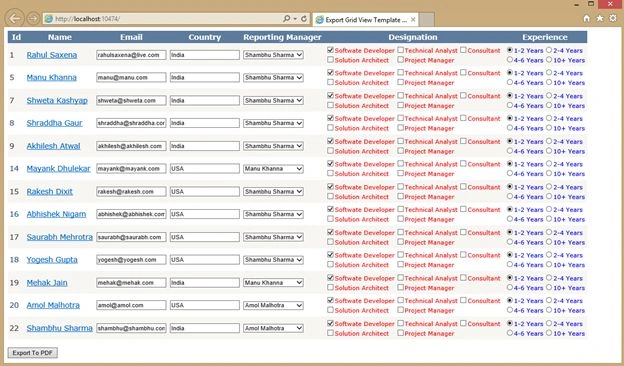
Now you can change the value from Drop Down List, Radio Button or Check Box List as in the following: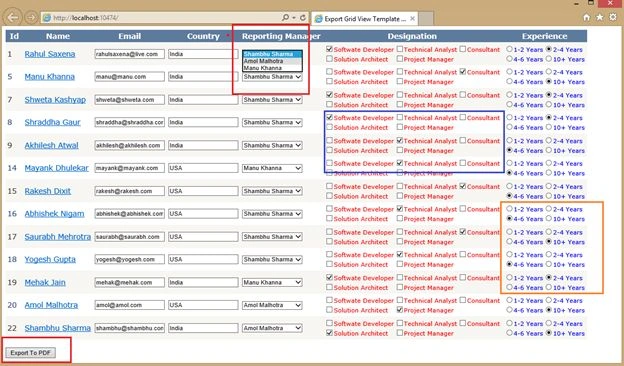
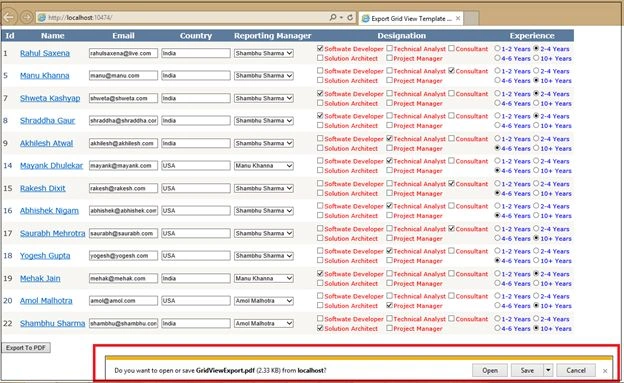
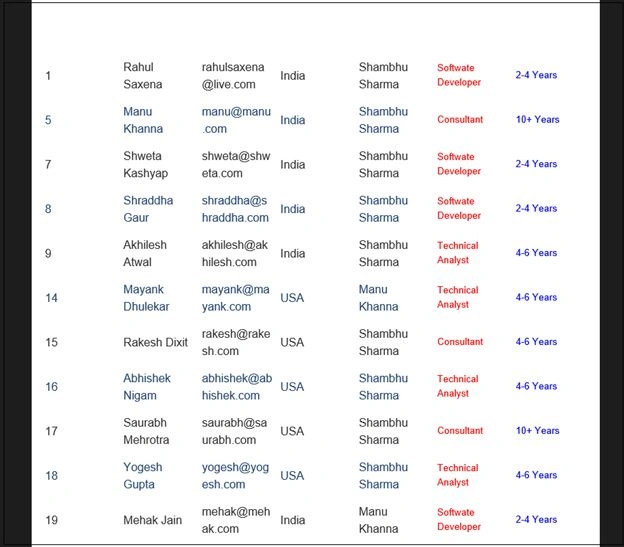
You can make change in your from and do the export again as in the following: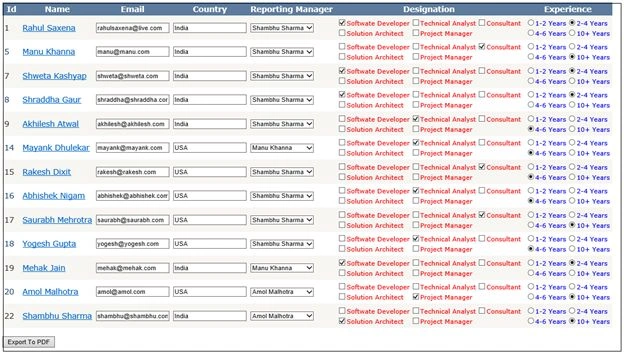
Rahul Kumar SaxenaPosted May 22, 2015, 2:42 AM
Thanks Santhakumar Munuswamy
Santhakumar MunuswamyPosted May 21, 2015, 3:13 PM
Thanks for good work
Rahul Kumar SaxenaPosted May 21, 2015, 7:58 AM
Thanks Amal Salah...
Amal SalahPosted May 21, 2015, 5:36 AM
thanks it seems wonderful i will try it