

A good way to display data is to show it in a GridView. However, it becomes difficult to manipulate and filter large amounts of data in this way. Exporting data to an Excel file is a great solution for handling large amounts of data because Excel has many features -- such as sorting, searching, and filtering.
The following step does this.
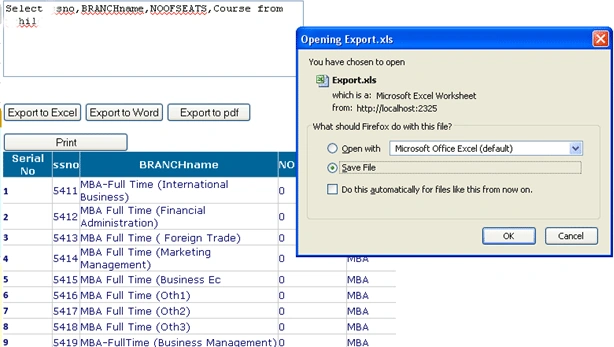
Using the code
This sample uses ASP.NET 2.0, C#, and SQL Server 2000. I am using a simple form & database for fast data retrieval. First, we pull data from a database and display it in the grid, and then we export the data from the grid to the Excel file.
That's the process to handle large amounts of data and combat various errors.
<div id="divprint">
On an aspx page, create a div tag with the id divPrint, then copy & paste your GridView source code, then close the div tag with </div>.
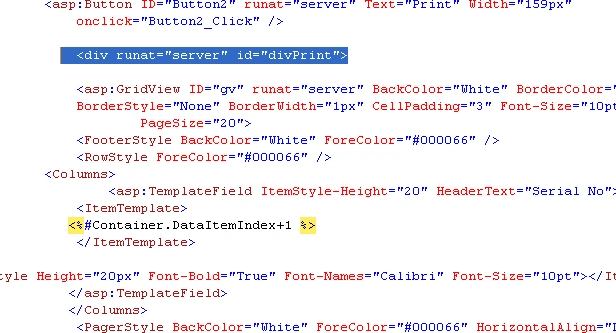
On .aspx page
First, add control Labels, Text Box, GridView, and Button. In the Go button, write the code to fill the GridView by calling the Fillgrid() function. In a TextBox, pass a query to the Go button. Click event, then Gridview Fill.

using System;
using System.Collections;
using System.Configuration;
using System.Data;
using System.Linq;
using System.Web;
using System.Web.Security;
using System.Web.UI;
using System.Web.UI.HtmlControls;
using System.Web.UI.WebControls;
using System.Web.UI.WebControls.WebParts;
using System.Xml.Linq;
using System.Data.SqlClient;
using System.Globalization;
using System.Text;
using System.IO;
using iTextSharp.text;
using iTextSharp.text.pdf;
using iTextSharp.text.html;
Fillgrid function code
public void fillGrid()
{
    string constr1;
    IFormatProvider culture = new CultureInfo("fr-FR", true);

    constr1 = ConfigurationManager.ConnectionStrings["constr"].ConnectionString;
    con = new SqlConnection(constr1);
    con.Open();

    cmd = new SqlCommand(TextBox1.Text, con);
    adp = new SqlDataAdapter(cmd);
    ds = new DataSet();
    adp.Fill(ds);

    gv.DataSource = ds;
    gv.DataBind();

    con.Close();
}
On the .aspx page in Page_Load Event.
On the page load event, write this code and set the Button.Attributes["onclick"].
Button2.Attributes["onclick"] = "javascript:CallPrint('divPrint');";
On Export Button
On the export button, write this code & generate a Save As popup box.
string attachment = "attachment; filename=Export.xls";
Response.ClearContent();
Response.AddHeader("content-disposition", attachment);
Response.ContentType = "application/ms-excel";

StringWriter sw = new StringWriter();
HtmlTextWriter htw = new HtmlTextWriter(sw);

// Create a form to contain the grid
HtmlForm frm = new HtmlForm();
gv.Parent.Controls.Add(frm);
frm.Attributes["runat"] = "server";
frm.Controls.Add(gv);
frm.RenderControl(htw);

// GridView1.RenderControl(htw);
Response.Write(sw.ToString());
Response.End();
After doing this, your GridView data can be exported to the Excel file Export.xls.
Conclusion
This article showed how to pull data from a database and show it in the GridView control. We have learned how to export data from GridView to an Excel file. I hope that this code helps you. Feel free to give me any suggestions regarding this article.
Happy coding!
Vishal PatelPosted Mar 1, 2018, 1:59 AM
Very Good ...... :)
Former memberPosted Sep 30, 2012, 1:13 PM
This is really nice article http://www.dotnetpools.com/Article/ArticleDetiail/?articleId=22&title=Gridview%20Export%20To%20Excel%20In%20Asp.Net%20C#
peterjp jpPosted Jun 13, 2012, 2:55 AM
thank u very much sir, its working
jan derPosted Jul 22, 2011, 6:30 AM
sir, I would like to ask help in export large amount of data. It about 650000 rows which result of query from database and display to datagrid. My problem is during export the data from datagrid to excel which usually cause hang-up or system.outofmemory. what are the possible thing to do to address this errors. or there another way to export large amount of data to excel? thanks for the help.
padma yeddulaPosted Jul 4, 2011, 1:36 AM
how to export dataset tables (large data i.e appr 2-3lak rows) to excel 2007 format(i.e xlsx file) for windows application using c# coding
Bhushan TaydePosted Apr 29, 2011, 1:31 AM
sir i have try many times to generate unique registration no in aspform but i hv lot problems pls tell how can i try to write code pls sir
Suthish NairPosted Apr 9, 2011, 4:35 AM
Prabhakar, Am not blaming you. You are using callprint method. There is no such method exists in your code. If you are saying callprint method used to print a gridview then you need to show/share that JavaScript method in your sample also. Another thing "gv.Parent.Controls.Add(frm);" Your GridView is already in a Form, then why adding it again. You can rewrite the code as above. Check (Add your contents and source code to this article) section, just below Comment Request.
Abhimanyu K VatsaPosted Apr 8, 2011, 10:06 AM
Hi buddy Nice work, but lot of things are not discussed like writing word & pdf. I'm ur regular article reader...keep it up
Suthish NairPosted Apr 7, 2011, 3:57 PM
What the use of method CallPrint here?
Former memberPosted Apr 7, 2011, 6:48 AM
Thanks for sahring , but as a reader I would be looking for more explanation of codes you are using ... Thanks
Shirsendu NandiPosted Apr 7, 2011, 2:20 AM
Nice article..very good