

Once I came across a simple requirement from a site admin where he wants to export all users from various SharePoint groups to Excel sheet. In this case, number of users are in hundreds and admin wants to send these details for audit purpose.
We have export to excel functionality in SharePoint lists, but unfortunately this is not available in user information lists or SharePoint Groups. So we came up with a simple solution to export SharePoint Group users into excel using OData & REST. In this article, I explained how to achieve this.
Prerequisites:
- SharePoint 2013 On-prem or O365 site, where you have sufficient permissions to perform REST query.
- MS Excel 2013, where you already signed-in with your domain account (for On-prem) or O365 account.

Steps to export data from SharePoint to Excel
- Open Excel 2013.
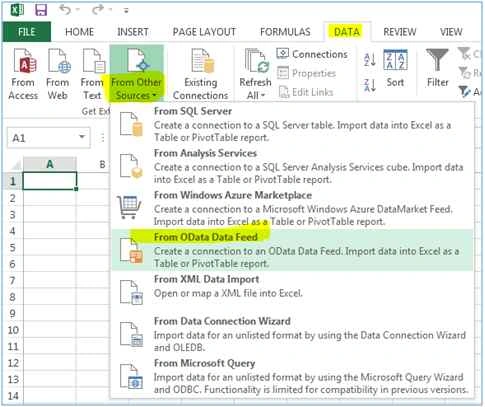
- Go to ribbon, select DATA and select From Other Sources, and click on From OData Data Feed.
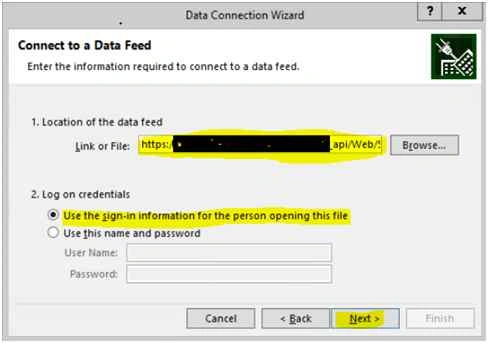
- In ‘Data Connection Wizard’ form, provide appropriate REST link (see table above) and click on Next.
REST Link format to get SPGroup users:
https://<Your SP2013 Site>/_api/Web/SiteGroups/getbyname('<Group Name')/Users
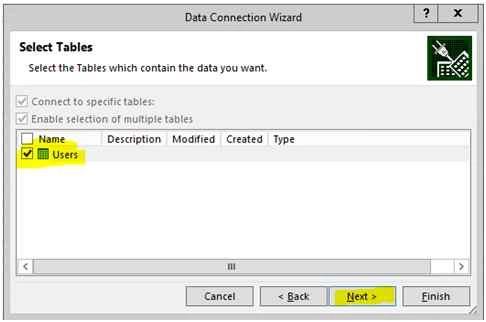
- In Next form, select ‘Users’ table and click Next.
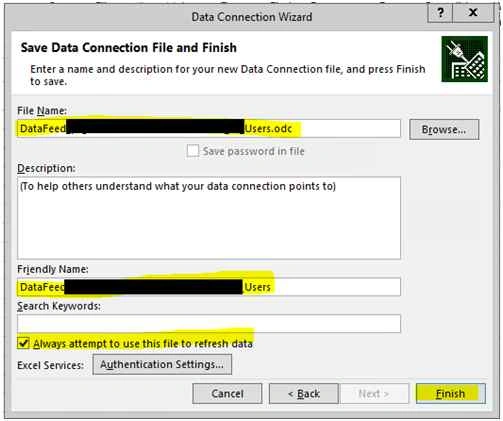
- In next form provide an appropriate data connection file name & friendly name (Note: this is not excel file name), check ‘Always attempt to use this file to refresh data’ and click Finish.
- In last form, ensure that ‘Table’ is selected. Select worksheet (by default its existing worksheet which is open) and click OK.

- Users of that group will be exported to the excel sheet.
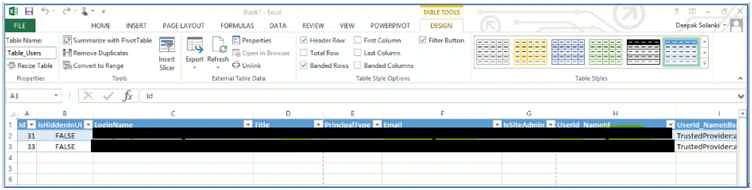
Note: We can use same steps to get data from SharePoint lists into Excel with OData Data feed and REST API by providing a valid REST query in step #3.
Glenn CoolongPosted Dec 29, 2018, 12:32 PM
This is great, but how can I modify it to get other information from the list, such as Department, Office, phone, etc.? Using Sharepoint Online.
Brendan MurphyPosted Oct 6, 2018, 11:05 AM
When I try to create the connection I receive the following error. "The request was aborted: Could not create SSL/TLS secure channel." Any idea how to resolve?
Rathrola Prem KumarPosted May 3, 2017, 9:32 PM
Is there any that to keep trigger this process daily?
Deepak SolankiPosted Nov 4, 2015, 1:45 AM
Thanks, i hope this is useful.
Harshad PansuriyaPosted Oct 30, 2015, 1:51 AM
Nice one
Mohammed IbrahimPosted Oct 28, 2015, 9:22 AM
nice
Sibeesh VenuPosted Oct 28, 2015, 7:28 AM
Nice Share
Nilesh JadavPosted Oct 27, 2015, 9:50 PM
Nice Share sir !