Table of Contents
Introduction
What Is Dominant Color Extraction?
Real-World Scenario: Real-Time Brand Compliance Monitoring in Retail Stores
Step-by-Step Implementation from Scratch
Complete Code with Test Cases
Performance Tips and Best Practices
Conclusion
Introduction
Ever wondered how apps like Pinterest or Adobe Color identify the “main” colors in a photo? The secret lies in k-means clustering—a simple yet powerful unsupervised learning technique that groups similar pixels together to reveal an image’s dominant palette.
While libraries like scikit-learn make this easy, implementing it from scratch in pure NumPy gives you full control, deeper insight, and the ability to deploy in environments where external dependencies are restricted—like retail edge devices or secure brand-monitoring systems.
In this guide, we’ll build a lightweight, dependency-free dominant color extractor and apply it to a high-stakes real-world use case transforming retail today.
What Is Dominant Color Extraction?
Dominant color extraction reduces an image’s millions of colors to a small set (e.g., 3–5) that best represent its visual essence. Using k-means clustering in RGB space, we:
Treat each pixel as a 3D point (R, G, B)
Group pixels into k clusters
Use each cluster’s centroid as a dominant color
The result? A compact color palette that captures the image’s mood, branding, or material composition—perfect for design, analytics, or compliance.
Real-World Scenario: Real-Time Brand Compliance Monitoring in Retail Stores
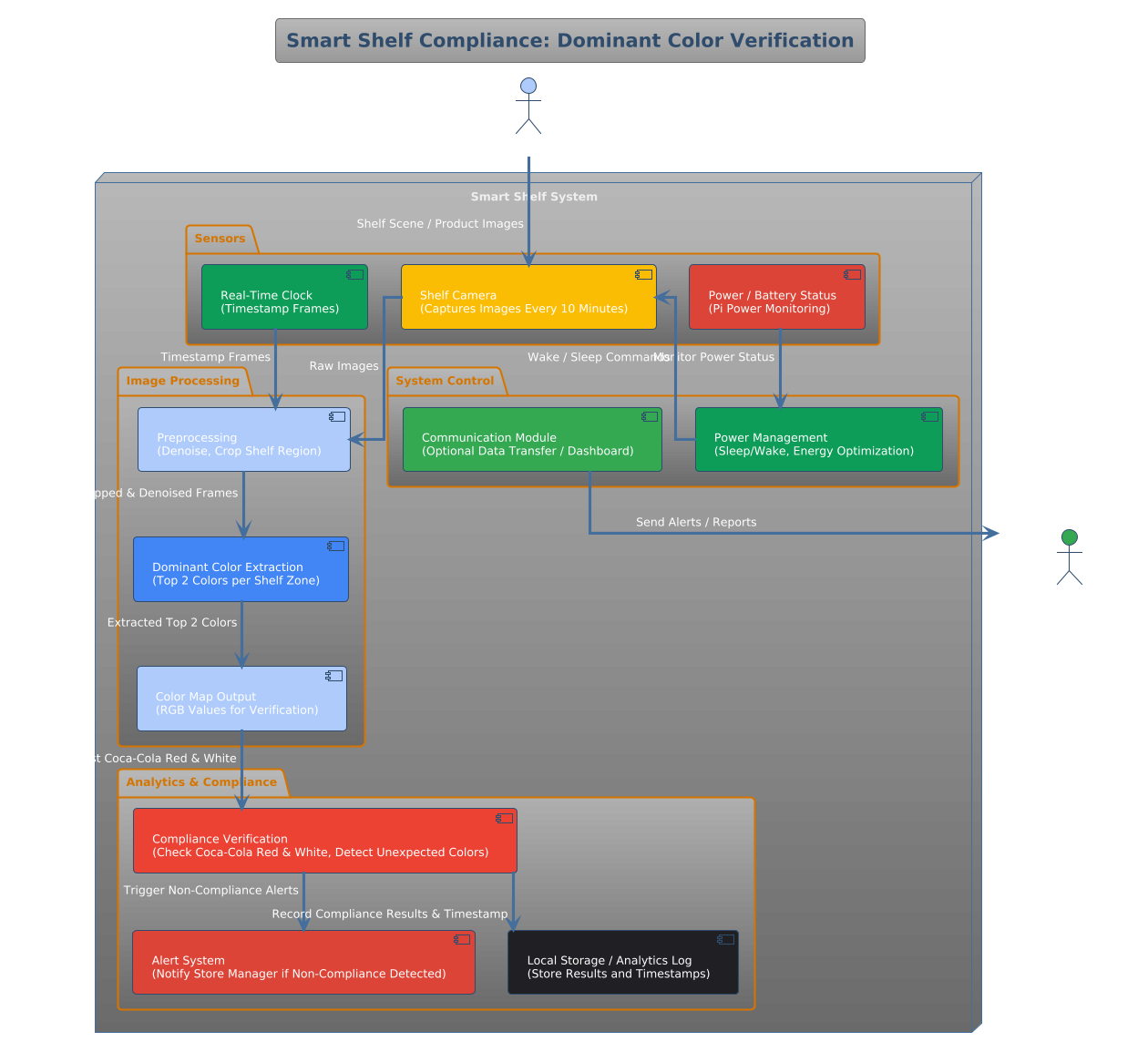
Picture a smart shelf camera in a Walmart aisle, scanning product displays every 10 minutes. A beverage brand like Coca-Cola pays premium shelf space—but requires strict visual compliance: only red-and-white packaging in designated zones.
If a competitor’s green bottle sneaks in, or a faded label appears, the brand loses impact. Manual audits are slow and expensive.
By running dominant color extraction on each shelf image, the system instantly verifies:
This real-time color audit runs on a $35 Raspberry Pi at the store edge—no cloud, no internet, no scikit-learn. Companies like Trax and AiFi already deploy similar systems globally. A pure-NumPy implementation ensures reliability, speed, and zero licensing overhead.
Step-by-Step Implementation from Scratch
We’ll implement k-means clustering for dominant colors using only numpy:
Reshape image into a list of RGB pixels
Initialize k random centroids
Iteratively assign pixels to nearest centroid and update centroids
Return top k dominant colors (centroids)
No scikit-learn. No OpenCV. Just clean, auditable math.
Complete Code with Test Cases
import numpy as np
import unittest

def extract_dominant_colors(image: np.ndarray, k: int = 3, max_iters: int = 50, seed: int = 42) -> np.ndarray:
    """
    Extract dominant colors from an image using k-means clustering.

    Args:
        image: 3D NumPy array of shape (H, W, 3) with dtype uint8 (RGB)
        k: Number of dominant colors to extract (must be ≥1)
        max_iters: Maximum iterations for k-means convergence
        seed: Random seed for reproducibility

    Returns:
        Array of shape (k, 3) with dominant colors in RGB (uint8)
    """
    if image.ndim != 3 or image.shape[2] != 3:
        raise ValueError("Input must be a 3D RGB image with shape (H, W, 3).")
    if k < 1:
        raise ValueError("k must be at least 1.")

    np.random.seed(seed)
    pixels = image.reshape(-1, 3).astype(np.float32)
    n_pixels = pixels.shape[0]

    # Initialize centroids randomly from pixel data
    centroids = pixels[np.random.choice(n_pixels, size=k, replace=False)]

    for _ in range(max_iters):
        # Compute distances from each pixel to each centroid
        distances = np.linalg.norm(pixels[:, np.newaxis] - centroids, axis=2)
        labels = np.argmin(distances, axis=1)

        # Update centroids
        new_centroids = np.array([
            pixels[labels == i].mean(axis=0) if np.any(labels == i) else centroids[i]
            for i in range(k)
        ])

        # Check for convergence
        if np.allclose(centroids, new_centroids, atol=1e-4):
            break
        centroids = new_centroids

    return np.clip(centroids, 0, 255).astype(np.uint8)


class TestDominantColors(unittest.TestCase):

    def test_single_color_image(self):
        img = np.full((10, 10, 3), [255, 0, 0], dtype=np.uint8)
        colors = extract_dominant_colors(img, k=1)
        np.testing.assert_array_equal(colors[0], [255, 0, 0])

    def test_two_color_image(self):
        img = np.zeros((20, 20, 3), dtype=np.uint8)
        img[:10, :] = [255, 0, 0]    # Red top half
        img[10:, :] = [0, 255, 0]    # Green bottom half
        colors = extract_dominant_colors(img, k=2)
        # Should contain red and green (order may vary)
        color_set = {tuple(c) for c in colors}
        self.assertIn((255, 0, 0), color_set)
        self.assertIn((0, 255, 0), color_set)

    def test_invalid_input(self):
        gray = np.random.randint(0, 256, (10, 10), dtype=np.uint8)
        with self.assertRaises(ValueError):
            extract_dominant_colors(gray, k=2)

    def test_k_too_small(self):
        img = np.random.randint(0, 256, (5, 5, 3), dtype=np.uint8)
        with self.assertRaises(ValueError):
            extract_dominant_colors(img, k=0)


if __name__ == "__main__":
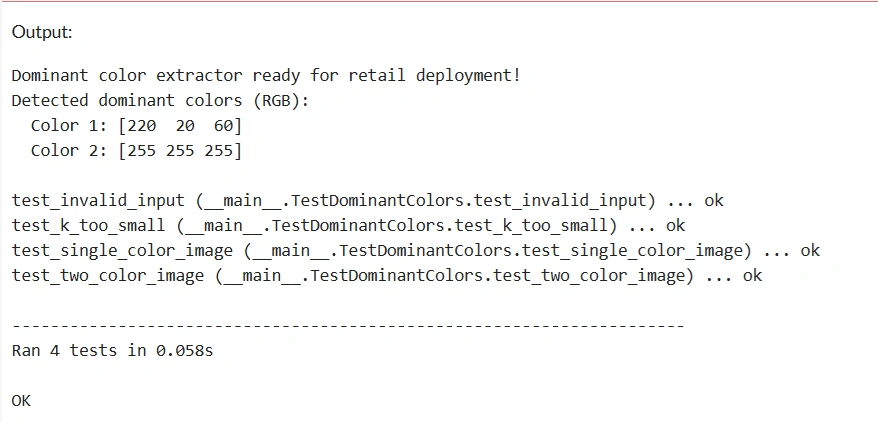
    unittest.main(argv=[''], exit=False, verbosity=2)

    print("\n Dominant color extractor ready for retail deployment!")
    demo_img = np.zeros((100, 100, 3), dtype=np.uint8)
    demo_img[:, :50] = [220, 20, 60]   # Crimson
    demo_img[:, 50:] = [255, 255, 255] # White
    palette = extract_dominant_colors(demo_img, k=2)
    print("Detected dominant colors (RGB):")
    for i, color in enumerate(palette, 1):
        print(f"  Color {i}: {color}")
Performance Tips and Best Practices
Downsample large images (e.g., 100×100) to speed up clustering
Use k=3 to k=5 for most real-world applications
Seed the RNG for consistent results in production
Prefer RGB over HSV unless you need perceptual uniformity
Cache results for static product images in retail audits
Conclusion
Dominant color extraction isn’t just for design tools—it’s a stealth weapon in retail automation, brand protection, and visual compliance. By implementing k-means from scratch, you gain a lightweight, transparent, and dependency-free module that runs on the edge, respects privacy, and delivers instant insights. With under 30 lines of pure NumPy, you now have a production-ready color analyzer that can verify brand presence in a store aisle, detect counterfeit goods, or power a fashion recommendation engine—no cloud required.


Join the conversation! Your thoughts help the community grow.