

Abstract
This guide shows how to build a production-ready AI backend using FastAPI and Large Language Models (LLMs). You’ll learn how to design APIs that handle AI prompts, integrate with providers like OpenAI or Mistral, manage performance with caching and streaming, and deploy on scalable infrastructure.
The article focuses on intermediate-level developers familiar with Python and REST APIs who want to move beyond playground experimentation to deploy AI features in real-world applications.
Conceptual Background
FastAPI is a high-performance Python web framework built on Starlette and Pydantic. It’s asynchronous, type-safe, and ideal for modern AI applications requiring low latency and concurrent requests.
LLMs (Large Language Models) are transformer-based neural networks trained to generate human-like text. Developers access them via APIs—examples include OpenAI GPT-4, Anthropic Claude, Mistral, and Cohere.
Combining both technologies enables:
Dynamic AI endpoints (chat, summarization, code generation)
Model-agnostic backends (switching between providers)
Integration with RAG (Retrieval-Augmented Generation) pipelines
Architecture Overview
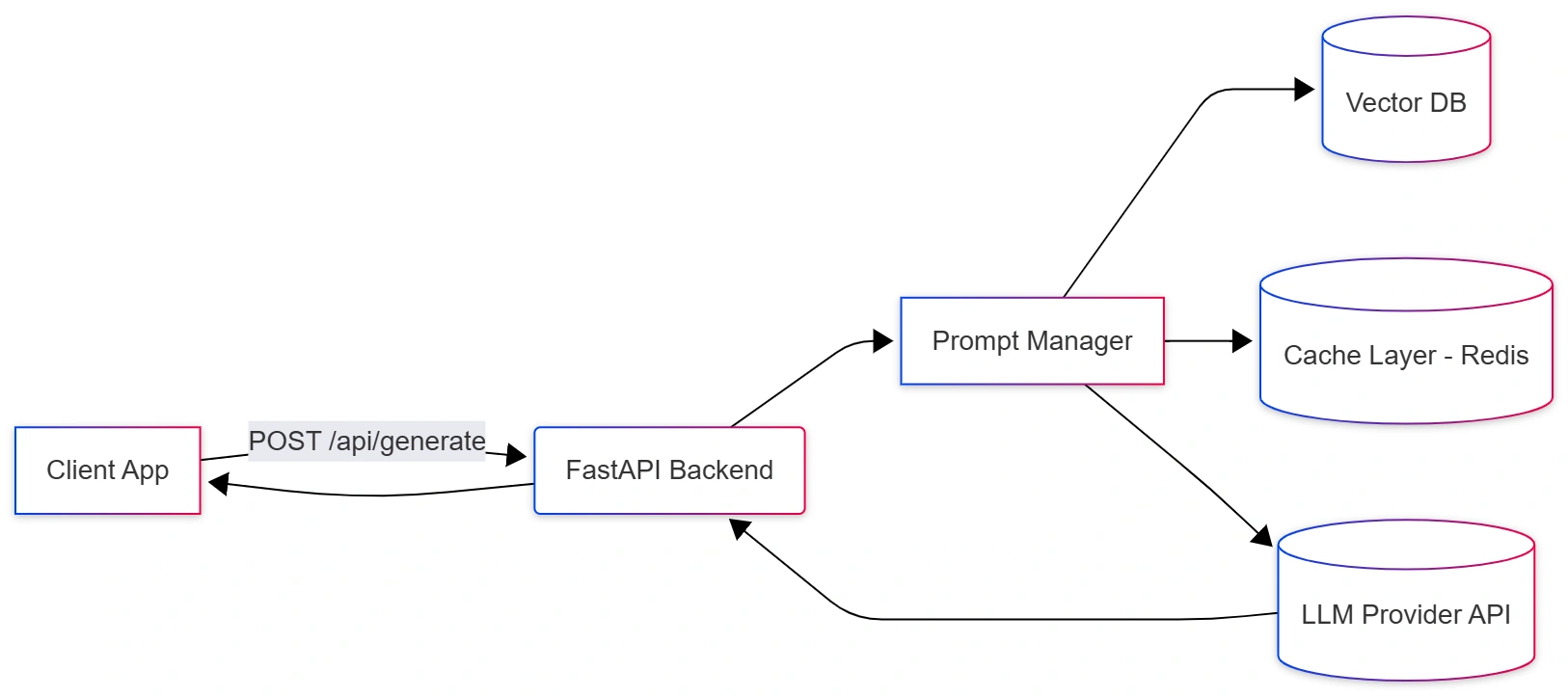
Step-by-Step Walkthrough
1. Setup Your Environment
pip install fastapi uvicorn httpx pydantic openai redis langchainAdd environment variables in .env:
OPENAI_API_KEY=YOUR_API_KEY
REDIS_URL=redis://localhost:6379
2. Create a FastAPI App
# main.py
from fastapi import FastAPI, HTTPException
from pydantic import BaseModel
import httpx, os

app = FastAPI(title="FastAPI + LLM Backend")

class PromptRequest(BaseModel):
    prompt: str
    model: str = "gpt-4o-mini"

@app.post("/generate")
async def generate_text(request: PromptRequest):
    async with httpx.AsyncClient() as client:
        try:
            response = await client.post(
                "https://api.openai.com/v1/chat/completions",
                headers={
                    "Authorization": f"Bearer {os.getenv('OPENAI_API_KEY')}"
                },
                json={
                    "model": request.model,
                    "messages": [{"role": "user", "content": request.prompt}],
                    "temperature": 0.7
                }
            )
            data = response.json()
            return {"output": data["choices"][0]["message"]["content"]}
        except Exception as e:
            raise HTTPException(status_code=500, detail=str(e))
Run the app:
uvicorn main:app --reloadTest with:
curl -X POST http://127.0.0.1:8000/generate -H "Content-Type: application/json" \
  -d '{"prompt":"Write a haiku about FastAPI"}'
3. Add Redis Caching
LLM calls are expensive and slow. Cache frequent prompts.
import aioredis, hashlib, json

redis = aioredis.from_url(os.getenv("REDIS_URL"), decode_responses=True)

async def get_cached_response(prompt):
    key = hashlib.sha256(prompt.encode()).hexdigest()
    if (cached := await redis.get(key)):
        return json.loads(cached)
    return None

async def set_cache(prompt, data):
    key = hashlib.sha256(prompt.encode()).hexdigest()
    await redis.set(key, json.dumps(data), ex=3600)
Integrate in /generate:
cached = await get_cached_response(request.prompt)
if cached:
    return {"output": cached}

# else call API...
await set_cache(request.prompt, output)
4. Integrate a Vector Database for Context (RAG)
Use Chroma or Pinecone to inject relevant context before sending to the LLM.
Join the conversation! Your thoughts help the community grow.