

Introduction
Many times, we are required to upload a file with strongly-typed View and also, apply validation on uploading file using data annotation validators. In this article, I would like to share how we can upload a file and validate that file.
Description
The upload control in MVC checks the file extension as well as the limitation of file size. This validates the control before posting back to the Server side and shows the warning message to the end-user using JavaScript.
Steps to Build this Requirement
Step 1. First, create an MVC Empty Template project named “FileUploadValidation”.
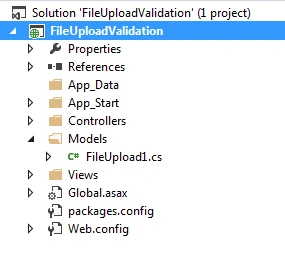
Step 2. Then, create a Model class file named “FileUpload1.cs”.
Code Ref
using System;
using System.Collections.Generic;
using System.Drawing;
using System.IO;
using System.Linq;
using System.Web;

namespace FileUploadValidation.Models
{
    public class FileUpload1
    {
        public string ErrorMessage { get; set; }
        public decimal filesize { get; set; }

        public string UploadUserFile(HttpPostedFileBase file)
        {
            try
            {
                var supportedTypes = new[] { "txt", "doc", "docx", "pdf", "xls", "xlsx" };
                var fileExt = System.IO.Path.GetExtension(file.FileName).Substring(1);
                if (!supportedTypes.Contains(fileExt))
                {
                    ErrorMessage = "File Extension Is InValid - Only Upload WORD/PDF/EXCEL/TXT File";
                    return ErrorMessage;
                }
                else if (file.ContentLength > (filesize * 1024))
                {
                    ErrorMessage = "File size Should Be UpTo " + filesize + "KB";
                    return ErrorMessage;
                }
                else
                {
                    ErrorMessage = "File Is Successfully Uploaded";
                    return ErrorMessage;
                }
            }
            catch (Exception ex)
            {
                ErrorMessage = "Upload Container Should Not Be Empty or Contact Admin";
                return ErrorMessage;
            }
        }
    }
}
Code Description
I have declared two variables with different data types.
public string ErrorMessage { get; set; }
public decimal filesize { get; set; }
The first one is used to show a warning message to the end-user if any fault happens during the upload of the file by the user.
The second one is to validate the file size if it exceeds.
public string UploadUserFile(HttpPostedFileBase file)
Then, I created one Definition, and inside, I passed one system-defined class object called “HttpPostedFileBase”. It serves as the base class for classes that provide access to individual files uploaded by clients.
Then, I mentioned some supported extensions. You can add any extension. If you want pdf file validation, then add pdf/doc/docx/xls/xlsx/txt/jpg/jpeg/png in variable supported Types.
var supportedTypes = ["jpg", "jpeg", "png"];

var supportedTypes = ["txt", "doc", "docx", "pdf", "xls", "xlsx"];
First, validate the image extensions like “jpg, jpeg, png” only. Second, validate the file extensions like “txt, doc, docx, pdf, xls,xlsx”
var fileExt = System.IO.Path.GetExtension(file.FileName).Substring(1);
This will fetch the extension of the posted file.
Here, the GetExtension method is used to get the extension of uploaded file that is file.FileName From the path of the system.
if (!supportedTypes.Contains(fileExt))
{
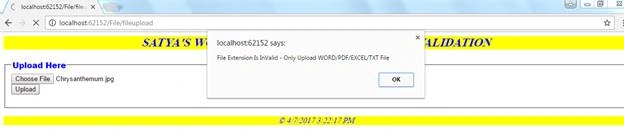
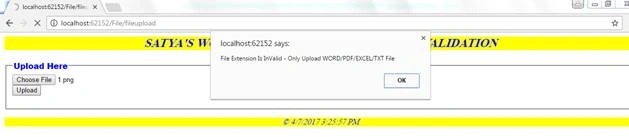
    ErrorMessage = "File Extension Is InValid - Only Upload WORD/PDF/EXCEL/TXT File";
    return ErrorMessage;
}
Here, whatever file is uploaded by the user, it can be checked as valid or not by this code.
if (!supportedTypes.Contains(fileExt))
If it satisfies, it is ok else the error message will be shown to the end user.
ErrorMessage = "File Extension Is InValid - Only Upload WORD/PDF/EXCEL/TXT File";
return ErrorMessage;
We will check for file size validation.
else if (file.ContentLength > (filesize * 1024))
{
    ErrorMessage = "File size Should Be UpTo " + filesize + "KB";
    return ErrorMessage;
}
Here, is the file.ContentLength gets the length of the file size in bytes.
Then, the filesize * 1024 is the required file size.
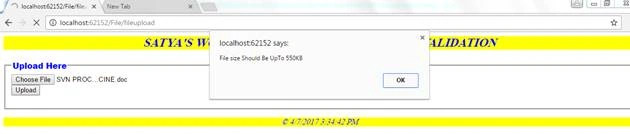
If file.ContentLength > filesize * 1024 value will exceed, then the warning message will be generated.
ErrorMessage = "File size Should Be UpTo " + filesize + "KB";
The filesize value is defined in the controller class file.
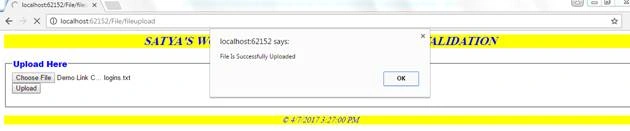
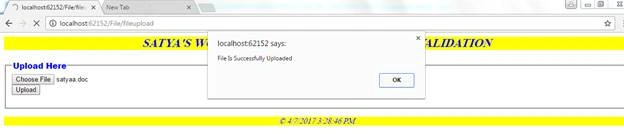
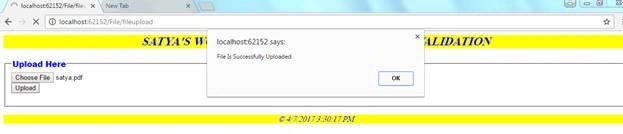
If all conditions are satisfied without any warning messages, then the successful message will come.
else
{
    ErrorMessage = "File Is Successfully Uploaded";
    return ErrorMessage;
}
All the above descriptions of code are in the Try {} block.
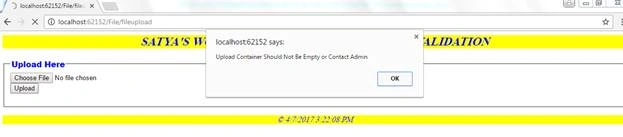
If any other warning and validation fail then the catch block will show the warning message. Like empty upload control and required extension file size more than average.
catch (Exception ex)
{
    ErrorMessage = "Upload Container Should Not Be Empty or Contact Admin";
    return ErrorMessage;
}

Step 3. Then, create a Controller class file named “FileController.cs”.
Code Ref
using System;
using System.Collections.Generic;
using System.Linq;
using System.Web;
using System.Web.Mvc;
using FileUploadValidation.Models;
using System.Web.UI.WebControls;

namespace FileUploadValidation.Controllers
{
    public class FileController : Controller
    {
        // GET: /File/

        public ActionResult Index()
        {
            return View();
        }
        public ActionResult fileupload()
        {
            return View();
        }
        [HttpPost]
        public ActionResult fileupload(HttpPostedFileBase file)
        {
            FileUpload1 fs = new FileUpload1();
            fs.filesize = 550;
            string us = fs.UploadUserFile(file);
            if (us != null)
            {
                ViewBag.ResultErrorMessage = fs.ErrorMessage;
            }
            return View();
        }
    }
}
Code Description
Here, I used the reference of the Model class file for future one.
using FileUploadValidation.Models;
Here, I used the Controller action method named “file upload”.One for [HttpGet] and another for [HttpPost] attributes.

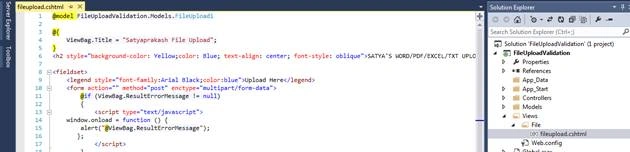
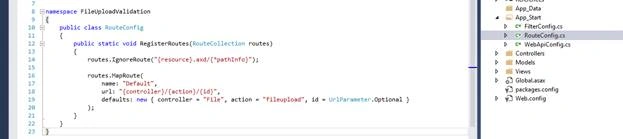
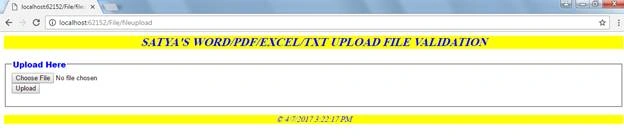


Mohsin KhanPosted Mar 21, 2018, 12:22 AM
I got really good article on validation with both side validation,interestingly he is using unobtrusive validation with adding plugin and taking leverage of server code as well with both side validation. hope you like it. https://code.msdn.microsoft.com/MVC-File-upload-unobtrusive-d0099c30
Mohsin KhanPosted Mar 20, 2018, 11:22 PM
Hi, Though it is a nice article, but the problem I can see here with server side validation, browser will upload file first and pass it to controller for validation . so for an instance if my file size is 400MB (an exception case but never know what could happen at client, agree we can handle this on web config ) and behavior would be like browser is uploading file 1%...2% and then call controller for validation.Is it possible to check on JS side ? this would be light weight and reduce one server call ? double side validation is also good though.Please share your thoughts on this.