

Today I am explaining what FILESTREAM is and how to use FILESTREAM in SQL server.
FILESTREAM is used for storing documents, images and any other binary objects in SQL database. Before FILESTREAM feature was released in SQL, for storing images in the database we had two options. The first was to store image bytes in varbinary data type and the second was to store image to any location in Windows file system and then store its path in in database table.
Both option have some disadvantages. The first option slows down the system performance and the second option has security issues, because in the second option anyone can see and access your images which are stored in you computer.
From SQL server 2008 FILESTREAM option is available. FILESTREAM is not a data type, it's an attribute of varbinary data type. FILESTREAM allows you to store the large size object in windows file system. Using FILESTREAM you can store any size of object; there is no size limit and you can store files as large as your hard drive size.
FILESTEAM feature is not available in default of SQL server installation. If you want to use FILESTREAM then you have to enable it in SQL server instance.
For enabling the FILESTREAM feature you have 2 options.
- At the time of installation of SQL server you have to select the option for enabling this FILESTREAM feature
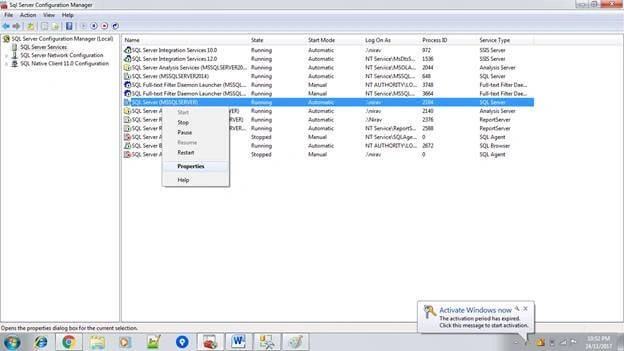
- You can enable it after installation using SQL server configuration manager as shown in the below image.
For enabling FILESTREAM feature after installation in SQL server follow the below steps.
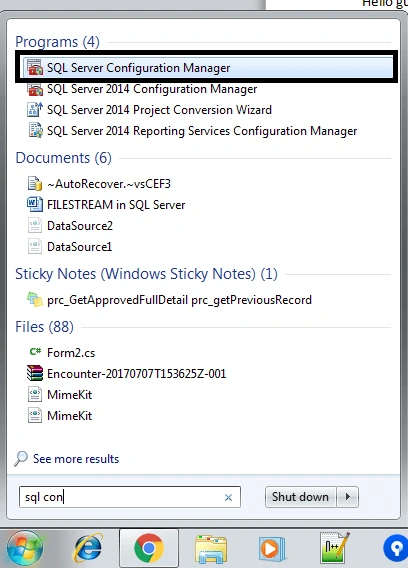
- Open the SQL Server Configuration Manager from start menu.
- Select SQL services on left panel and then select your SQL server from right panel and right click on it and go to properties menu.
- In property window Go to “FILESTREAM” tab.
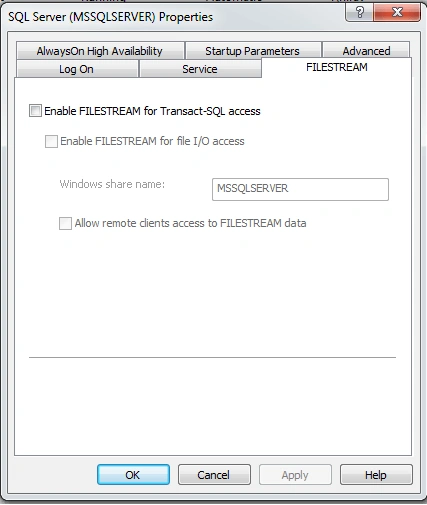
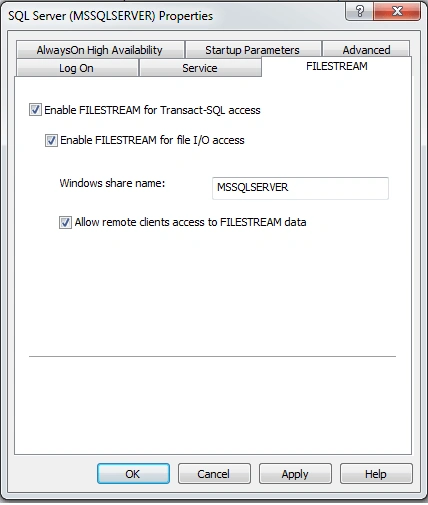
- Enable “FILESTREAM for Transact-SQL access” option and other two options given below and give proper windows share name. Click on Apply and OK button.
- Restart the SQL Server service. You feature is now enabled on your SQL server instance and now you have to give access level to them so open SQL server management Studio and execute below command.
- EXEC sp_configure filestream_access_level, 2
- GO
- RECONFIGURE
- GO
Here “filestream_access_level” has following vvalue.
- 0 - FILESTREAM feature disable
- 1 - FILESTREAM feature enable for T-SQL
- 2 - FILESTREAM feature enable for both
- Now our SQL server is enabled with file stream feature.
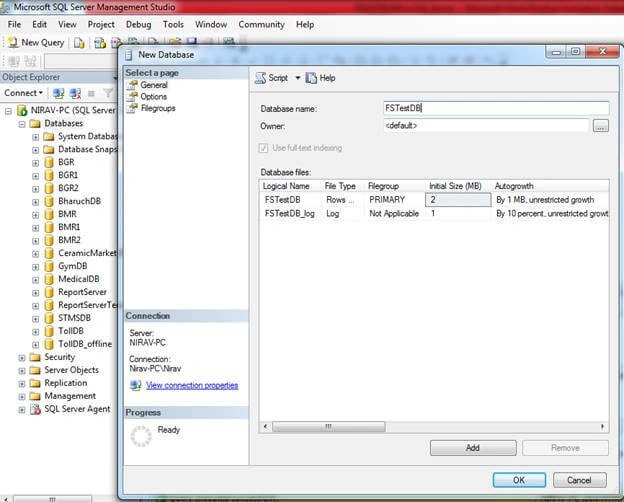
- For using FILESTREAM feature you have to create FILESTREAM enabled database. Follow below process for creating database
- Right click on “DATABASES” and select new database.
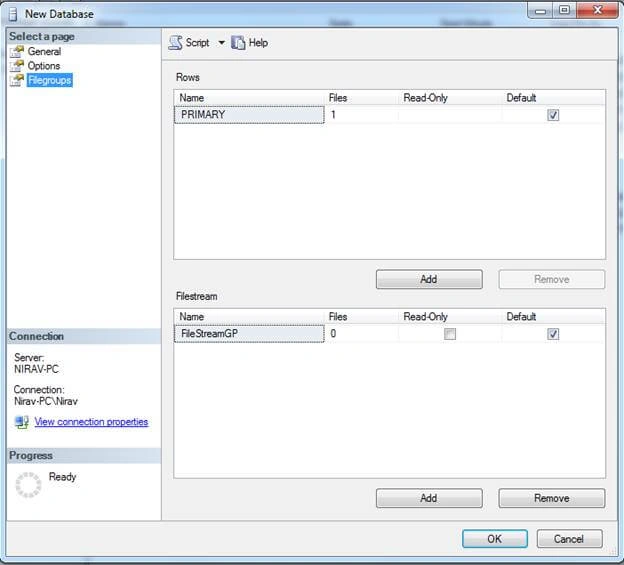
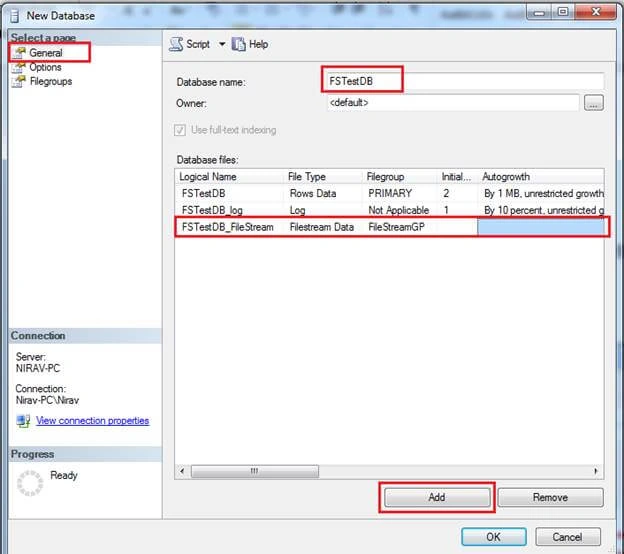
- Go to “FIlegroups” option and click on “Add” button and enter name “FileStreamGP”(you can give any name here) and enable default option as shown in below image.


samad seifPosted Feb 14, 2021, 5:44 AM
Hi i have a stream file table that when I delete a row, that physical file is not deleted. How should that physical file be deleted when deleting the record?
kyi tharPosted Aug 12, 2019, 10:39 AM
Thank you so much for this article, Can I use ID column with int and primary key instead of UNIQUEIDENTIFIER ROWGUIDCOL ? Because I want to create Relational DB. Please explain to me. Thanks in advance.
jaz suneerPosted Dec 11, 2018, 4:15 AM
Thank u so much for explaining it . I have a doubt . Isn't there uploaded image in that folder with same name and same format?
Hadshana KamalanathanPosted Jul 16, 2018, 10:27 AM
Nice explanation, thank you for sharing.
Mohamed IbrahimPosted Mar 16, 2018, 8:29 AM
What is the advantages of the file stream feature? , I created it in my DB but when i take a full back the back up is very very big so I do not prefer this feature