


To find an object property or property value in the object repository,
make sure that the relevant object repository is open (in the Object Repository window or Object Repository Manager).
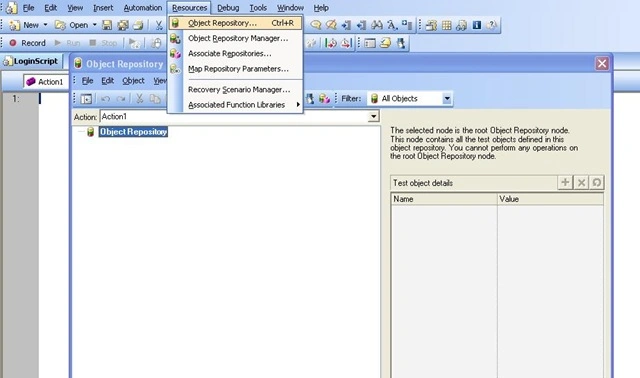
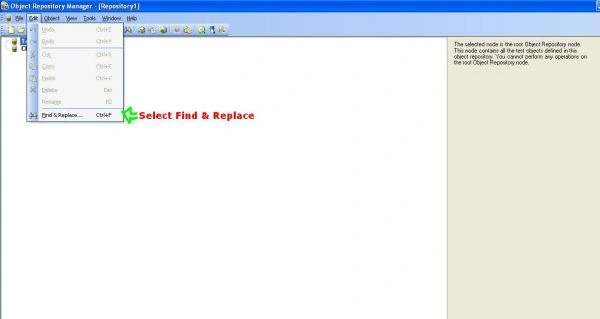
Click the Find & Replace button or select Edit>Find & Replace. The Find and Replace dialog box opens.
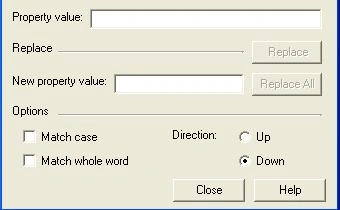
Specify one or more criteria by which you want to search for the object property or property value.
- Object Name
- Object Type
- Object Class
- Property Name
- Property Value

If you specified a property value and want to replace it with a different value, enter the new property value in the New Property Value Box.
Specify the search parameters as follows:
- If you want the search to distinguish between upper and lower case letters, select Match Case.
- If you want the search to find only complete words that exactly match the single word you entered, select Match whole word.
- Specify the direction in which you want to search : Up or Down.
Perform the find or replace operation in one of the following ways. The search is performed on the entire object repository, starting with the currently selected object and in the direction you specified. To find the next instance, click Find Next again.
Reference
Selftechy.com
Join the conversation! Your thoughts help the community grow.