

Intent
An intent is an abstract description of an operation to be performed. In simple words, we can say that intent is basically used to notify the Android system about the occurrence of an event.
Procedure
Use the following procedure:
- Start Eclipse IDE.
- Create a new project.
- Create two Java files, one is MainActivity.java and the other is a.java.
- Create two XML files, one is activity_main.xml file and the second is other.xml for layout design.
- In the first case of intent, we add an activity with an intent filter in the manifest file.
For instance
- <activity
- android:name="A"
- android:label="@string/app_name" >
- <intent-filter>
- <action android:name="abhijeet" />
- <category android:name="android.intent.category.DEFAULT" />
- </intent-filter>
- </activity>
- Then look up the button by its id in the MainActivity.java file and declare a string in it.
- Then in the onclick function declare an intent.For example
- public void onClick(View v) {
- Intent i=new Intent(str);
- startActivity(i);
- }
The code is given below.
MainActivity.java
- package com.example.intentistcaseeeee;
- import android.os.Bundle;
- import android.app.Activity;
- import android.content.Intent;
- import android.view.Menu;
- import android.view.View;
- import android.view.View.OnClickListener;
- import android.widget.Button;
- public class MainActivity extends Activity implements OnClickListener {
- Button b1;
- String str = "abhijeet";
- @Override
- protected void onCreate(Bundle savedInstanceState) {
- super.onCreate(savedInstanceState);
- setContentView(R.layout.activity_main);
- b1 = (Button) findViewById(R.id.button1);
- b1.setOnClickListener(this);
- }
- public void onClick(View v) {
- Intent i = new Intent(str);
- startActivity(i);
- }
- }
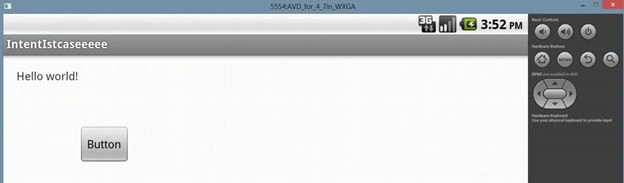
- <RelativeLayout
- xmlns:android="http://schemas.android.com/apk/res/android"
- xmlns:tools="http://schemas.android.com/tools"
- android:layout_width="match_parent"
- android:layout_height="match_parent"
- android:paddingBottom="@dimen/activity_vertical_margin"
- android:paddingLeft="@dimen/activity_horizontal_margin"
- android:paddingRight="@dimen/activity_horizontal_margin"
- android:paddingTop="@dimen/activity_vertical_margin"
- tools:context=".MainActivity" >
- <TextView
- android:id="@+id/textView1"
- android:layout_width="wrap_content"
- android:layout_height="wrap_content"
- android:text="@string/hello_world" />
- <Button
- android:id="@+id/button1"
- android:layout_width="wrap_content"
- android:layout_height="wrap_content"
- android:layout_below="@+id/textView1"
- android:layout_marginTop="52dp"
- android:layout_toRightOf="@+id/textView1"
- android:text="Button" />
- </RelativeLayout>
A.java
- package com.example.intentistcaseeeee;
- import android.app.Activity;
- import android.os.Bundle;
- public class A extends Activity {
- @Override
- protected void onCreate(Bundle savedInstanceState) {
- super.onCreate(savedInstanceState);
- setContentView(R.layout.other);
- }
- }
Other.xml
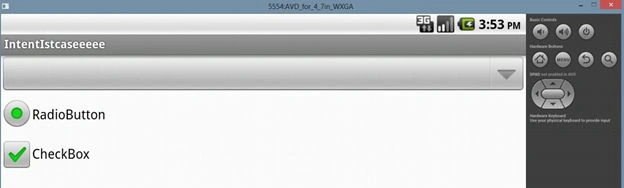
- <?xml version="1.0" encoding="utf-8"?>
- <LinearLayout
- xmlns:android="http://schemas.android.com/apk/res/android"
- android:layout_width="match_parent"
- android:layout_height="match_parent"
- android:orientation="vertical" >
- <Spinner
- android:id="@+id/spinner1"
- android:layout_width="match_parent"
- android:layout_height="wrap_content" />
- <RadioButton
- android:id="@+id/radioButton1"
- android:layout_width="wrap_content"
- android:layout_height="wrap_content"
- android:text="RadioButton" />
- <CheckBox
- android:id="@+id/checkBox1"
- android:layout_width="wrap_content"
- android:layout_height="wrap_content"
- android:text="CheckBox" />
- </LinearLayout>
AndroidManifest.xml
- <?xml version="1.0" encoding="utf-8"?>
- <manifest
- xmlns:android="http://schemas.android.com/apk/res/android"
- package="com.example.intentistcaseeeee"
- android:versionCode="1"
- android:versionName="1.0" >
- <uses-sdk
- android:minSdkVersion="8"
- android:targetSdkVersion="17" />
- <application
- android:allowBackup="true"
- android:icon="@drawable/ic_launcher"
- android:label="@string/app_name"
- android:theme="@style/AppTheme" >
- <activity
- android:name="MainActivity"
- android:label="@string/app_name" >
- <intent-filter>
- <action android:name="android.intent.action.MAIN" />
- <category android:name="android.intent.category.LAUNCHER" />
- </intent-filter>
- </activity>
- <activity
- android:name="A"
- android:label="@string/app_name" >
- <intent-filter>
- <action android:name="abhijeet" />
- <category android:name="android.intent.category.DEFAULT" />
- </intent-filter>
- </activity>
- </application>
- </manifest>
Output
Join the conversation! Your thoughts help the community grow.