

In my previous article I explained how to use Scalar UI with a .NET 9 web API and add global JWT authorization. The main goal was to show how to avoid adding [Authorize] to every endpoint and instead configure the OpenAPI document so Scalar UI displays a global authentication input. After .NET 10 was released, many developers found that the same code no longer works. Instead of compiling, the project throws errors about missing types and properties in the OpenAPI API.

What Changed in .NET 10
When .NET 10 shipped, Microsoft updated the Microsoft.AspNetCore.OpenApi and related OpenAPI classes.
In .NET 9 you were able to do something like this to reference a security scheme:
new OpenApiSecurityScheme
{
    Reference = new OpenApiReference
    {
        Id = "Bearer",
        Type = ReferenceType.SecurityScheme
    }
}
This pattern worked because the OpenAPI model allowed you to directly assign a Reference object to the security scheme.
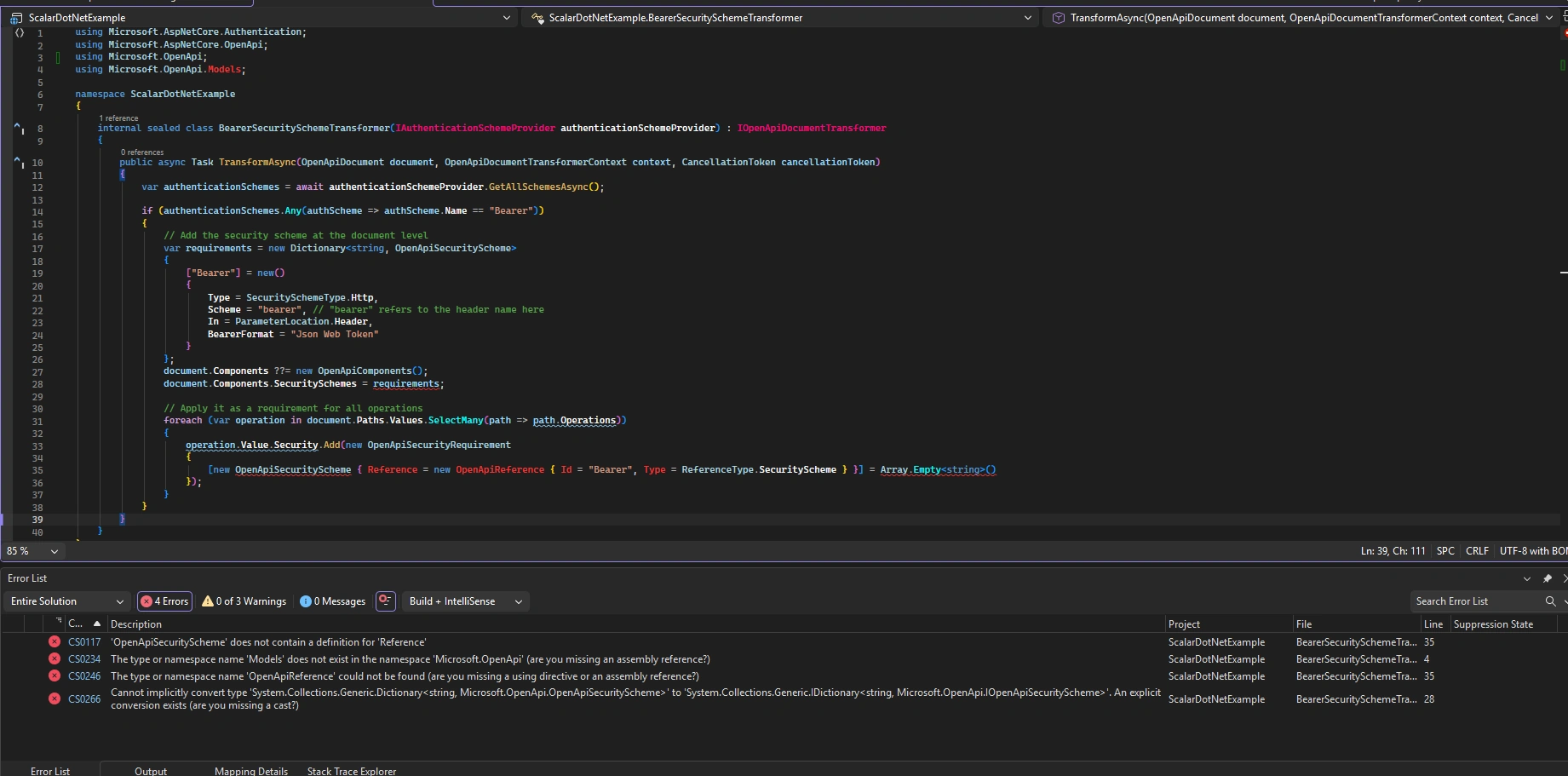
In .NET 10, that property and internal types changed. The old pattern is no longer valid, so the compiler cannot find:
.Reference on OpenApiSecurityScheme
The Models namespace under Microsoft.OpenApi
Types expected by the older code
As a result, the project fails with errors like:
‘OpenApiSecurityScheme’ does not contain a definition for ‘Reference’
The type or namespace name ‘Models’ does not exist
Cannot implicitly convert type ...
This happens not because your idea was wrong, but because the OpenAPI internal API changed . Because Scalar UI depends on the final OpenAPI document, your transformer must now use the correct APIs to build references.
How I Solved It
To fix this, I rewrote the transformer to use the new OpenAPI reference APIs introduced with .NET 10.
Instead of setting a Reference property directly on the security scheme, the new implementation:
Creates a proper OpenApiSecurityScheme object
Adds it into the document’s components using the AddComponent helper
Builds a security requirement that references the scheme in the document
Applies this requirement to all operations in the API
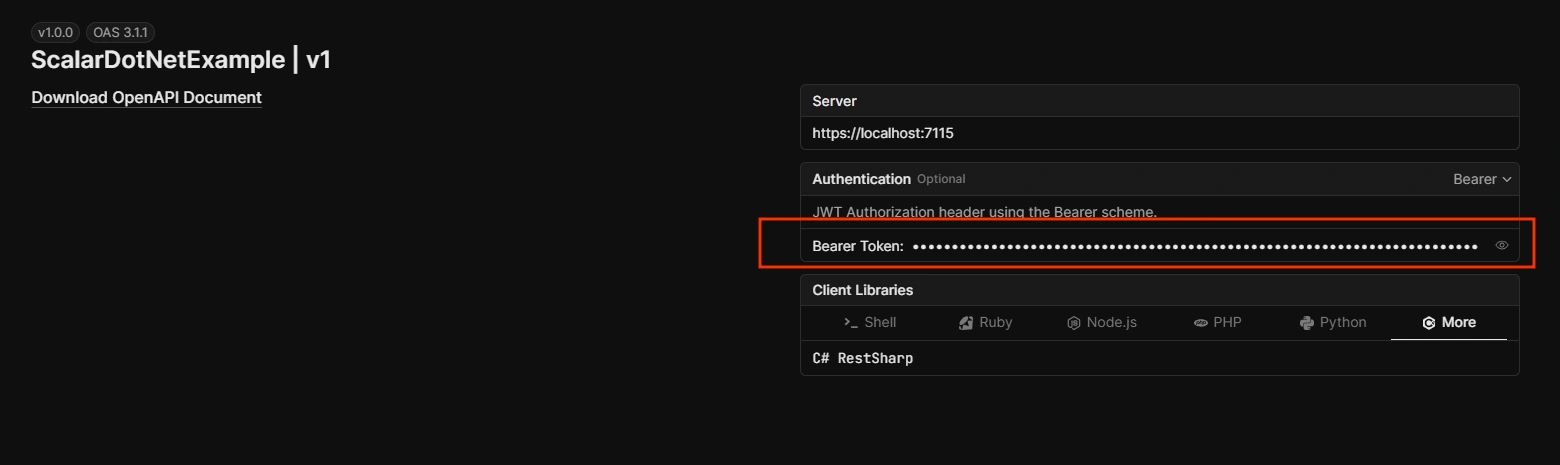
This way the OpenAPI document contains a valid Bearer JWT scheme, and Scalar UI can read it and show a global token input.
Solution
using Microsoft.AspNetCore.Authentication;
using Microsoft.AspNetCore.OpenApi;
using Microsoft.OpenApi;

namespace ScalarDotNetExample
{
    internal sealed class BearerSecuritySchemeTransformer(
        IAuthenticationSchemeProvider authenticationSchemeProvider
    ) : IOpenApiDocumentTransformer
    {
        public async Task TransformAsync(
            OpenApiDocument document,
            OpenApiDocumentTransformerContext context,
            CancellationToken cancellationToken
        )
        {
            var authenticationSchemes =
                await authenticationSchemeProvider.GetAllSchemesAsync();

            if (authenticationSchemes.Any(authScheme => authScheme.Name == "Bearer"))
            {
                // Add the security scheme at the document level
                // var requirements = new Dictionary<string, OpenApiSecurityScheme>
                // {
                //     ["Bearer"] = new()
                //     {
                //         Type = SecuritySchemeType.Http,
                //         Scheme = "bearer",
                //         In = ParameterLocation.Header,
                //         BearerFormat = "Json Web Token"
                //     }
                // };

                var bearerScheme = new OpenApiSecurityScheme
                {
                    Type = SecuritySchemeType.Http,
                    Scheme = "bearer",
                    BearerFormat = "JWT",
                    In = ParameterLocation.Header,
                    Description = "JWT Authorization header using the Bearer scheme."
                };

                document.Components ??= new OpenApiComponents();
                document.AddComponent("Bearer", bearerScheme);

                // document.Components.SecuritySchemes = requirements;

                var securityRequirements = new OpenApiSecurityRequirement
                {
                    [new OpenApiSecuritySchemeReference("Bearer", document)] = []
                };

                // Apply it as a requirement for all operations
                foreach (var operation in document.Paths.Values
                             .SelectMany(path => path.Operations))
                {
                    operation.Value.Security ??=
                        new List<OpenApiSecurityRequirement>();

                    operation.Value.Security.Add(securityRequirements);

                    // operation.Value.Security.Add(new OpenApiSecurityRequirement
                    // {
                    //     [
                    //         new OpenApiSecurityScheme
                    //         {
                    //             Reference = new OpenApiReference
                    //             {
                    //                 Id = "Bearer",
                    //                 Type = ReferenceType.SecurityScheme
                    //             }
                    //         }
                    //     ] = Array.Empty<string>()
                    // });
                }
            }
        }
    }
}
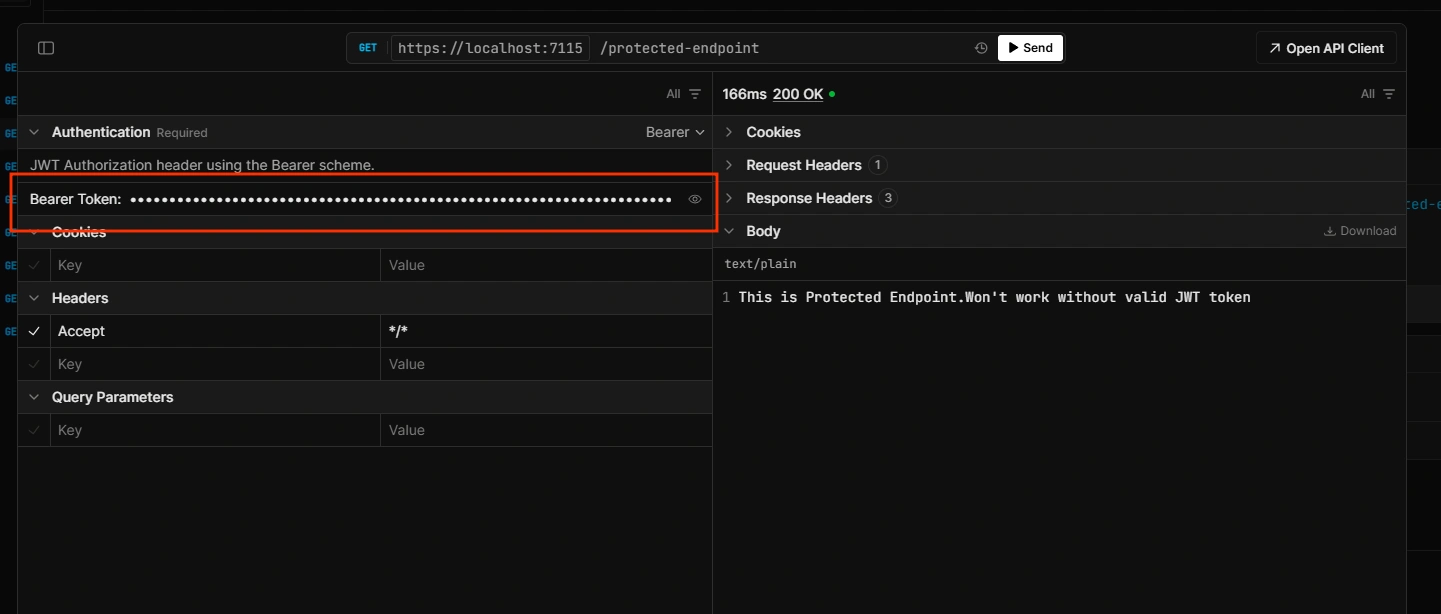
Conclusion
Upgrading to .NET 10 can cause confusing errors because the internal OpenAPI APIs changed. The old pattern of assigning Reference directly on security schemes no longer works. The correct solution is to use the new APIs for adding components and building references.
I hope this article helps you understand why the issue occurred and how to fix it. If you are upgrading your project from .NET 9 to .NET 10 and using Scalar UI with JWT authentication, this solution should make the transition smooth.
You can find the full source code for this example on my GitHub repository:
GitHub: https://github.com/YogeshHadiya33/ScalarUiWithDotNet
Thank you for reading, and I hope you find this article useful.
Julien LefebvrePosted Mar 2, 2026, 12:42 PM
Thank you for the solution. Just one thing in tyou program.cs instead of :options.Authentication = new ScalarAuthenticationOptions { PreferredSecurityScheme = "Bearer" }; you should add options.Authentication = new ScalarAuthenticationOptions { PreferredSecuritySchemes = new[] { "Bearer" }, };