

In this article we will learn how simply a Windows Phone Application can be developed. So for this article we will create a demo app for a puzzle, named FLAMES.
As we know FLAMES is a puzzle to calculate the relationship between two persons. We learn more about this puzzle because most boys and girls have played this puzzle during school. So it's time for us to convert these puzzles into a phone application, so that the people of this era can play the same puzzle(s) in a modern way.
Note
Basically this puzzle is used to match the relationship between a male and female. Let's learn more about FLAMES here:
- F: Friend
- L: Lover
- A: Affection
- M: Marriage
- E: Enemy
- S: Sister
Let's see the following procedure to create the Windows Phone app for FLAMES using Visual Studio 2012 and Visual C# as a language for this article.
Step 1
To create a new Windows Phone Application use the following procedure to create the Windows Phone 8.0 application.
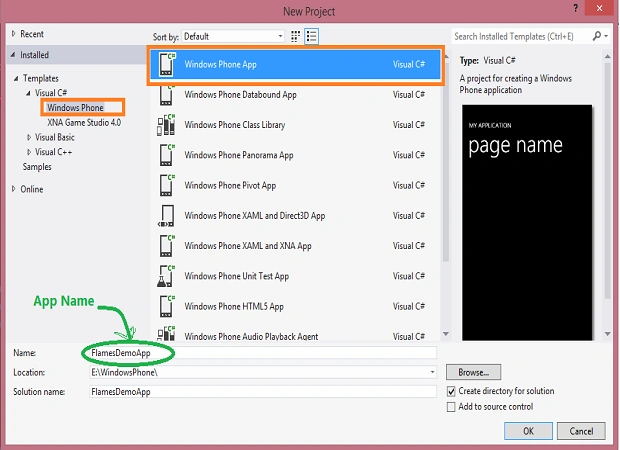
Open Visual Studio 2012 then select File --> New project.
And select "Visual C#" from the language template and "Windows Phone App" from the project template.
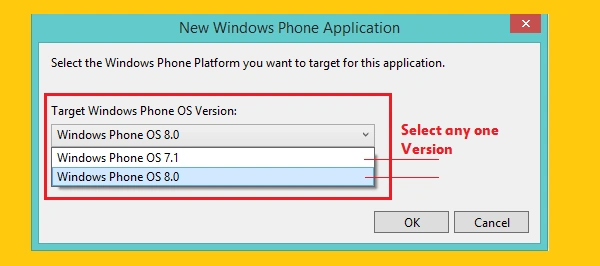
Now select the version 8.0 because we will develop this application for Windows Phone 8.0.
Step 2
- <Grid x:Name="LayoutRoot" Background="RoyalBlue">
- <phone:Pivot Title="" >
- <!--First Page-->
- <phone:PivotItem Header="flames">
- <Grid>
- <Grid.RowDefinitions>
- <RowDefinition Height="Auto"/>
- <RowDefinition Height="Auto"/>
- <RowDefinition Height="Auto"/>
- <RowDefinition Height="*"/>
- </Grid.RowDefinitions>
- <StackPanel Grid.Row="0" >
- <TextBlock Visibility="Collapsed" Text="FLAMES" FontSize="60" Padding="15,0,0,0" />
- <StackPanel Background="White" Height="0" />
- </StackPanel>
- <StackPanel Grid.Row="1" >
- <TextBlock Text="First Name (Male)" FontSize="28"
- Margin="15,0,0,0" Foreground="White"/>
- <TextBox x:Name="txtFirstName" Padding="5" FontSize="28"
- Background="White"/>
- <TextBlock Text="Second Name (Female)" FontSize="28"
- Margin="15,0,0,0" Foreground="White"/>
- <TextBox x:Name="txtSecondName" Padding="5" FontSize="28"
- Background="White"/>
- <Button x:Name="btnMatchRelation" Content="Match Relation"
- Padding="10" FontFamily="Segoe UI" FontSize="30"
- Background="Green" BorderThickness="0" Width="300"
- Click="btnMatchRelation_Click"/>
- </StackPanel>
- <StackPanel x:Name="panelOutput" Grid.Row="2" Visibility="Collapsed" >
- <TextBlock x:Name="txtResultDescription" Text=""
- Foreground="Orange" FontSize="30" TextWrapping="Wrap" />
- <TextBlock x:Name="txtRelation" Foreground="Red"
- FontSize="35" Text=""/>
- </StackPanel>
- </Grid>
- </phone:PivotItem>
- <!--Second Page-->
- <phone:PivotItem Header="about" >
- <Grid>
- <Grid.RowDefinitions>
- <RowDefinition Height="Auto" />
- <RowDefinition Height="Auto" />
- </Grid.RowDefinitions>
- <TextBlock TextWrapping="Wrap" Grid.Row="0" FontSize="30"
- Foreground="Wheat"
- Text="FLAMES : It's a puzzle to calculate the relation type between two persons."/>
- <StackPanel Grid.Row="1">
- <TextBlock Text="F : Friend" FontSize="30" />
- <TextBlock Text="L : Lover" FontSize="30" />
- <TextBlock Text="A : Affection" FontSize="30" />
- <TextBlock Text="M : Marriage" FontSize="30" />
- <TextBlock Text="E : Enemy" FontSize="30" />
- <TextBlock Text="S : Sister" FontSize="30" />
- </StackPanel>
- </Grid>
- </phone:PivotItem>
- </phone:Pivot>
- </Grid>
Please note that in the preceding code we have written the code inside the "pivot page" where the pivot page is the kind of page used to design multiple pages in a single XAML page (for examle MainPage.xaml).
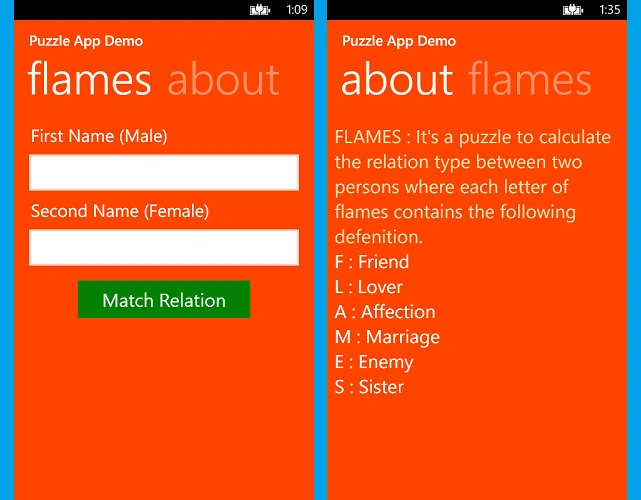
At run time, the preceding code will be divided into to separate pages because this pivot page has two "PivotItem" as in the following:
- flames page
- about page
Step 3
Write the following code to calculate the relationship. But before writing the code I would like to share the logic to calculate FLAMES.
- First remove the common letters from both names
For example:
TINKU & RINKI
These names have three common letters so remove the common letters i, n and k from both names. (Remove only one letter for each one).
- After removing the common letter put together the remaining letters. So the preceding name will look like the following:
"TURI"
- Now count the letters of the remaining letters. (For the example the count is 4.)
- Now we will traverse the string FLAMES in a circular way by counting 1, 2, 3, 4 and removing the letter in the 4th place and again traverse on the remaining letters of FLAMES until a single letter remains.
- The last letter will denote the relation between these two names.
For example suppose "F" is the last letter after traversing then show the obtained relation, FRIEND.
Use the following code for the Button Click:
- private void btnMatchRelation_Click(object sender, RoutedEventArgs e)
- {
- if (txtFirstName.Text.Trim() != "" && txtSecondName.Text.Trim() != "")
- {
- int restCharsCount = CalculateFlamesCount(txtFirstName.Text.Trim().ToLower(), txtSecondName.Text.Trim().ToLower());
- char letter = CalculateRelation(restCharsCount);
- txtRelation.Text = ShowRelationshipResult(letter);
- txtResultDescription.Text = String.Format(txtFirstName.Text.ToUpper().Trim() + " & " + txtSecondName.Text.ToUpper().Trim( ) + "{0}" + "share a relationship :", Environment.NewLine);
- panelOutput.Visibility = Visibility.Visible;
- }
- else
- {
- MessageBox.Show("Name could not be empty ! Please enter both name and press show button !!");
- }
- }
- private int CalculateFlamesCount(string s1, string s2)
- {
- List<char> lst1 = s1.ToList();
- List<char> lst2 = s2.ToList();
- int count = 0;
- int j = 0;
- while (j < lst2.Count)
- {
- if (lst1.Contains(lst2[j]))
- {
- lst1.Remove(lst2[j]);
- lst2.Remove(lst2[j]);
- if (j == 0)
- j = 0;
- else
- j--;
- }
- else
- j++;
- }
- count = lst1.Count + lst2.Count;
- return count;
- }
- //RELATIONSHIP CALCULATION : It return the Flame result in single char like (F,L,A,M,E or S)
- private char CalculateRelation(int count)
- {
- bool gameover = true;
- string list = "FLAMES";
- var list1 = list.ToList();
- int runcount;
- int traversing;
- while (gameover)
- {
- runcount = 0;
- traversing = 0;
- while (traversing < list1.Count)
- {
- if (runcount == count)
- {
- if (traversing != 0)
- list1.Remove(list1[--traversing]);// = '*';
- else
- {
- list1.Remove(list1[list1.Count - 1]);
- traversing = 0;
- }
- runcount = 0;
- }
- else
- {
- runcount++;
- if (traversing < list1.Count - 1)
- {
- traversing++;
- }
- else
- {
- traversing = 0;
- }
- }
- if (list1.Count == 1)
- traversing = list1.Count;
- }
- gameover = false;
- }
- return list1[0];
- }
- //Relation : It takes the output of just above method as input letter and return the relation type in word like Friend, Lover or other
- private string ShowRelationshipResult(char flamesChar)
- {
- string relation = string.Empty;
- switch (flamesChar)
- {
- case 'F':
- relation = "FRIEND";
- break;
- case 'L':
- relation = "LOVER";
- break;
- case 'A':
- relation = "AFFECTION";
- break;
- case 'M':
- relation = "MARRIAGE";
- break;
- case 'E':
- relation = "ENEMY";
- break;
- case 'S':
- relation = "SISTER";
- break;
- default:
- break;
- }
- return relation;
- }
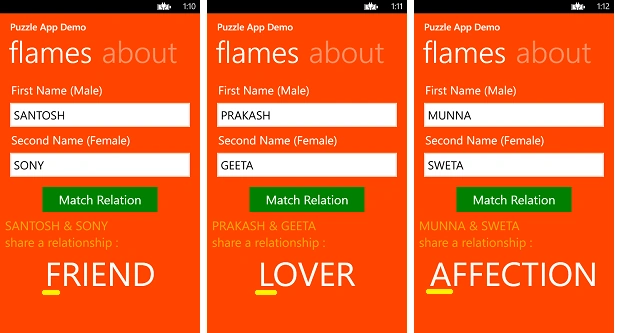
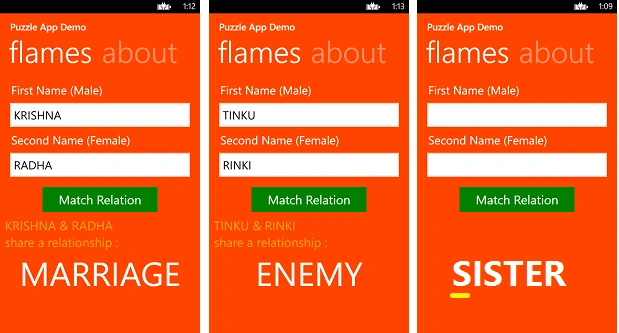
- Visual Studio 2012
- Windows 8.0 OS
- Emulator or Windows Phone 8.0
In this article we saw how simply we can convert our thoughts into a Windows Phone application. In a future article I will start a series of articles in which we will study Windows Phone 8.0 application development from the beginner label.
Vipul MalhotraPosted Jul 6, 2015, 4:37 AM
Nice
Gaurav KumarPosted May 18, 2015, 11:30 PM
Very Nice Praveen Kumar
Santhakumar MunuswamyPosted Apr 23, 2015, 11:42 PM
Thanks for nice one
Karthik Muthu KaruppanPosted Apr 23, 2015, 11:28 AM
good
NitinPosted Apr 19, 2015, 5:44 AM
nice
Sibeesh VenuPosted Apr 19, 2015, 3:46 AM
Good one