

What is GenAIOps?
The end to end application development of Gen AI applications is referred to as GenAIOps. It is also referred to as LLMOps interchangeability. It involves selection of the right model and how it fits a broader framework based on human feedback. Normally how we use LLM involves creating a structured framework for better management of things. It involves understanding and acting and managing on three steps in loop:
Step 1: Exploration - Defining strategy of what needs to be done based on discovery of problem statement and defining the solution.
Step 2: Build - Creating and refining the Proof of concept and validating against the core use case.
Step 3: Operationalize - Productionizing the solution by effectively monitoring, scaling and refining the solution.
Apart from this it involves governance, managing and organizing the impact and cost associated with overall availability of the GenAI use case we intend to address.
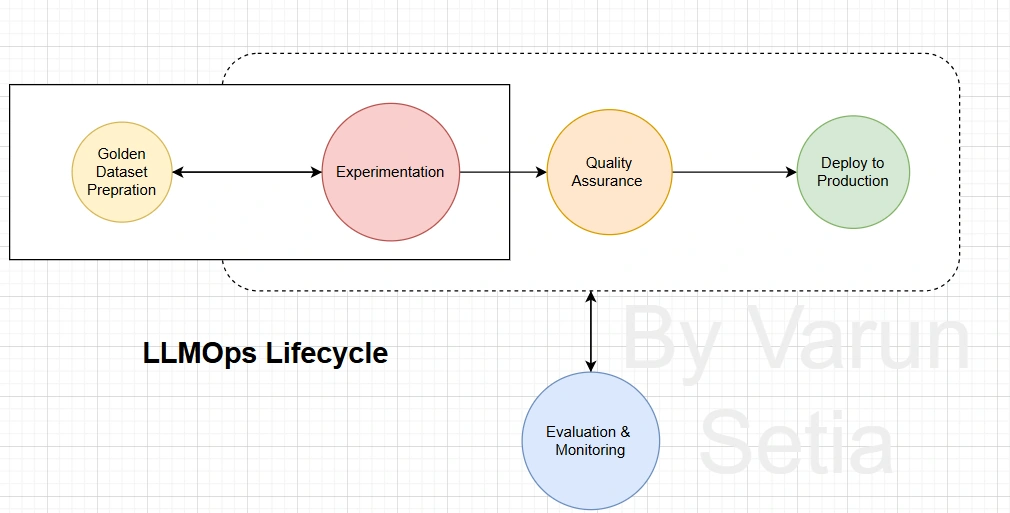
LLMOps covers a broad range of activities required to effectively manage large language models throughout their lifecycle:
Model deployment and maintenance: Deploying LLMs on cloud or on-premise infrastructure and ensuring they run reliably over time
Data management: Collecting, preparing, and maintaining high-quality data for training and evaluation
Model training and fine-tuning: Training models and refining them to enhance performance for specific use cases
Monitoring and evaluation: Continuously tracking performance, detecting issues, and improving model outcomes
Security and compliance: Safeguarding systems and ensuring adherence to regulatory and organizational standards
LLMOps ensures that language models are not just built, but efficiently deployed, maintained, and improved in real-world environments.It requires carefully understanding several aspects of how AI behaves in a controlled environment and then it is to be made available to a wider audience.
Key metrics involved in understanding if our AI is useful are:
Cost - How much money/resources it takes to run the system (API calls, compute, storage).
Accuracy - How correct the output is compared to the expected answer.
Performance - How fast and efficiently the system responds (latency, scalability).
Groundedness - How well the response is based on real, reliable data (not hallucinated).
Intent Resolution - How well the system understands what the user actually wants. Requires setting up manual feedback collection mechanism.
If all these metrics meet our use case it should be made available to end users. Most of it can be automated for collection while some human in loop interaction may be relevant.
What is MLflow?
It helps us in building AI products that are all about iteration. MLflow lets us develop solutions by simplifying how you debug, evaluate, and monitor your LLM applications, Agents, and Models. It is really easy to set up and have everything needed to manage MLOps lifecycle.
Walkthrough
First, install the required package:
pip install --upgrade "mlflow[genai]"This package enables MLflow’s GenAI capabilities, including prompt management and OpenAI-compatible integrations.
Enable MLflow Tracking
We begin by configuring MLflow to track all LLM interactions.
import mlflow
from openai import OpenAI
mlflow.set_tracking_uri("http://localhost:5000")
mlflow.set_experiment("Varun LLMOps")
mlflow.openai.autolog()
Connect to MLflow AI Gateway
Now we connect to the MLflow AI Gateway, which acts as a unified interface for LLMs.
client = OpenAI(base_url="http://localhost:5000/gateway/mlflow/v1", api_key="", # Managed on server-side )Basic LLM Interaction
Let’s send a simple message to the model:
messages = [ {"role": "user", "content": "Hi, I am Varun Setia. How are you?"} ]
response = client.chat.completions.create( model="llm-dev", messages=messages, )
print(response.choices[0].message)
Prompt Management with MLflow
Instead of hardcoding prompts, MLflow allows you to version and manage prompts centrally.
Load a Prompt (Version 1)
prompt = mlflow.genai.load_prompt("prompts:/Greet_Prompt/1")Use Managed Prompt in Application
Now integrate the prompt into your request:
messages = [ {"role": "system", "content": prompt.format()}, {"role": "user", "content": "Hi, I am Varun Setia. How are you?"} ]
response = client.chat.completions.create( model="llm-dev", messages=messages, )
print(response.choices[0].message)
Compare model versions and use most relevant
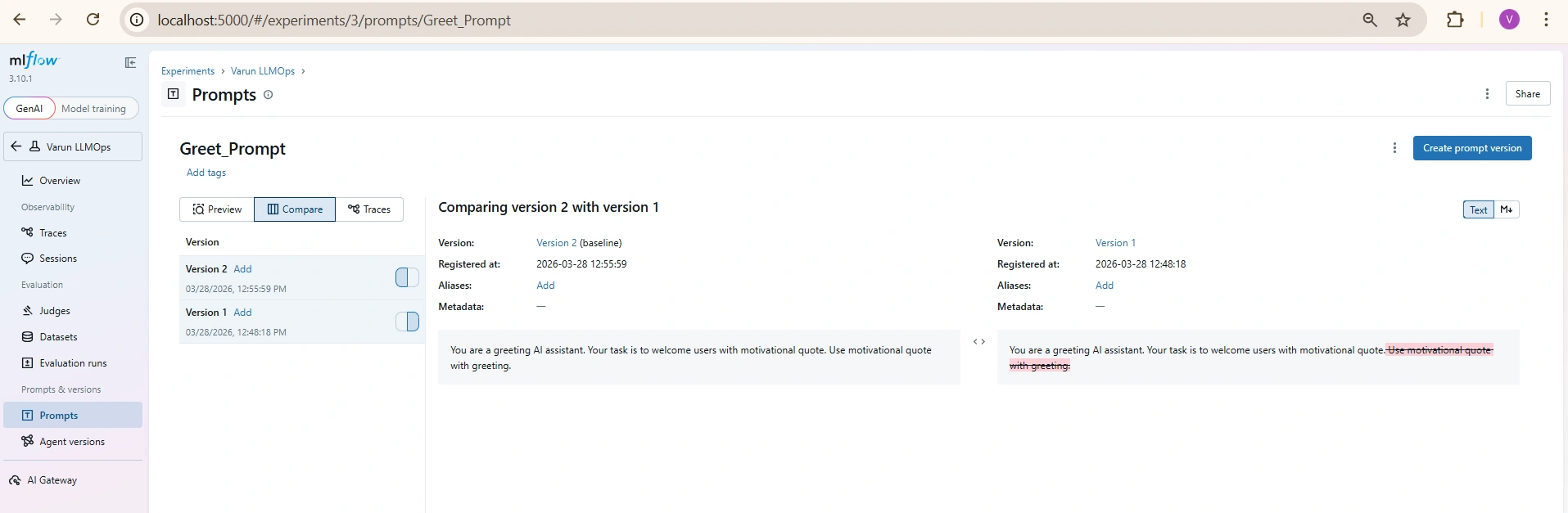
This flow demonstrates a complete LLMOps lifecycle in MLflow:
Tracking - Every interaction is logged automatically
Gateway Usage - Centralized access to LLMs
Prompt Versioning - Prompts are reusable and version-controlled
Experimentation - Easily compare different prompt versions and outputs
More capabilities
Once your LLM application is running, the next step in LLMOps is evaluation - understanding how well your model is performing.
MLflow simplifies this by using:
Traces - Real interactions captured during execution
Golden Dataset - High-quality reference data using traces from UI
Judges - Automated evaluation mechanisms
I covered specific aspects of MLflow. If you really enjoyed it, explore more and share your favourite features in comments section. Thank you for reading till the end.
Join the conversation! Your thoughts help the community grow.