Implementation
While starting a new project, sometimes a database may exist and if we can generate code-first models from the existing database, then it will reduce our effort. Now, let's see how to generate Entity Framework Core Code-First models from the database in ASP.NET Core.
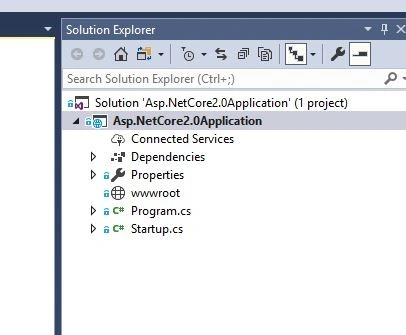
First, open Visual Studio (I am using VS2017 Community edition) and create a new ASP.NET Core project.
And then, for demo purposes, I have created a sample table called "Employee" in my database. Below is the script.
- USE [Demo]
- GO
-
- CREATE TABLE [dbo].[EMPLOYEE](
- [Id] [int] NOT NULL IDENTITY PRIMARY KEY,
- [Name] [varchar](100) NOT NULL,
- [Designation] [varchar](100) NOT NULL,
- [SALARY] [int] NULL,
- [Branch] [varchar](100) NULL
- )
- GO
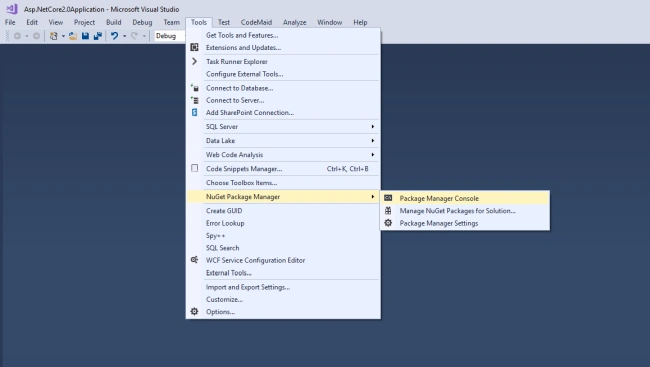
Now go to Tools-> NuGet Package Manager -> Package Manager Console like shown in the below screenshot.
Now, to generate the EF Core code-first models from the database in ASP.NET Core, the Scaffold-DbContext command is used. Below is the syntax to run Scaffold-DbContext command.
PM > Scaffold-DbContext ConnectionString Provider -OutputDir DirectoryName
Below is the sample command I have used to generate the models from the database.
PM> Scaffold-DbContext "Server=xxx;Database=Demo;Trusted_Connection=True;" Microsoft.EntityFrameworkCore.SqlServer -OutputDir Models
It will generate the model classes and DbContext file. Below is the generated Employee.cs & DemoContext.cs file contents.
Employee.cs
- using System;
- using System.Collections.Generic;
-
- namespace AspNetCore2Application.Models
- {
- public partial class Employee
- {
- public int Id { get; set; }
- public string Name { get; set; }
- public string Designation { get; set; }
- public int? Salary { get; set; }
- public string Branch { get; set; }
- }
- }
DemoContext.cs
- using System;
- using Microsoft.EntityFrameworkCore;
- using Microsoft.EntityFrameworkCore.Metadata;
-
- namespace AspNetCore2Application.Models
- {
- public partial class DemoContext : DbContext
- {
- public DemoContext()
- {
- }
-
- public DemoContext(DbContextOptions<DemoContext> options)
- : base(options)
- {
- }
-
- public virtual DbSet<Employee> Employee { get; set; }
-
- protected override void OnConfiguring(DbContextOptionsBuilder optionsBuilder)
- {
- if (!optionsBuilder.IsConfigured)
- {
- #warning To protect potentially sensitive information in your connection string, you should move it out of source code. See http://go.microsoft.com/fwlink/?LinkId=723263 for guidance on storing connection strings.
- optionsBuilder.UseSqlServer("Server=xxx;Database=Demo;Trusted_Connection=True;");
- }
- }
-
- protected override void OnModelCreating(ModelBuilder modelBuilder)
- {
- modelBuilder.Entity<Employee>(entity =>
- {
- entity.ToTable("EMPLOYEE");
-
- entity.Property(e => e.Id).ValueGeneratedNever();
-
- entity.Property(e => e.Branch)
- .HasMaxLength(100)
- .IsUnicode(false);
-
- entity.Property(e => e.Designation)
- .IsRequired()
- .HasMaxLength(100)
- .IsUnicode(false);
-
- entity.Property(e => e.Name)
- .IsRequired()
- .HasMaxLength(100)
- .IsUnicode(false);
-
- entity.Property(e => e.Salary).HasColumnName("SALARY");
- });
- }
- }
- }
Using Database Names
Now, if you look into the Employee.cs, the table name and column name are not matching. My table name is EMPLOYEE but the class name is Employee. This is because, by default, the database names are changed to C# name style conventions. If you want to keep the database names, then you have to pass an additional parameter -UseDatabaseNames in your command. Now, the modified command looks like the following.
Scaffold-DbContext "Server=xxx;Database=Library;Trusted_Connection=True;" Microsoft.EntityFrameworkCore.SqlServer -OutputDir Models -UseDatabaseNames
Now, if I run the above command, it throws the below error.
The following file(s) already exist in directory C:\Users\xxxx\Documents\Visual Studio 2017\Projects\Asp.NetCore2.0Application\Asp.NetCore2.0Application\Models: DemoContext.cs,Employee.cs. Use the Force flag to overwrite these files.
So, we need to override the existing files. For that, we need to pass -Force parameter into the command. Now, our modified command will be like the following.
Scaffold-DbContext "Server=xxx;Database=Library;Trusted_Connection=True;" Microsoft.EntityFrameworkCore.SqlServer -OutputDir Models -UseDatabaseNames -Force
If you run this command, you will get the below class with the names, the same as the database table.
- using System;
- using System.Collections.Generic;
-
- namespace AspNetCore2Application.Models
- {
- public partial class EMPLOYEE
- {
- public int Id { get; set; }
- public string Name { get; set; }
- public string Designation { get; set; }
- public int? SALARY { get; set; }
- public string Branch { get; set; }
- }
- }
Using Data Annotations
After that, let's look into DemoContext.cs. All the models are configured using FluentAPI. This is the default option. But if you want to use DataAnnotation attributes to configure the models, then we need to pass -DataAnnotations parameter in the command like below.
PM> Scaffold-DbContext "Server=xxx;Database=Demo;Trusted_Connection=True;" Microsoft.EntityFrameworkCore.SqlServer -OutputDir Models -UseDatabaseNames -force -DataAnnotations
Now, you can see the modified Employee.cs and DemoContext.cs file contents.
Employee.cs
- using System;
- using System.Collections.Generic;
- using System.ComponentModel.DataAnnotations;
- using System.ComponentModel.DataAnnotations.Schema;
-
- namespace AspNetCore2Application.Models
- {
- public partial class EMPLOYEE
- {
- public int Id { get; set; }
- [Required]
- [StringLength(100)]
- public string Name { get; set; }
- [Required]
- [StringLength(100)]
- public string Designation { get; set; }
- public int? SALARY { get; set; }
- [StringLength(100)]
- public string Branch { get; set; }
- }
- }
DemoContext.cs
- using System;
- using Microsoft.EntityFrameworkCore;
- using Microsoft.EntityFrameworkCore.Metadata;
-
- namespace AspNetCore2Application.Models
- {
- public partial class DemoContext : DbContext
- {
- public DemoContext()
- {
- }
-
- public DemoContext(DbContextOptions<DemoContext> options)
- : base(options)
- {
- }
-
- public virtual DbSet<EMPLOYEE> EMPLOYEE { get; set; }
-
- protected override void OnConfiguring(DbContextOptionsBuilder optionsBuilder)
- {
- if (!optionsBuilder.IsConfigured)
- {
- #warning To protect potentially sensitive information in your connection string, you should move it out of source code. See http://go.microsoft.com/fwlink/?LinkId=723263 for guidance on storing connection strings.
- optionsBuilder.UseSqlServer("Server=xxx;Database=Demo;Trusted_Connection=True;");
- }
- }
-
- protected override void OnModelCreating(ModelBuilder modelBuilder)
- {
- modelBuilder.Entity<EMPLOYEE>(entity =>
- {
- entity.Property(e => e.Id).ValueGeneratedNever();
-
- entity.Property(e => e.Branch).IsUnicode(false);
-
- entity.Property(e => e.Designation).IsUnicode(false);
-
- entity.Property(e => e.Name).IsUnicode(false);
- });
- }
- }
- }
Conclusion
I hope you learned how to generate EF Core code-first models from the database in ASP.NET Core. Do you like this tutorial? Help me improve by posting your comments and feedback below.


Join the conversation! Your thoughts help the community grow.