

Let’s know about Web Service
Web Services are used for enabling an application to invoke a method of another application. These applications can be on the same computer or different computers. Web Services use protocols like HTTP, XML, and SOAP. Since these are open and well known protocols, the applications built on any platform can interoperate with Web Services. For example, a PHP application can interoperate with a Web Service built using .NET. Similarly, a web service built using different platform can be consumed by a .NET application.
Hyper Text Transfer Protocol (HTTP) is the protocol widely used by web services to send and receive messages. The messaging protocol is SOAP (Simple Object Access Protocol). SOAP messages are in XML format. Web Services have .asmx extension. For this reason, the web services are also often called as ASMX web services.
To know more about SOAP request and response, visit the below reference site.
https://www.w3.org/2003/06/soap11-soap12.html
A web service is a web-based functionality accessed using the protocols of the web to be used by the web applications. There are three aspects of web service development,
- Creating the web service
- Creating a proxy
- Consuming the web service
Introduction to proxy in ASP.NET Web Service
A proxy is a major part for the web service codes. Before using the web service, a proxy must be created. The proxy is registered with the client application. Then, the client application makes call to the web service as if it were using a local method. The proxy takes the calls, wraps it in proper format, and sends it as a SOAP request to the Server. SOAP protocol is then used for exchanging web service data.
When the Server returns the SOAP package to the client, the proxy decodes everything and presents it to the client application.
Relationship between Visual Studio and Proxy
Visual Studio generates a proxy class using the Web Service Description Language (WSDL) document of the web service. The Web Service Description Language document formally defines a web service. It includes,
- All the methods that are exposed by the web service
- The parameters and their types
- The return types of the methods
Top Important Notes While Write Code For Web Services:
- To use asp.net session object in a web service, the web service class must inherit from System.Web.Services.WebService class and EnableSession property of WebMethod attribute must be set to true. Hyper Text Transfer Protocol (HTTP) is the protocol widely used by web services to send and receive messages .The messaging protocol is SOAP. SOAP stands for Simple Object Access Protocol. SOAP messages are in XML format.
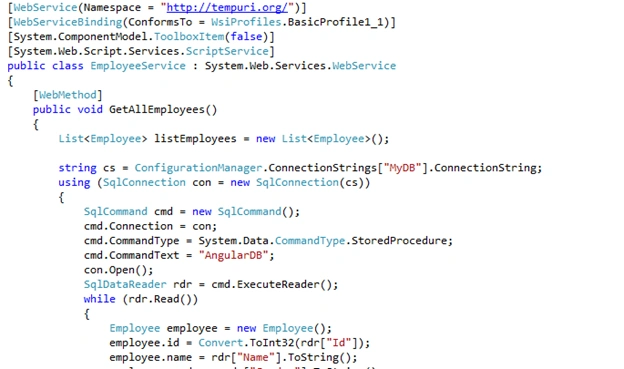
- Notice that a web service is a class that is decorated with [WebService] attribute and inherits from System.Web.Services.WebService base class. The [WebService] attribute tells that this class contains the code for a web service. Web Service Namespace is used to uniquely identify your web service on the internet from other services that are already there on the Web. Web Service Namespace can be any string, but it is common to give it a company's internet domain name as they are usually unique.
To allow a web service to be called from Javascript , using ASP.NET AJAX, then decorate the web service class with [System.Web.Script.Services.ScriptService] attribute. - Web Method attribute used to specify description for the web service method.
- BufferResponse is a boolean property. Default is true. When this property is true, the response of the XML Web service method is not returned to the client until either the response is completely serialized or the buffer is full. On the other hand, when this property is false, the response of the XML Web service method is returned to the client as it is being serialized.
In general, set BufferResponse to false, only when the XML Web service method returns large amounts of data. - CacheDuration is the property, if you want to cache the results of a web service method. This is an integer property, and specifies the number of seconds that the response should be cached. The response is cached for each unique parameter.
- Web Methods in a web service can also be overloaded based on the number of parameters. Method overloading possible in web services by using MessageName property of WebMethod attribute. MessageName property is used to uniquely identify the individual XML Web service methods.
- Call the web service using ASP.NET AJAX, which allows partial page post back. With partial page post back, only specific portion of the page is updated without reloading the entire page.
- For smaller amounts of data, web service performance is better when BufferResponse is set to true.
- In Web.Config file When allowCookies attribute is set to true, the client application accepts the cookie returned from the ASMX web service, and copies it into all future requests that are made to the web service. This ensures that the same session is maintained between the client and the web service.
- To use asp.net session object in a web service, the web service class must inherit from System.Web.Services.WebService class and EnableSession property of WebMethod attribute must be set to true.
Steps to Create a Simple Application To Understand Better
Step1
Create one table named “tblEmployees”.
Script
- Create table tblEmployees
- (
- Id int primary key identity,
- Name nvarchar(50),
- Gender nvarchar(10),
- Salary int
- )
- Go
Enter some Dummy Records into this table.
Script
- Insert into tblEmployees values ('Satya1', 'Male', 55000)
- Insert into tblEmployees values ('Satya2', 'Female', 68000)
- Insert into tblEmployees values ('Satya3', 'Male', 57000)
- Insert into tblEmployees values ('Satya4', 'Female', 53000)
- Insert into tblEmployees values ('Satya5', 'Male', 60000)
- Insert into tblEmployees values ('Satya6', 'Male', 60000)
- Insert into tblEmployees values ('Satya7', 'Male', 60000)
- Go
Step2
Create one Stored Procedure named “AngularDB”.
Script
- Create Procedure AngularDB
- As
- Begin
- select * from tblEmployees
- End
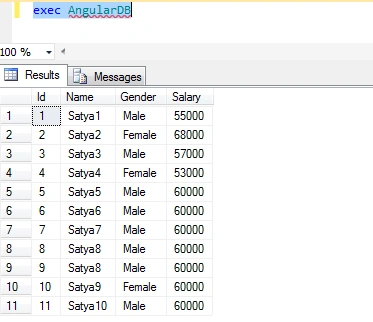
Then, execute this Stored Procedure to check the records.
- exec AngularDB
Step3
Then, create an ASP.NET application named “WebService”.
Step4
Then, add connection string in Web.Config file.
Code Ref
- <?xml version="1.0" encoding="utf-8"?>
- <!--
- For more information on how to configure your ASP.NET application, please visit
- http://go.microsoft.com/fwlink/?LinkId=169433
- -->
- <configuration>
- <connectionStrings>
- <add name="MyDB" providerName="System.Data.SqlClient" connectionString="Add Your Connection string here"/>
- </connectionStrings>
- <system.web>
- <webServices>
- <protocols>
- <add name="HttpGet"/>
- </protocols>
- </webServices>
- <compilation debug="true" targetFramework="4.0" />
- </system.web>
- </configuration>
Code Description
Here, I have mentioned the name of the connection string as “MyDB”.
- <connectionStrings>
- <add name="MyDB" providerName="System.Data.SqlClient" connectionString="Add Your Connection string here"/>
- </connectionStrings>
Created ASMX web service that can perform a HTTP GET request.
- <webServices>
- <protocols>
- <add name="HttpGet"/>
- </protocols>
- </webServices>
Enable an ASP.NET Web Service for HTTP POST and GET requests.
- <system.web>
- <webServices>
- <protocols>
- <add name="HttpGet"/>
- <add name="HttpPost"/>
- </protocols>
- </webServices>
- </system.web>
Step5
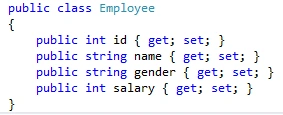
Then, create a class file named “Employee.cs”.
Code Ref
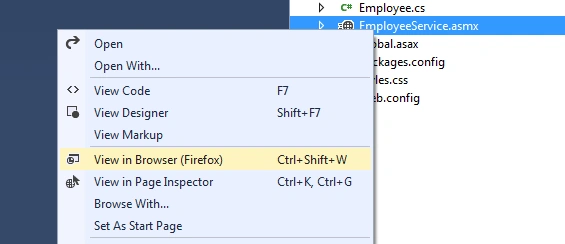
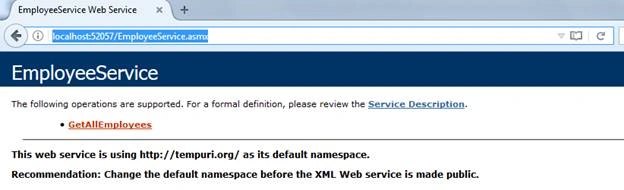
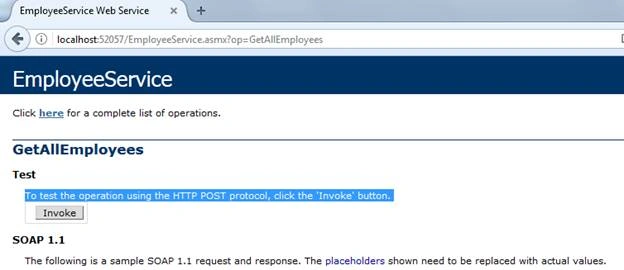

Manoj vaishPosted Apr 6, 2020, 12:01 AM
I want to call web services within stored procedure and that web service will return json data and store into the table. PLease help
chetan rajputPosted Dec 14, 2018, 8:06 AM
Thank you so much , and if I want to give one web service result or output is give to the another sql satement as input how to do
Yasir RazaPosted Sep 6, 2018, 1:58 AM
I got this error
Yasir RazaPosted Sep 6, 2018, 1:58 AM
System.Data.SqlClient.SqlException: Could not find stored procedure 'AngularDB'. at System.Data.SqlClient.SqlConnection.OnError(SqlException exception, Boolean breakConnection, Action`1 wrapCloseInAction) at System.Data.SqlClient.SqlInternalConnection.OnError(SqlException exception, Boolean breakConnection, Action`1 wrapCloseInAction) at System.Data.SqlClient.TdsParser.ThrowExceptionAndWarning(TdsParserStateObject stateObj, Boolean callerHasConnectionLock, Boolean asyncClose) at System.Data.SqlClient.TdsParser.TryRun(RunBehavior runBehavior, SqlCommand cmdHandler, SqlDataReader dataStream, BulkCopySimpleResultSet bulkCopyHandler, TdsParserStateObject stateObj, Boolean& dataReady) at System.Data.SqlClient.SqlDataReader.TryConsumeMetaData() at System.Data.SqlClient.SqlDataReader.get_MetaData() at System.Data.SqlClient.SqlCommand.FinishExecuteReader(SqlDataReader ds, RunBehavior runBehavior, String resetOptionsString, Boolean isInternal, Boolean forDescribeParameterEncryption, Boolean shouldCacheForAlwaysEncrypted) at System.Data.SqlClient.SqlCommand.RunExecuteReaderTds(CommandBehavior cmdBehavior, RunBehavior runBehavior, Boolean returnStream, Boolean async, Int32 timeout, Task& task, Boolean asyncWrite, Boolean inRetry, SqlDataReader ds, Boolean describeParameterEncryptionRequest) at System.Data.SqlClient.SqlCommand.RunExecuteReader(CommandBehavior cmdBehavior, RunBehavior runBehavior, Boolean returnStream, String method, TaskCompletionSource`1 completion, Int32 timeout, Task& task, Boolean& usedCache, Boolean asyncWrite, Boolean inRetry) at System.Data.SqlClient.SqlCommand.RunExecuteReader(CommandBehavior cmdBehavior, RunBehavior runBehavior, Boolean returnStream, String method) at System.Data.SqlClient.SqlCommand.ExecuteReader(CommandBehavior behavior, String method) at System.Data.SqlClient.SqlCommand.ExecuteReader() at WebS.EmployeeService.GetAllEmployees() in f:\WPF\WebS\WebS\EmployeeService.asmx.cs:line 29
Gowtham AllakaPosted Jul 27, 2018, 1:23 AM
{ country : "india", state : [ "ap", "telangana","tamilnadu"]}, { country : "srilanka",state:["aaa","bbb","ccc"]
Gowtham AllakaPosted Jul 27, 2018, 1:20 AM
good morning sir, i want json format like nested json ....country and nested states ...
Juan SamanoPosted Jul 3, 2018, 6:22 PM
Excellent! Thank you.
Ilham NiyaPosted May 22, 2018, 6:05 PM
Mailon munansangu ,i tried with both web service and jdbc methods and i found the web service that works well
Ilham NiyaPosted May 22, 2018, 6:00 PM
I have already found the solution thank you very much Satyaprakash Samantaray
mailon munansanguPosted May 4, 2018, 11:16 AM
If I want to access the web service data in android app, will I need special permission on the sever? Plus which is better web service or jdbc to connect an android app
Ilham NiyaPosted May 3, 2018, 3:50 AM
Thank you very much .it's very usefull .please i need the same thing but with geometry data .and i can't convert the geometry in my .asmx .Can you help me.
Zeeshan AzimPosted Aug 9, 2017, 10:11 AM
Thanks bro. It works
Thiruppathi RPosted May 12, 2017, 7:50 AM
Nice Article.Thanks to sharing..
Saravanakumar SekaranPosted May 9, 2017, 6:24 AM
Wow very nice article