

Introduction:
Yahoo Web Services are made available to developers through Yahoo's Developer
Network; a variety of services are available but this article is specifically
interested in using Yahoo's Geocoding Service. This service will return the
closest matching address to a submitted physical address and will also return
the addresses position in latitude and longitude. The terms and conditions for
using the service are pretty simple; users are permitted to geocode up to 5,000
addresses per day for the very reasonable price of absolutely nothing.
This article will demonstrate the basics of submitting an address to the
service, recovering and displaying the geocoded result, and will also
demonstrate a simple approach to displaying the location as mapped using Yahoo
maps. For more information regarding the program refer directly the Yahoo
Developer Network website located at http://developer.yahoo.com/dotnet/.
On a limited basis, the service can be used to obtain and store latitude and
longitude on all of the addresses contained in some sort of contact database or
asset location database, or might be useful for storing waypoints in a GPS
device. Naturally the service is based upon physical addresses so its use is
limited to tagging physical addresses with a lat/long.
When visiting the site, take a look at the different programs available and take
a look at some of the many services made available through Yahoo.
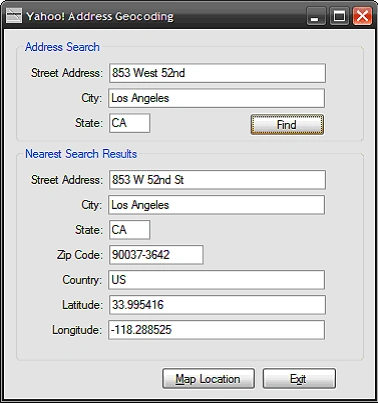
Figure 1: The demonstration application
running
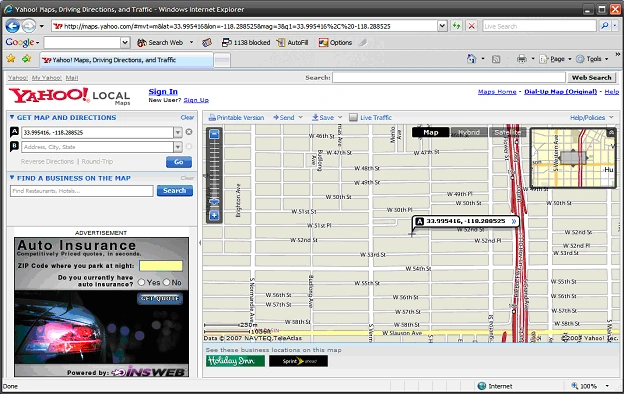
Figure 2: Displaying the coordinates in Yahoo Maps
Getting Started:
In order to get started, unzip the included project and open the solution in the
Visual Studio 2005 environment. In the solution explorer, you should note these
files:

Figure 3: Solution Explorer
The Main Form (Form1.vb)
The main form is the only form contained in the application; all of the
application specific code required to access the service, return the results of
an address search, and to display those results as text or as a map are included
in this class.
The code is pretty simple, if you'd care to open the code view up in the IDE you
will see that the code file begins as follows:
Imports System.Xml
The only import is System.Xml.
Following the import, the class is defined and a default constructor added.
Public Class Form1
''' <summary>
''' Default Constructor
''' </summary>
''' <remarks></remarks>
Public Sub New()
' This call is required by the Windows Form Designer.
InitializeComponent()
End Sub
Next up is the declaration of a structure used to contain the results returned
from a request to geocode a physical address.
''' <summary>
''' Address Struct is used to contain
''' the elements of the geocoded address
''' returned from the Yahoo Map Service
''' </summary>
''' <remarks></remarks>
Public Structure Address
Public Street As String
Public City As String
Public State As String
Public Zip As String
Public Country As String
Public Latitude As String
Public Longitude As String
End Structure
' declare an address
Private SearchAddress As Address
The next
section of the code is used to request a search on an address; this request is
submitted to Yahoo's service which returns the nearest matching address along
with its latitude and longitude. The geocoded address returned from the service
is stored in an Address.
''' <summary>
''' Call the Yahoo map service to geocode an address
''' and return that address to the caller
''' </summary>
''' <param name="street"></param>
''' <param name="city"></param>
''' <param name="state"></param>
''' <returns>A populated address</returns>
''' <remarks></remarks>
Private Function GetAddress(ByVal street As String, _ByVal city As String, _ByVal state AsString) As Address
Dim newAddress As New Address()
Dim reader As New XmlTextReader("http://local.yahooapis.com/MapsService/V1/geocode?appid=YahooDemo&street=" +
street + "&city=" +
city + "&state=" +
state)
' handle whitespace
reader.WhitespaceHandling = WhitespaceHandling.Significant
' get node values and populate address
While (reader.Read())
If reader.Name.ToString() = "Address" Then
newAddress.Street = reader.ReadString().ToString()
End If
If reader.Name.ToString() = "City" Then
newAddress.City = reader.ReadString().ToString()
End If
If reader.Name.ToString() = "State" Then
newAddress.State = reader.ReadString().ToString()
End If
If reader.Name.ToString() = "Zip" Then
newAddress.Zip = reader.ReadString().ToString()
End If
If reader.Name.ToString() = "Country" Then
newAddress.Country = reader.ReadString().ToString()
Join the conversation! Your thoughts help the community grow.