

I have created a simple code snippet which contains the combination of HTML structure, styles required for styling html structure and main JavaScript code.
HTML DOM
- <!-- Style required for HTML Snippet -->
- < style type = "text/css" > .tbl - roles th
- {
- background - color: #ddd;
- border: 2 px solid# fff;
- text - align: left
- }.tbl - roles td
- {
- background - color: #eee;
- border: 2 px solid# fff;
- }.web - heading
- {
- padding: 2 px;
- } < /style>
- <!--Include jQuery library to perform dynamic html dom manipulation -->
- < script type = "text/javascript"
- src = "/siteassets/scripts/jquery.js" > < /script> < div > < h2 class = "web-heading" > Web Role definitions < /h2> < /div> < table width = "100%"
- cellpadding = "10"
- cellspacing = "2"
- id = "tblRoles"
- class = "tbl-roles" > < thead > < tr > < th > Id < /th> < th > Role Name < /th> < th > Description < /th> < /tr> < /thead> < tbody > < /tbody> < /table>
- Load
- Some methods from jQuery is used to generate the result in tabular format.
- Create skeleton of table structure. Header row alone, later with the help of jQuery we will generate other rows.
- CSS lines help to style the table with results.
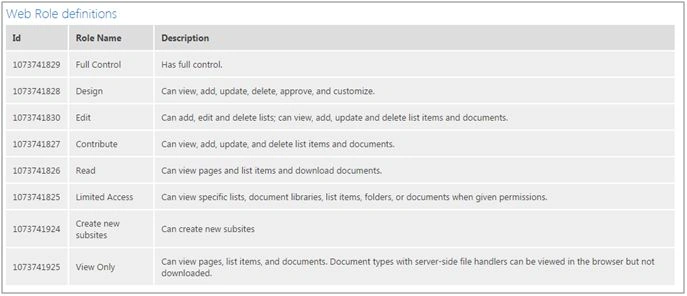
The permission level refers to the roles that are associated in the SharePoint site, which is used to align the permissions to groups or users to the SharePoint object.
The following REST API endpoint returns the collection of permission levels associated to the SharePoint site.
- http://<SharePoint site>/_api/web/roleDefinitions
parthasarathy BPosted Oct 1, 2018, 8:59 AM
How to get Role definitions for particular User using REST API
Ankit SaxenaPosted Jan 12, 2016, 3:21 AM
Good post. Thanks for sharing.
Nanddeep NachanPosted Jan 12, 2016, 12:08 AM
Nice share
Santhakumar MunuswamyPosted Jan 9, 2016, 2:24 AM
Thanks for nice article.
Debasis SahaPosted Jan 8, 2016, 12:08 AM
Good One..
Shubham KumarPosted Jan 7, 2016, 11:49 PM
nice explain
Shantha Kumar TPosted Jan 7, 2016, 11:44 PM
Thanks Vinodh
Vinodh NarayananPosted Jan 7, 2016, 10:59 PM
Good one