

Introduction
The Bot Framework enables you to build bots that support different types of interactions with users. You can design conversations in your bot to be free. Your bot can also have more guided interactions where it provides the users with choices or actions. The conversation can use simple text strings or more complex rich cards that contain text, images, and action buttons. And, you can add natural language interactions, which let your users interact with your bots in a natural and expressive way.
In this article, we will learn how to create a bot by using Visual Studio 2017 with Bot template, and will be testing it with the Bot Emulator.
Install Visual Studio 2017
Download Visual Studio 2017 from the following URL given below.
- Download Visual Studio 2017 from https://www.visualstudio.com/downloads/.
- Refer Visual Studio 2017 system requirement from https://www.visualstudio.com/en-us/productinfo/vs2017-system-requirements-vs.

Note
- You can build bots for free with Visual Studio 2017 Community.
- The Bot Builder SDK for .NET currently supports only Windows. Visual Studio for Mac is not supported.
Bot Application template
Download the Bot Application template from the following url -
http://aka.ms/bf-bc-vstemplate
- and install the template by saving the .zip file to your Visual Studio 2017 project templates directory.
The Visual Studio 2017 project templates directory is typically located at the following url -
%USERPROFILE%\Documents\Visual Studio 2017\Templates\ProjectTemplates\Visual C#\
 Create a New Project
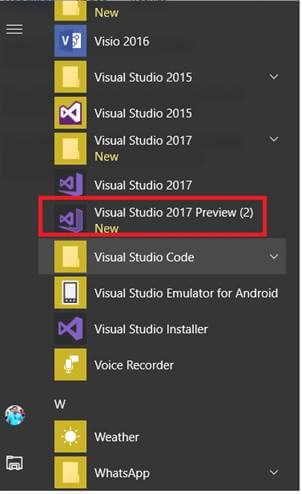
Let's start with creating a new Bot application in Visual Studio 2017. Go to Windows >> Visual Studio 2017.
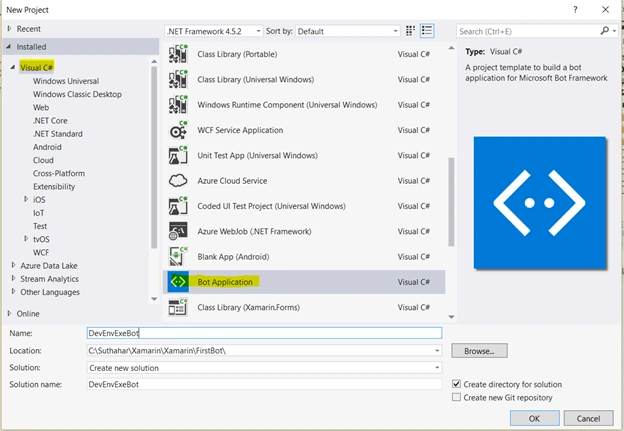
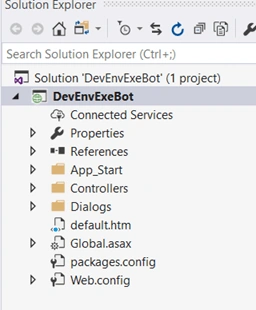
Verify that in your application Microsoft.Bot.Builder NuGet package was installed under reference. If not, refer to the below steps.
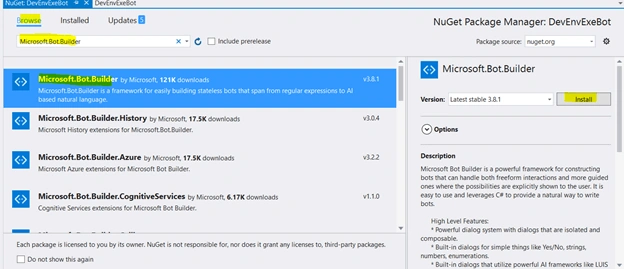
- Right-click on the Bot project (DevEnvExeBot) and select "Manage NuGet Packages".
- In the Browse tab, type "Microsoft.Bot.Builder" and click on "Search".
- Locate the Microsoft.Bot.Builder package in the list of search results, and click the "Update" button for that package; or Uninstall and install the package.
Update Code
The default application added a simple conde snippet, we have no need to change anything. If you want to test your custom message, you can change it like below.
You can find messagereceiveAsync method from Dialogs / RootDialog.cs file.
In this method, activity.Text will return user text input so that you can reply message based input text.
- private async Task MessageReceivedAsync(IDialogContext context, IAwaitable < object > result) {
- var activity = await result as Activity;
- // calculate something for us to return
- int length = (activity.Text ? ? string.Empty).Length;
- // return our reply to the user
- //test
- if (activity.Text.Contains("technology")) {
- await context.PostAsync("Refer C# corner website for tecnology http://www.c-sharpcorner.com/");
- } else if (activity.Text.Contains("morning")) {
- await context.PostAsync("Hello !! Good Morning , Have a nice Day");
- }
- //test
- else if (activity.Text.Contains("night")) {
- await context.PostAsync(" Good night and Sweetest Dreams with Bot Application ");
- } else if (activity.Text.Contains("date")) {
- await context.PostAsync(DateTime.Now.ToString());
- } else {
- await context.PostAsync($ "You sent {activity.Text} which was {length} characters");
- }
- Wait(MessageReceivedAsync);
- }
Install Bot Emulator
You need to download and install the emulator for testing bot application. You can download Bot Emulator from https://docs.microsoft.com/en-us/bot-framework/debug-bots-emulator.
 Run Bot Application
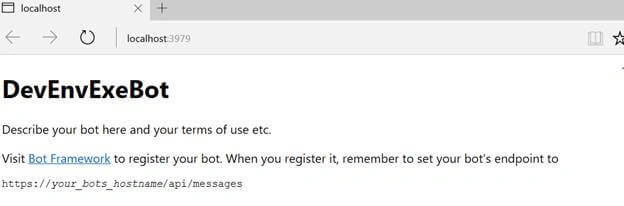
The emulator is a desktop application that lets you test and debug your bot on localhost or remotely. Now, you can click on "Run the application" in any browser.
 Test Application on Bot Emulator
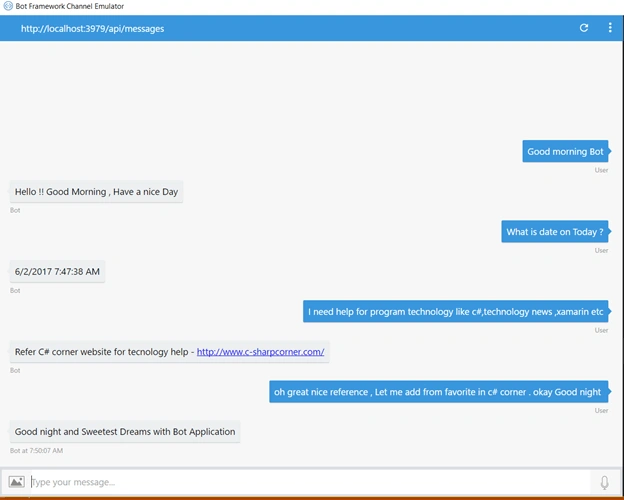
Follow the below steps to test your bot application.
- Open Bot Emulator.
- Copy the above localhost url and paste it in emulator e.g. - http://localHost:3979
- You can append the /api/message in the above url; e.g. - http://localHost:3979/api/messages.
- You won't need to specify Microsoft App ID and Microsoft App Password for localhost testing, so click on "Connect".

Summary
In this article, you learned how to create a Bot application using Visual Studio 2017. If you have any questions/ feedback/ issues, please write in the comment box.
Nishikant MohantyPosted Jun 11, 2019, 5:11 AM
Version 0.5.0.0 is not in nuget and this version can't update.
Nishikant MohantyPosted Jun 11, 2019, 5:10 AM
HI, the Adaptive cards has got new version and i need something like your code in new version plz help
jessy gunaPosted Jun 9, 2019, 8:28 PM
How do i connect my bot with oracle db that is present locally in my system?
Gopa MPosted Apr 3, 2019, 6:40 AM
Hi i am new to Chatbot. i want to integrate chat bot in my project (C# with Angular js ). based on the example we are running the code in emulator. but i want to deliver my out in my application with out Emulator. could you please help on this
Karthi SPosted Jan 10, 2019, 7:28 AM
Hi, the example which is given in article is for sdk3 or sdk4?i was trying the same in sdk4 so quite confused.Thanks
Deepak SelvarajPosted Dec 26, 2018, 5:45 AM
Hi I am quite new to Chatbot. I have created a basic Bot in VS. All I have to do is to redirect the user to a registration aspx page in the VS solution when the user enters into conversation.
Tausif MominPosted Sep 8, 2018, 12:07 PM
Nice article sir but can you tell me how to integrate this bot with our application
Sumit Singh SisodiaPosted Dec 20, 2017, 1:32 PM
Emulator URL Gives 404, https://docs.microsoft.com/en-us/bot-framework/debug-bots-emulator
Srikanth KanduriPosted Oct 17, 2017, 10:53 AM
Is there any possibility like redirect the parent page (eg., from Default.aspx to Home.aspx, based user on Microsoft bot - Direct/Webchat channel without clicking on the link?
Sundaram SubramanianPosted Jun 13, 2017, 8:05 AM
only the queries in the if and else statments works ???
Rub .Posted Jun 4, 2017, 10:15 AM
Thanks, very helpfull
Gnanavel SekarPosted Jun 3, 2017, 9:15 AM
New and nice to me, thanks for sharing this wonderful article sir.....
Gayathri AnbazhaganPosted Jun 3, 2017, 8:17 AM
Nice article... thanks for sharing