

About Task Runner
There are certain tasks which front-end developers are often asked to do. Tasks like:
- CSS file compression
- JS minification or obfuscation
- HTML/JSON file minification
- Image optimisation
- Compile SASS or LESS files to generate CSS files
- Unit testing
- SVN commit
- Build deployment etc
To do the above tasks we need so many different reliable tools and it is a tedious task to find such types of reliable tools online. And I don’t think any such tool is available which can do all the above tasks in one click.
What if these tasks can be automated and can be done in one key press? To do this, we would need to write few tasks in JS file and run Grunt.
So, what is Task Runner? We can say task runner is in one word Automation. Task runners help us to automate these tasks and perform these tasks synchronously or asynchronously.
Grunt
Grunt is a JavaScript Task Runner and this is a command line tool which runs on NodeJS. It helps us to do all the above tasks very easily with a minimum effort. Grunt ecosystem and its huge list of plugins help us get all front-end code production ready.
Prerequisites
Grunt and Grunt plugins are installed and managed by NodeJS Package Manager (npm). To run grunt commands, it is required to have NodeJS installed in your system.
To test if node and npm are installed in your system, followthe below steps:
- Open terminal
- Type “node –v” in command line and press enter. It should show node version.
- Type “npm” in command line and press enter. It should show npm details.
Install Command Line Interface (CLI)
To work with Grunt, it is required to install Grunt’s Command Line Interface (CLI). To install run below command in command line (or terminal in Mac).
npm install -g grunt-cli
This will put the grunt command in your system path, allowing it to be run from any directory.
In Mac it may be required to use sudo to run npm commands. So, in that case, command should look like:
sudo npm install -g grunt-cli
Start with a new Grunt Project
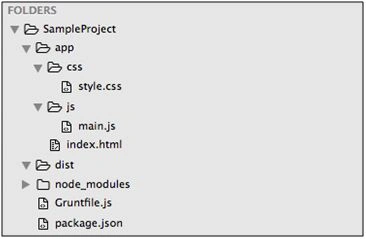
Each grunt project requires two files in your project folder:
- package.json
- Gruntfile.js
Create package.json
As mentioned in official website of Grunt, this file is used by npm to store metadata for projects published as npm modules. You will list grunt and the Grunt plugins your project needs as devDependencies in this file. To create package.json:
- Change to Project’s root directory in the command line.
- Run below command in command line:
npm init
This command will askfor a few inputs. It is not necessary to enter values for any option. Remember to type “Gruntfile.js” when it asks “entry point”. Then continue pressing enter. It will create a package.json file in your project directory. package.json should look like:
- {
- "name": "sampleproject",
- "version": "1.0.0",
- "description": "",
- "main": "Gruntfile.js",
- "scripts": {
- "test": "echo \"Error: no test specified\" && exit 1"
- },
- "author": "",
- "license": "ISC"
- }
Gruntfile.js is a JavaScript file which will be used to configure or define tasks and load Grunt plugins. So, to create a Gruntfile.js:
- Create a new JavaScript file with name Gruntfile.js in your project directory.
- Copy below code to Gruntfile.js and save:
- module.exports = function(grunt) {
- grunt.initConfig({
- pkg: grunt.file.readJSON('package.json'),
- });
- grunt.registerTask('default', []);
- };
Install Grunt
To install grunt in your project folder, run the below command in command line:
npm install grunt --save-dev
Appending --save-dev in any npm command, it adds installed plugin in devDependencies object of the package.json.
- {
- "name": "sampleproject",
- "version": "1.0.0",
- "description": "",
- "main": "Gruntfile.js",
- "scripts": {
- "test": "echo \"Error: no test specified\" && exit 1"
- },
- "author": "",
- "license": "ISC",
- "devDependencies": {
- "grunt": "^0.4.5"
- }
- }
In command line, type grunt and press enter. Below message should appear in your command line:
Done, without errors.
If above message is appearing in the command line, it means your grunt project is ready and we are good to move forward to add plugins for automation tasks in our Grunt file.
How to Add Tasks in Grunt file
Let’s start with how tasks work by adding a “test” task in our Gruntfile.js. Add below code in your Gruntfile.js:
- grunt.registerTask('test', 'My "test" task description.', function() {
- grunt.log.writeln('Currently running the "test" task.');
- });
- module.exports = function(grunt) {
- grunt.initConfig({
- pkg: grunt.file.readJSON('package.json'),
- });
- grunt.registerTask('test', 'My "test" task description.', function() {
- grunt.log.writeln('Currently running the "test" task.');
- });
- grunt.registerTask('default', []);
- };
Sabyasachi MishraPosted Mar 10, 2016, 11:22 PM
nice one and well explained
Saillesh PawarPosted Mar 8, 2016, 11:08 AM
gREAT
kalu singh raoPosted Mar 7, 2016, 10:33 AM
Nice...
Sibeesh VenuPosted Mar 7, 2016, 7:30 AM
Nice Share
Vignesh ManiPosted Mar 7, 2016, 6:31 AM
Good
Mohammed IbrahimPosted Mar 7, 2016, 4:11 AM
nice
Anurag TomarPosted Mar 7, 2016, 12:07 AM
Great Article :)
Akhil MittalPosted Mar 6, 2016, 10:16 PM
Sumant Mishra Nice article :-) Helpful.
Kumaresh RajalingamPosted Mar 6, 2016, 8:33 PM
good one
Kumaresh RajalingamPosted Mar 6, 2016, 8:33 PM
Nice explanation
Ranjan DailataPosted Mar 6, 2016, 6:50 PM
Gulp can also do like what Grunt does :)
Asfend YarPosted Mar 6, 2016, 2:58 PM
nice