

Introduction
A process of testing the smallest functional unit of code. Unit testing often involves testing the logic of the unit of code by providing the fake input to that piece of code. It usually involves three steps Arrange, Act, and Assert.
Importance of Unit Testing in Modern Web Development
There are several reasons why unit testing is important.
- Ensure Code Quality: Writing unit tests for a piece helps verify that each line of code is working as expected or not.
- Promotes Maintainability: Well-tested helps to maintain the code base because we can identify the root cause of the problem more quickly.
- Bugs Detection: Bugs can be found more easily because you can provide fake data to that piece to check the behaviors it will perform in real scenarios.
- Facilitate Continuous Integration and Deployment: By writing unit tests you can include that in your CI/CD pipeline to ensure that when a code goes for deployment it first passes all the unit tests otherwise it does not.
Let's jump into the code and do some practical to understand it better.
Setting Up the Testing Environment
ASP.NET Core provides various testing frameworks like,
- xUnit
- NUnit
- MSTest
For me, I like working with xUnit so in this demo we will go with xUnit. Create a new test project and select the xUnit testing framework template in Visual Studio. You can also create the project by using dotnet CLI.
dotnet new sln -o unit-testing-using-dotnet-test
Install Required Nuget Packages
Here's the corrected version, including the real commands to install the packages.
I like to use a few NuGet packages when working with unit testing.
- AutoFixture: Used to generate fake data. `dotnet add package AutoFixture`.
- Moq: Used to generate mock objects of dependencies. `dotnet add package Moq`.
- FluentAssertions: Used to assert test results more descriptively and functionally. `dotnet add package FluentAssertions`
What do you need to test exactly?
I have a clean architecture in this demo project and I will test the Application Layer. The application layer takes care of the HTTP Request, performs operations, and then gives a response back to the API layer. So in my opinion writing a unit test for the Application layer makes sense. Below is the screenshot of the clean architecture setup of my project.
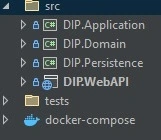
After setting up the solution with the xUnit Testing framework now let's start writing some unit tests.
I have this CompanyService class which is in the Application Layer and I will write unit tests for each function of this service.
public sealed class CompanyService
{
    private readonly ApplicationDbContext _context;

    public CompanyService(ApplicationDbContext context)
    {
        _context = context;
    }

    public async Task<Company> GetCompanyAsync(Guid id)
    {
        var company = await _context.Companies.FindAsync(id);
        return company!;
    }

    public async Task<Company> GetCompanyAsync(string companyName)
    {
        var company = await _context.Companies.SingleOrDefaultAsync(e => e.Name.Equals(companyName));
        return company!;
    }

    public async Task<Guid> CreateCompany(string name)
    {
        var company = Company.Create(name);
        _context.Companies.Add(company);
        await _context.SaveChangesAsync();

        return company.Id;
    }
}
Now I will create a test class with the name CompanyServiceTest to write all my company entity-related tests inside it.
public class CompanyServiceTests: IDisposable
{
    private readonly ApplicationDbContext _dbContext;
    private readonly CompanyService _companyService;

    public CompanyServiceTests()
    {
        var options = new DbContextOptionsBuilder<ApplicationDbContext>()
            .UseInMemoryDatabase(databaseName: "TestDatabase")
            .Options;

        _dbContext = new ApplicationDbContext(options);
        _companyService = new CompanyService(_dbContext);
    }

    [Fact]
    public async Task GetCompanyById_ShouldReturnCompany_WhenCompanyExists()
    {
        // Arrange
        var companyId = Guid.NewGuid();
        var company = new Company { Id = companyId, Name = "Test Company" };

        _dbContext.Companies.Add(company);
        await _dbContext.SaveChangesAsync();

        // Act
        var result = await _companyService.GetCompanyAsync(companyId);

        // Assert
        Assert.NotNull(result);
        Assert.Equal(companyId, result.Id);
        Assert.Equal("Test Company", result.Name);
    }

    [Fact]
    public async Task ShouldCreateCompany_WhenCompanyNotExists()
    {
        // Arrange
        var company = Company.Create("Test Company");

        _dbContext.Companies.Add(company);
        await _dbContext.SaveChangesAsync();

        // Act
        var result = await _companyService.CreateCompany(company.Name);

        // Assert
        result.Should().NotBeEmpty();
    }

    [Fact]
    public async Task GetCompanyByName_ShouldReturnCompany_WhenCompanyExists()
    {
        // Arrange
        var companyId = Guid.NewGuid();
        var company = new Company { Id = companyId, Name = "Test 1 Company" };

        _dbContext.Companies.Add(company);
        await _dbContext.SaveChangesAsync();

        // Act
        var result = await _companyService.GetCompanyAsync(company.Name);

        // Assert
        Assert.NotNull(result);
        Assert.Equal(companyId, result.Id);
        Assert.Equal("Test 1 Company", result.Name);
    }

    public void Dispose()
    {
        _dbContext.Dispose();
    }
}
Join the conversation! Your thoughts help the community grow.