

Introduction
Today we explain how to create an app that gets the user's current geographic location using C# and XAML in Windows Store apps. It is possible to get user current location in Windows Store apps.
This example shows your location, latitude, longitude and accuracy in meters and location status. When you first time run the app, you'll get a prompt that asks if the app can use your location. Choose the "Allow" option. Click the "Get Location" button to get the current location. In this example we are using two namespaces; "Windows.Devices.Geolocation" to determine location information and "Windows.UI.Popups" to display a message.
Step 1
Open Visual Studio 2012 and start a new Windows Store app.
Step 2
Go to Solution Explorer and click on "Package.appxmanifest" to open it.
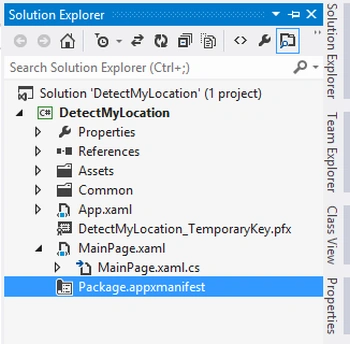
Step 3
In "Package.appxmanifest" go to the "Capability" tab and enable "Location".

Step 4
Now go to the "MainPage.xaml" page and replace all code with the following code:
<Page
x:Class="DetectMyLocation.MainPage"
xmlns="http://schemas.microsoft.com/winfx/2006/xaml/presentation"
xmlns:x="http://schemas.microsoft.com/winfx/2006/xaml"
xmlns:local="using:DetectMyLocation"
xmlns:d="http://schemas.microsoft.com/expression/blend/2008"
xmlns:mc="http://schemas.openxmlformats.org/markup-compatibility/2006"
mc:Ignorable="d">
<Grid Background="SteelBlue">
<Button Content="Find Location" Height="30"
HorizontalAlignment="Left" Margin="12,180,0,0" Name="button3" VerticalAlignment="Top" Width="120" Click="button3_Click" />
<TextBlock Margin="14,220,0,0" Text="Latitude" x:Name="textLatitude" />
<TextBlock Margin="14,260,0,0" Text="Longitude" x:Name="textLongitude" />
<TextBlock Margin="14,300,0,0" Text="Accuracy" x:Name="textAccuracy" />
</Grid>
</Page>
Step 5
Your "MainPage.xaml.cs" page is as the following:
using System;
using System.Collections.Generic;


Join the conversation! Your thoughts help the community grow.