
Globalization & Localization:
It is that part of .NET that deals with "Multi Lingual" Applications i.e the web
application which can generate content in different languages. The Dynamic
content which comes from the database will already be in a specific language we have
to explicitly take care of the static content we change from language to
language
For every language which we wish to support we add a RESOURCE FILE having key
value pairs ,the keys will be same but the values will change based on the language
which our application supports.
To the project we can have GLOBAL and Local Resource Files
The Difference between Global and Local Resource Files are, GRF: It can share
between many web forms, LRF: It has to share to a particular web form
*GRF(GlobalResource File)
*LRF(LOCALResource File)
- While dealing with multilingual If some dynamic (language independent) text has to be stored in the database table the column datatypes to be taken must be either nChar, nVarchar, nText.
- In Web.Config: <globalization requestEncoding="Unicode" responseEncoding="Unicode"/>
"WebConfig" will decide how the text going to be encoded
Three steps for building a Multi-Lingual WebApplication
Creation of Resource files
Designing the WebForm so that the controls in it are linked to the Keys of resource
files
Set the culture settings with thread executing the request from the client
Creation of Resource Files
Local Resource File: These files must be present in the folder
App_LocalResources and the filename is based on the name of WebForm with which
the resource file is associated with.
Steps:
- Create a new Web Application with Default.aspx
- To the root folder - RightClick - Add ASP.NET Folder - App_LocalResources
- To App_LocalResources - RightClick - Add a new Item - Resource File (provide name and Value pairs)
\AppName\Default.aspx.
\AppName\App_LocalResources\Default.aspx.resx - Culture Neutral Resource File.
\AppName\App_LocalResources\Default.aspx.fr.resx - French Neutral Resource File.
\AppName\App_LocalResources\Default.aspx.fr-BE.resx - French Belgium Resource
File.
\AppName\App_LocalResources\Default.aspx.de.resx- German Neutral Resource File.

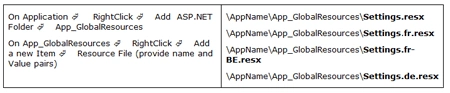
Global Resourse File in the folder App_GlobalResources: This is Global to all
the WebForms in a given web application. It can have any name and must be
present in the Root directory of the web application.

Design the WebForm so that the controls are linked to Keys in Resource Files
Steps for setting the Explicit Expression:
- Select the control - RightClick - Properties - Goto Expressions
- On the lefthand side select the property to be initialized, set ExpressionType to Resources
- If the key has to be fetched from LocalResources File directly set ResourceKey. Otherwise, to fetch from GlobalResoucesFile first set ClassKey with the value of GlobalResource Filename and then set ResourceKey
--------------------Explicit Expression From
Local Resource File------------------
<asp:Label Text="<%$Resources:lblRealNameTextKey %>"
ForeColor="<%$Resources:lblRealNameForeColorKey %>" ID="lblRealName" runat="server"/>
------------------Explicit Expression From Global Resource
File---------------</strong>
<asp:Label Text="<%$ Resources:Settings, lblCompanyName %>" ID="lblCompanyName"
runat="server"></asp:Label>
--------------------Implicit Expression-------------------
<asp:Label meta:ResourceKey="lblAddressKey" ID="lblAddress" runat="server"/>
Based on the key "lblAddressKey" the ForeColor and Text properties are
automatically fetched from the resouce file.
Note: Implicit expression cannot fetch keys from Global Resource File.
-------------------Fetching Values Programatically-------
<asp:Label ID="lblRealName1" runat="server" Font-Bold="False"></asp:Label>
--------------Culture Demos-------------------
<asp:Label ID="lblDate" runat="server"></asp:Label>
<asp:Label ID="lblAmount" runat="server"></asp:Label>
Default.aspx.vb
protected
void Page_Load(object
sender, EventArgs e)
{
lblRealName1.Text = GetLocalResourceObject("lblRealNameTextKey").ToString();
lblRealName1.ForeColor =
System.Drawing.Color.FromName(GetLocalResourceObject("lblRealNameForeColorKey").ToString());
decimal amt = 100.02M;
lblAmount.Text = amt.ToString("C");
lblDate.Text = DateTime.Now.ToString();
}
We can use GetGlobalResourceObject for reading the Key - Value pair from
Global resource file.
Any one of the following alternatives can be used for associating the culture
with the current thread / request in execution.
Alternative 1
We do it in the Web.Config file.
Note: If configured here the value would remain same for all the webforms
of the project and is not based on clients choice of language.
Alternative 2: In ASPX Page.
Join the conversation! Your thoughts help the community grow.