Introduction
This article describes how to add a Google Image search feature in ASP.Net. Here I will describe how to communicate with the Google search API.
Description
Since it is third party software, we require a third-party DLL to be referenced by our application that will communicate with the Google server.
For this we must download the Google Search API:
- GoogleSearchAPI.dll
You can download it from the source code attached to this article.
Or from this link: http://google-api-for-dotnet.googlecode.com/files/GoogleSearchAPI_0.3.1.zip
Design
Now add one TextBox,one Button and one Datalist.
In the Datalist I used one HyperLink to show the search result title with Image and LinkButton to show the actual site link.
Design your screen as in the following screen.
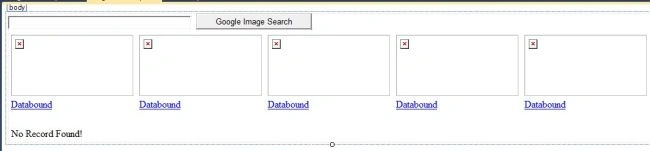
Or you can copy the following source code:
- <body>
- <form id="form1" runat="server">
- <div>
- <asp:TextBox ID="TextBox1" runat="server" Width="300px"></asp:TextBox>
- <asp:Button ID="btnSearch" runat="server" Text="Google Search" OnClick="Button1_Click" /><br />
- <asp:DataList ID="dlSearch" runat="server" Width="600px">
- <ItemTemplate>
- <asp:HyperLink ID="HyperLink1" runat="server" NavigateUrl='<%#Eval("Url") %>'><img src='<%#Eval("Url") %>' width="200" height="100px"/></asp:HyperLink>
- <asp:LinkButton ID="LinkButton2" runat="server" Text='<%#Eval("Title") %>' PostBackUrl='<%#Eval("OriginalContextUrl") %>'> </asp:LinkButton><br />
- <br />
- </ItemTemplate>
- <FooterTemplate>
- <asp:Label Visible='<%#bool.Parse((dlSearch.Items.Count==0).ToString())%>' runat="server"
- ID="lblNoRecord" Text="No Record Found!"></asp:Label>
- </FooterTemplate>
- </asp:DataList>
- </div>
- </form>
- </body>
Now go to the code view.
Next add a reference of the following Google Search API DLL to your website:
- GoogleSearchAPI.dll
And write the following code in the .cs file:
- using System;
- using System.Collections.Generic;
- using Google.API.Search;
- using System.Data;
- public partial class _Default : System.Web.UI.Page
- {
- protected void Page_Load(object sender, EventArgs e)
- {
- if (!IsPostBack)
- {
- dlSearch.DataSource = null;
- dlSearch.DataBind();
- TextBox1.Text = "";
- }
- }
- protected void Button1_Click(object sender, EventArgs e)
- {
- DataSet ds = new DataSet();
- DataTable dt = new DataTable();
- dt.Columns.Add(new DataColumn("Title", typeof(string)));
- dt.Columns.Add(new DataColumn("OriginalContextUrl", typeof(string)));
- dt.Columns.Add(new DataColumn("Url", typeof(string)));
- GimageSearchClient client = new GimageSearchClient("www.c-sharpcorner.com");
- IList<IImageResult> results = client.Search(TextBox1.Text, 30);
- foreach (IImageResult result in results)
- {
- DataRow dr = dt.NewRow();
- dr["Title"] = result.Title.ToString();
- dr["OriginalContextUrl"] = result.OriginalContextUrl;
- dr["Url"] = result.Url;
- dt.Rows.Add(dr);
- }
- dlSearch.DataSource = dt;
- dlSearch.DataBind();
- }
- }
In the code above I passed the TextBox value in the button click to Google server.
After getting the result I bound it to the datatable then to the datalist control.
Just check these two lines:
- GimageSearchClient client = new GimageSearchClient ("www.c-sharpcorner.com");
- IList<IImageResult> results = client.Search(TextBox1.Text, 30);
In the first line I am passing "www.c-sharpcorner.com" as the Client because it required a hosted site for security purposes.
If you don't pass that then it will show an exception.
In the second line I am passing 30 and a TextBox value. Here 30 in other words I am getting 30 search results.
So you can increase or decrease this value as needed.
Now build your application. Enter a search query then press the button.
It will show all the Google search Image results.

Click on the image to see the original image and click on the link to see the corresponding Image website.
For any modifications or problems please comment.
Thank You.
Google search APIGoogle Image searchGoogle Image search feature in ASP.Net


Bhuvanesh MohankumarPosted May 29, 2016, 7:09 AM
Nice one
Nallapaneni BhanuChandPosted Mar 16, 2016, 1:25 AM
Hi.. As am using this code for image search in asp.net the the error had occurred like [response status:403]This API is no longer available. what is the solution for this. how can we rectify that. please suggest alternative solution for this error. my mail id: [email protected]
Kien HoangPosted Jan 20, 2016, 8:54 PM
Hi! Thanks for your code! But I used C# winform to search image with google api, an error occured : "[response status:403]This API is no longer available." Please help me!
saravanan ezhumalaiPosted Oct 30, 2014, 10:24 AM
hello everyone i used this code but while adding the namespace (Google.API.Search). I'm getting error. it shows red line under API. and the error is " The Type name API does not exist in type Google". pls get me out from this error.. and pls suggest any alternate way to retrieve image from google image search and show in our web page... my mail id: [email protected]
Sanjeeb LenkaPosted Jun 22, 2013, 3:42 AM
yes in my next post i will provide that tutorial for Video search
Jack OwensPosted Jun 21, 2013, 3:18 PM
Question-03: Is there any example like this one for YouTube search?
Jack OwensPosted Jun 21, 2013, 3:17 PM
Question-02: In example above you are showing 30 records MAX. I presume Pagination is something that needs to be implemented on top of this code-base correct OR does Google API provides are feature out-of-box to do that?
Jack OwensPosted Jun 21, 2013, 3:14 PM
Question-01: Other than the attributes that are displayed (above in your example), what other attributes are exposed by Google Image Search API?
Jack OwensPosted Jun 21, 2013, 3:12 PM
Great article