Gradio 6 introduces a unified event-driven architecture, simplified component lifecycle, improved state handling, and a cleaner Python-first API. For developers upgrading from Gradio 3–5, the changes streamline UI creation and eliminate inconsistent patterns that built up across earlier versions. This guide provides a migration-focused walkthrough with before/after code examples, component updates, callback migration patterns, and structured diagrams to help teams modernize existing interfaces with minimal friction.
This tutorial assumes intermediate Python experience and familiarity with prior Gradio versions.
Conceptual Background
Earlier Gradio releases grew organically as features expanded. Versions 3–5 added blocks, events, and component patterns incrementally, resulting in:
Multiple ways to handle events.
Inconsistent component attributes.
Patchwork patterns for state, async execution, and streaming.
Hard-to-track update logic.
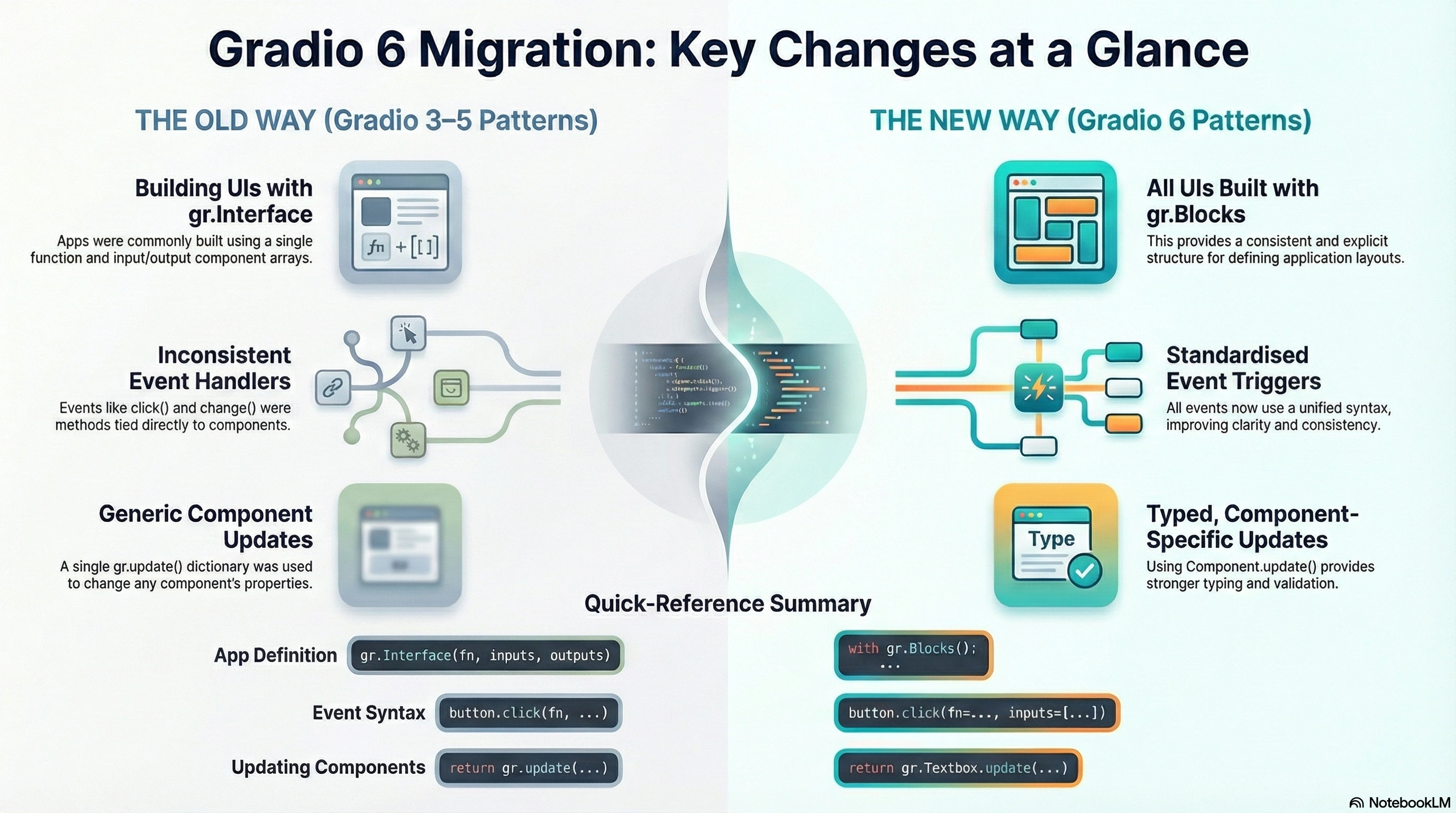
Gradio 6 consolidates these patterns into a single, consistent event model, more predictable component definitions, and clearer data flow. Migration focuses on three core changes:
Event system unification.
Standardized component interfaces.
More explicit application structures.
Mermaid Diagram: Migration at a High Level
Step-by-Step Walkthrough
Step 1: Identify Deprecated Patterns
Primary deprecated patterns:
gradio.Interface positional constructors.
inputs= and outputs= arrays.
Legacy change(), click(), submit() methods tied directly to components.
update(...) dictionaries scattered across callbacks.
ML model deployments that originally used Interface.
Fast prototyping where unified events simplify experimentation.
Enterprise apps need consistent code patterns across teams.
Limitations / Considerations
Some deprecated attributes are removed entirely; fallback shims may not exist.
Async streaming requires Python 3.8+.
Component-specific updates require checking the new update signatures.
Interface-to-Blocks rewrites are manual for complex apps.
Fixes (Common Pitfalls)
Problem: Buttons no longer accept direct .click(fn, ...) with positional args
Fix: Use keyword args.
Problem: Old gr.update() usages break
Fix: Replace with Component.update().
Problem: Interface apps fail to load dynamic components
Fix: Convert to Blocks and assign variables explicitly.
Frequently Asked Questions
Can I still use Interface in Gradio 6?
Basic usage remains, but Blocks is recommended for all migration paths.
Does Gradio 6 auto-upgrade old event handlers?
No. You must update event signatures manually.
Do streaming callbacks require async?
Async is preferred, but sync generators are still supported.
Are component names required now?
Variables referencing components are recommended for clarity.
References
Gradio official migration notes
Python async/await documentation
UI component design best practices
Event-driven architecture patterns
Reactive data flows in Python apps
Conclusion
Gradio 6 delivers a more unified, predictable, and modern interface framework for Python developers. Migrating from Gradio 3–5 requires updating event definitions, adopting component-specific update objects, and switching to the Blocks API for structured UI definition. With standardized behaviors across components and events, Gradio 6 improves maintainability and reduces code complexity across applications.
Upgrading now ensures compatibility with new Gradio features and a more scalable UI architecture.




Join the conversation! Your thoughts help the community grow.