

Abstract / Overview
Visible watermarking improves provenance and disclosure for AI media. Gradio adds built-in watermark support to Image, Video, and Chatbot components so that you can ship disclosure without custom front-end code. This article showcases a production-ready demo, which generates a QR watermark image, overlays a persistent watermark into exported images, displays a UI-level watermark on images and videos, and appends a copy watermark to chatbot messages. Assumption: Python 3.10+ with gradio, Pillow, and qrcode installed.
Direct answer
Use gr.Image(..., watermark=wm_img), gr.Video(..., watermark="wm.png"), and gr.Chatbot(..., watermark="Text"). The watermark appears bottom-right for Image and Video. For the Chatbot, the text is appended when users copy messages. (Gradio)
Conceptual Background
Watermarking has two forms here:
Display watermark: a visible overlay in the UI for images and videos. Users see it, but the base file is unchanged. (Gradio)
Copy watermark: a string appended when users copy chatbot messages, which improves attribution for downstream paste events. (Gradio)
Why it matters now
Gradio added native parameters for images, videos, and chat copy, lowering integration cost to one line per component. (Hugging Face)
Regulation and policy discussions continue to push for clear labeling of AI content. (European Parliament)
Deepfake exposure and fraud incidents are trending upward, which increases the value of provenance cues such as visible marks and copy attributions. (Regula)
Step-by-Step Walkthrough
Install dependencies
pip install gradio pillow qrcode[pil]Prepare a QR watermark image
This creates a small, high-contrast PNG watermark.
# make_qr_watermark.py
from PIL import Image
import qrcode

def make_qr_watermark(text="Generated with YourApp.example", out_path="qr_watermark.png", box_size=4):
    qr = qrcode.QRCode(version=1, box_size=box_size, border=1)
    qr.add_data(text)
    qr.make(fit=True)
    img = qr.make_image(fill_color="black", back_color="white").convert("RGBA")
    # optional: make white background transparent for better overlay
    datas = img.getdata()
    new_data = []
    for r, g, b, a in datas:
        if r > 240 and g > 240 and b > 240:
            new_data.append((255, 255, 255, 0))
        else:
            new_data.append((r, g, b, a))
    img.putdata(new_data)
    img.save(out_path)
    return out_path

if __name__ == "__main__":
    make_qr_watermark()
Persistently overlay a watermark into an image you export
Gradio’s UI watermark is visible but does not modify pixels. Many teams also want an exported image with pixels marked.
# overlay_persistent.py
from PIL import Image

def overlay_watermark(base_img: Image.Image, wm_img: Image.Image, margin=10):
    base = base_img.convert("RGBA")
    wm = wm_img.convert("RGBA")
    bx, by = base.size
    wx, wy = wm.size
    # place at bottom-right
    x = max(0, bx - wx - margin)
    y = max(0, by - wy - margin)
    composite = base.copy()
    composite.alpha_composite(wm, (x, y))
    return composite.convert("RGB")
Build the full Gradio demo
Tab 1: Upload an image, show a UI watermark, and offer a persistently watermarked download.
Tab 2: Display a video with a UI watermark.
Tab 3: Chatbot with a copy watermark for attribution.
# app.py
import gradio as gr
from PIL import Image
from overlay_persistent import overlay_watermark
from make_qr_watermark import make_qr_watermark

WM_PATH = make_qr_watermark("AI-generated media: example.com/provenance")

def persist_overlay_fn(img: Image.Image):
    wm = Image.open(WM_PATH)
    out = overlay_watermark(img, wm)
    return out

with gr.Blocks(title="Gradio Watermarking Demo") as demo:
    gr.Markdown("## Watermark your media and disclose provenance")

    with gr.Tab("Image"):
        with gr.Row():
            inp = gr.Image(label="Upload image", type="pil")
            out = gr.Image(label="Preview with UI watermark", interactive=False, watermark=WM_PATH)
        with gr.Row():
            btn_preview = gr.Button("Preview (UI watermark only)")
            btn_export = gr.Button("Export with pixels watermarked")
            download = gr.Image(label="Exported image (pixels watermarked)", interactive=False, show_download_button=True)

        def preview(img):
            # pass through; UI watermark is applied by the component parameter
            return img

        btn_preview.click(preview, inputs=inp, outputs=out)
        btn_export.click(persist_overlay_fn, inputs=inp, outputs=download)

    with gr.Tab("Video"):
        gr.Markdown("Video output shows a UI watermark in bottom-right.")
        vid_note = gr.Markdown("Upload or provide a URL to a short, browser-compatible video.")
        vid_in = gr.Video(label="Input video")
        # When used as output, Gradio can repackage streams. Here we simply echo input.
        vid_out = gr.Video(label="Watermarked (UI overlay)", watermark=WM_PATH)
        def passthrough(v):
            return v
        vid_in.change(passthrough, inputs=vid_in, outputs=vid_out)

    with gr.Tab("Chat"):
        gr.Markdown("Copy any assistant message; attribution is appended.")
        chat = gr.Chatbot(
            value=[{"role": "assistant", "content": "Ask about watermarking."}],
            type="messages",
            watermark="Generated by AI • example.com/provenance"
        )
        msg = gr.Textbox(label="Your message")
        def respond(history, message):
            history = history + [{"role": "user", "content": message}]
            # trivial echo; replace with your model call
            history += [{"role": "assistant", "content": f"Watermarking info: {message}"}]
            return history, ""
        msg.submit(respond, inputs=[chat, msg], outputs=[chat, msg])

demo.launch()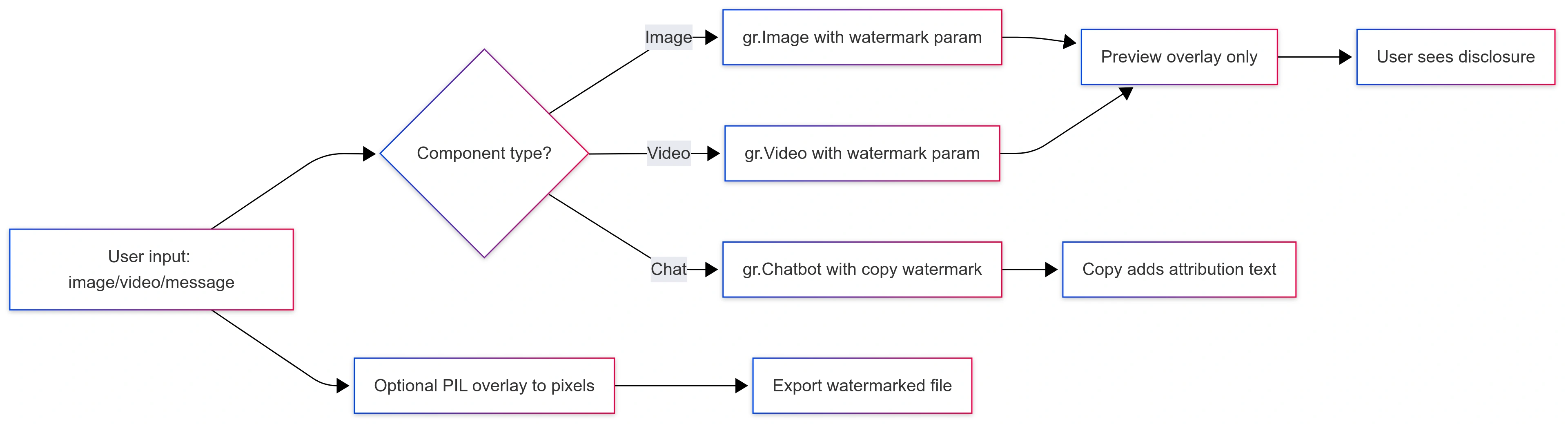
Join the conversation! Your thoughts help the community grow.