

Fundamentals of GridView Control
If we have data in database we can display it in Data Display controls and also
can edit it. There are couples of Data Display and Edit Controls exist in
ASP.Net but we will discuss on GridView here.
The GridView control is one of the most useful controls in ASP.NET. The GridView
control enables us to display, select, sort, page, and edit data items such as
database records.
Displaying Data
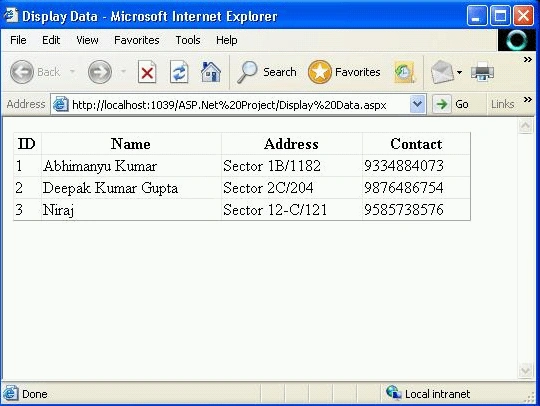
GridView control renders data items in an HTML table. Each data item is rendered
in a distinct HTML table row. For example, given code will demonstrates how we
use the GridView to display the contents of the database table.
<%@ Page Language="VB" AutoEventWireup="false" CodeFile="Display
Data.aspx.vb"Inherits="Display_Data" %>
<!DOCTYPE html PUBLIC "-//W3C//DTD
XHTML 1.0 Transitional//EN""http://www.w3.org/TR/xhtml1/DTD/xhtml1
transitional.dtd">
<html xmlns="http://www.w3.org/1999/xhtml">
<head runat="server">
<title>Display
Data</title>
</head>
<body>
<form id="form1" runat="server">
<div>
<asp:GridView ID="GridView1" runat="server" AutoGenerateColumns="False"
DataSourceID="SqlDataSource1"
EmptyDataText="There
are no data records to display." Width="458px">
<Columns>
<asp:BoundField DataField="ID" HeaderText="ID" SortExpression="ID" />
<asp:BoundField DataField="Name" HeaderText="Name" SortExpression="Name" />
<asp:BoundField DataField="Address" HeaderText="Address"
SortExpression="Address" />
<asp:BoundField DataField="Contact" HeaderText="Contact"
SortExpression="Contact" />
</Columns>
</asp:GridView>
<asp:SqlDataSource ID="SqlDataSource1" runat="server"
ConnectionString="<%$ ConnectionStrings:DatabaseConnectionString1 %>"
ProviderName="<%$ ConnectionStrings:DatabaseConnectionString1.ProviderName %>"
SelectCommand="SELECT
[ID], [Name], [Address], [Contact] FROM [MyTB]">
</asp:SqlDataSource>
</div>
</form>
</body>
</html>
In above code, the GridView control is bound to a SqlDataSource control, which
represents the database table named MyTB. The GridView is associated with its
data source through its DataSourceID property.
We can add a GridView and SqlDataSource control to a page quickly by dragging a
database table from the Database Server Explorer onto a page in Design view. It
automatically creates SqlDataSource, which retrieves all the rows and all the
columns from database table.
Programmatic Data Binding
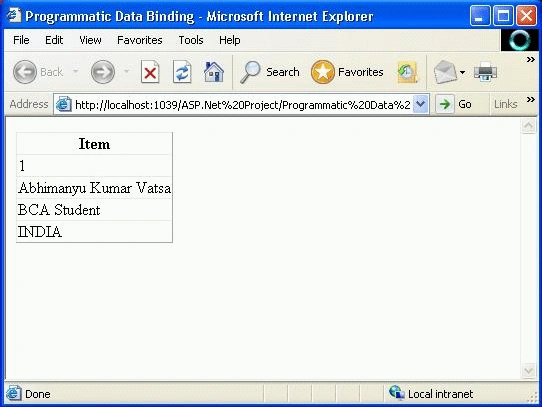
GridView control also supports programmatic data-binding. In programmatic
data-binding it lists Generic collections. Notice that the GridView is bound to
the myinfo list in the Page_Load() method. Its DataSource property points to the
list collection, and its DataBind() method is called to load the items from the
list collection and display them.
<%@ Page Language="VB" %>
<!DOCTYPE html PUBLIC "-//W3C//DTD XHTML 1.0 Transitional//EN""http://www.w3.org/TR/xhtml1/DTD/xhtml1-transitional.dtd">
<script runat="server">
Sub Page_Load()
'
Building list item
Dim myinfo As New List(Of String)()
myinfo.Add("1")
myinfo.Add("Abhimanyu
Kumar Vatsa")
myinfo.Add("BCA
Student")
myinfo.Add("INDIA")
'
Binding to GridView
GridView1.DataSource = myinfo
GridView1.DataBind()
End Sub
</script>
<html xmlns="http://www.w3.org/1999/xhtml">
<head runat="server">
<title>Programmatic
Data Binding</title>
</head>
<body>
<form id="form1" runat="server">
<div>
<asp:GridView ID="GridView1" runat="server">
</asp:GridView>
</div>
</form>
</body>
</html>
Selecting GridView
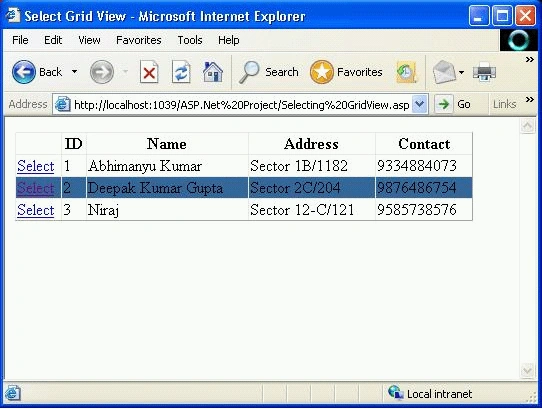
We can enable a user to select a particular row in a GridView control. This is
useful when we want to build single page form for huge data. We can apply some
different property to selected row to look different than other when selected.
<%@ Page Language="VB" %>
<!DOCTYPE html PUBLIC "-//W3C//DTD
XHTML 1.0 Transitional//EN""http://www.w3.org/TR/xhtml1/DTD/xhtml1-transitional.dtd">
<script runat="server">
</script>
<html xmlns="http://www.w3.org/1999/xhtml">
<head id="Head1" runat="server">
<title>Select
Grid View</title>
</head>
<body>
<form id="form1" runat="server">
<div>
<asp:GridView ID="GridView1" runat="server" AutoGenerateColumns="False"
DataSourceID="SqlDataSource1"
EmptyDataText="There
are no data records to display." Width="458px">
<Columns>
<asp:CommandField ShowSelectButton="True"/>
<asp:BoundField DataField="ID" HeaderText="ID" SortExpression="ID" />
<asp:BoundField DataField="Name" HeaderText="Name" SortExpression="Name" />
<asp:BoundField DataField="Address" HeaderText="Address"
SortExpression="Address" />
<asp:BoundField DataField="Contact" HeaderText="Contact"
SortExpression="Contact" />
</Columns>
<SelectedRowStyle BackColor="#336699" BorderColor="Blue" />
</asp:GridView>
<asp:SqlDataSource ID="SqlDataSource1" runat="server"
ConnectionString="<%$ ConnectionStrings:DatabaseConnectionString1 %>"
ProviderName="<%$ ConnectionStrings:DatabaseConnectionString1.ProviderName %>"
SelectCommand="SELECT
[ID], [Name], [Address], [Contact] FROM [MyTB]">
</asp:SqlDataSource>
</div>
</form>
</body>
</html>
We can also enable the GridView selection using the following properties:
-
SelectedDataKey: Returns the
DataKey object associated with the selected row (it is useful when there are
multiple data key).
- SelectedIndex: Returns
the index of the selected row.
- SelectedValue: Returns
the data key associated with the selected row.
- SelectedRow: Returns the actual row that is GridViewRow object associated with the selected row.
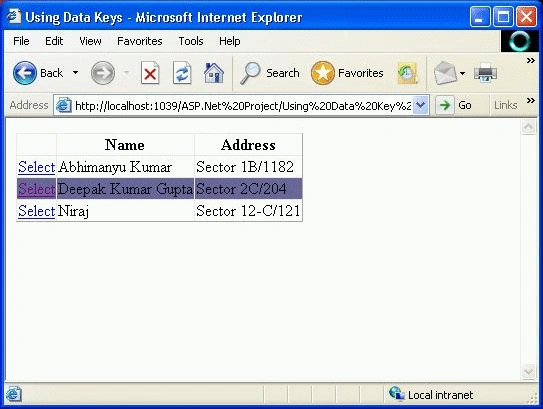
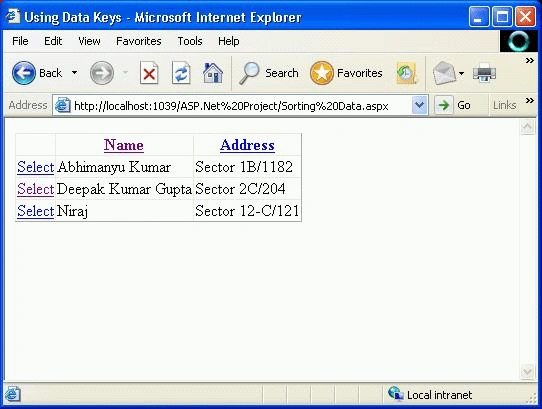
We associate a value with each row in a GridView by providing a value for the GridView control's DataKeyName property. We can assign the name of a single database column to this property or we can assign a comma-separated list of column names to this property.
<%@ Page Language="VB" %>
<!DOCTYPE html PUBLIC "-//W3C//DTD XHTML 1.0 Transitional//EN""http://www.w3.org/TR/xhtml1/DTD/xhtml1-transitional.dtd">
<script runat="server">
</script>
<html xmlns="http://www.w3.org/1999/xhtml">
<head runat="server">
<title>Using
Data Keys</title>
<style type="text/css">
</style>
</head>
<body>
<form id="form1" runat="server">
<div>
<asp:GridView ID="GridView1"
runat="server"
DataSourceID="SqlDataSource1"
DataKeyNames="Name,Address"
AutoGenerateSelectButton="true">
<SelectedRowStyle CssClass="mycss" BackColor="#666699" BorderColor="Red">
</SelectedRowStyle>
</asp:GridView>
<br />
<br />
<asp:SqlDataSource ID="SqlDataSource1" runat="server"
ConnectionString="<%$ ConnectionStrings:DatabaseConnectionString1 %>"
SelectCommand="SELECT
Name, Address FROM MyTB">
</asp:SqlDataSource>
<br />
Hussain AhmedPosted Mar 12, 2014, 11:31 AM
Nice