In this article, I am going to show how you can display master/detail GridView using Ajax ModalPopupExteder.
The controls we will require are
- GridView
- Button
- Ajax's ModalpopUpExtender
- Script Manager
- Panel
- SqlDataSource
- LinkButton
Database design
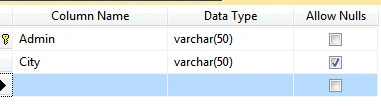
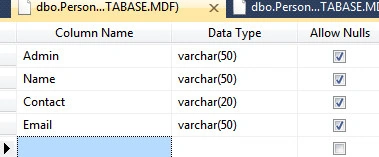
First of all we will design our database. We need two tables since we are creating a master/detail page. Here are the table structures.
Master table
Child table
Master GridView setup
Now add a GridView to the page, which is a Master GridView, and bind it using a SqlDataSource with the Master table; also enable AllowSelection.
<asp:GridView ID="GridView1" runat="server" AutoGenerateColumns="False" CellPadding="4" DataKeyNames="PersonID" DataSourceID="SqlDataSource1" ForeColor="#333333" GridLines="None">
    <AlternatingRowStyle BackColor="White" />
    <Columns>
        <asp:CommandField ShowSelectButton="True" />
        <asp:BoundField DataField="PersonID" HeaderText="PersonID" ReadOnly="True" SortExpression="PersonID" />
        <asp:BoundField DataField="PersonName" HeaderText="PersonName" SortExpression="PersonName" />
        <asp:BoundField DataField="Salary" HeaderText="Salary" SortExpression="Salary" />
    </Columns>
    <EditRowStyle BackColor="#2461BF" />
    <FooterStyle BackColor="#507CD1" Font-Bold="True" ForeColor="White" />
    <HeaderStyle BackColor="#507CD1" Font-Bold="True" ForeColor="White" />
    <PagerStyle BackColor="#2461BF" ForeColor="White" HorizontalAlign="Center" />
    <RowStyle BackColor="#EFF3FB" />
    <SelectedRowStyle BackColor="#D1DDF1" Font-Bold="True" ForeColor="#333333" />
    <SortedAscendingCellStyle BackColor="#F5F7FB" />
    <SortedAscendingHeaderStyle BackColor="#6D95E1" />
    <SortedDescendingCellStyle BackColor="#E9EBEF" />
    <SortedDescendingHeaderStyle BackColor="#4870BE" />
</asp:GridView>

<asp:SqlDataSource ID="SqlDataSource1" runat="server" ConnectionString="Data Source=.\SQLEXPRESS;AttachDbFilename=|DataDirectory|\Database.mdf;Integrated Security=True;User Instance=True" ProviderName="System.Data.SqlClient" SelectCommand="SELECT * FROM [PersonMaster]"></asp:SqlDataSource>
Child GridView setup
Next We have to take A Panel and inside the Panel use a second GridView (a Child GridView) and a linkButton.
<asp:Panel ID="Panel1" runat="server" Width="400" CssClass="ModalWindow">
    <div align="right">
        <asp:LinkButton ID="lnkOk" runat="server" Text="Close" />
    </div>
    <asp:GridView ID="GridView2" runat="server" BackColor="White" BorderColor="White"
        BorderStyle="Ridge" BorderWidth="2px" CellPadding="3" CellSpacing="1" DataSourceID="SqlDataSource2" GridLines="None" AutoGenerateColumns="False">
        <Columns>
            <asp:BoundField DataField="Admin" HeaderText="Admin" SortExpression="Admin" />
            <asp:BoundField DataField="Name" HeaderText="Name" SortExpression="Name" />
            <asp:BoundField DataField="Contact" HeaderText="Contact" SortExpression="Contact" />
            <asp:BoundField DataField="Email" HeaderText="Email" SortExpression="Email" />
        </Columns>
        <FooterStyle BackColor="#C6C3C6" ForeColor="Black" />
        <HeaderStyle BackColor="#4A3C8C" Font-Bold="True" ForeColor="#E7E7FF" />
        <PagerStyle BackColor="#C6C3C6" ForeColor="Black" HorizontalAlign="Right" />
        <RowStyle BackColor="#DEDFDE" ForeColor="Black" />
        <SelectedRowStyle BackColor="#9471DE" Font-Bold="True" ForeColor="White" />
        <SortedAscendingCellStyle BackColor="#F1F1F1" />
        <SortedAscendingHeaderStyle BackColor="#594B9C" />
        <SortedDescendingCellStyle BackColor="#CAC9C9" />
        <SortedDescendingHeaderStyle BackColor="#33276A" />
    </asp:GridView>
    <asp:SqlDataSource ID="SqlDataSource2" runat="server" ConnectionString="<%$ ConnectionStrings:ConnectionString %>"
        SelectCommand="SELECT * FROM [PersonDetail] WHERE ([Admin] = @Admin)">
        <SelectParameters>
            <asp:ControlParameter ControlID="GridView1" Name="Admin" PropertyName="SelectedValue"
                Type="String" DefaultValue="" />
        </SelectParameters>
    </asp:SqlDataSource>
</asp:Panel>
Modal popup extender setup
Next take a Button on the page which is the targetControlID of the ModalPopupExtender.
<asp:Button runat="server" ID="btnModalPopUp" Style="display: none" />
All the required Controls are added and now take a ModalPopupExteder and scriptManager on the page.
<asp:ScriptManager ID="ScriptManager1" runat="server"></asp:ScriptManager>

<cc1:ModalPopupExtender TargetControlID="btnModalPopUp"
                        ID="ModalPopupExtender2" runat="server"
                        BackgroundCssClass="modalBackground"
                        PopupControlID="Panel1"
                        OkControlID="lnkOk"/>
- TargetControlID: This is the property that sets the ID of control using which we can display the Popup (Required)
- PopupControlID: This is the property that sets the ID of control which will be popped up after clicking on the TargetControlID control(Required).
Here we took the Button but we are not showing this button on a webpage, we took this because the property of ModalPopup "TargetControlID" is required to be set. But in our example, this button is of no use.
CSS styling
Add the CSS for the ModalPopUP and ScriptManage.
<style type="text/css">
    .modalBackground {
        background-color: #CCCCFF;
        filter: alpha(opacity=40);
        opacity: 0.5;
    }

    .ModalWindow {
        border: solid 1px #c0c0c0;
        background-color: #99ccff;
        padding: 0px 10px 10px 10px;
        position: absolute;
        top: -1000px;
    }
</style>
Selected index changed event implementation
Now the main event of displaying a popup. Implement the SelectedIndexChanged Event of GridView1.
protected void GridView1_SelectedIndexChanged(object sender, EventArgs e)
{
    ModalPopupExtender2.Show();
}
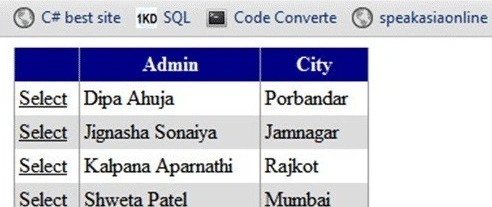
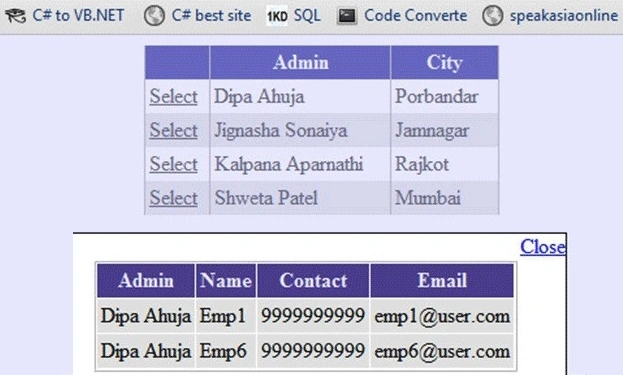
Result


Amar BishtPosted Sep 30, 2014, 5:25 AM
thank you very much..!!
apex patelPosted Jul 22, 2014, 5:03 AM
nice work.but I guess u missed to mentioned Gridview1 selectedIndexchange event in <asp:GridView ID="GridView1" runat="server" AutoGenerateColumns="False" CellPadding="4" DataKeyNames="PersonID" DataSourceID="SqlDataSource1" ForeColor="#333333" GridLines="None">
viniston ArockiasamyPosted Sep 18, 2012, 4:15 AM
very valuable sample this one... its help me a lot.... thank you so much to your team...
mohan kumarPosted Mar 8, 2012, 9:29 AM
I was looking for this article with very easy to understandable form...You did it Dipa Ahuja
Dipa AhujaPosted Jul 7, 2011, 11:10 AM
thank you all @ Abhimanyu Kumar i forgot table structure, but now i have included.. thanks..
Dinesh BeniwalPosted Jul 7, 2011, 1:31 AM
Good one
Abhimanyu K VatsaPosted Jul 7, 2011, 1:01 AM
you write stunning articles. in this article you said about tabel structure but it is missing from this article.
Jeff RosenthalPosted Jul 6, 2011, 4:49 PM
Thanks Dipa
coskuntekinPosted Jul 6, 2011, 3:55 PM
thank you