

Description:
Grouping ListView items dynamically can be confusing at first, the reason is that you can't simply "tell" the item what's his group's header is. You have to find the proper group from the group-collection and add the item to that existing group. And if no matching group is found, you have to create a new group. Okay, let's get started:
I'm going to skip form-designing. The form that I'm going to use for demonstration looks like this:
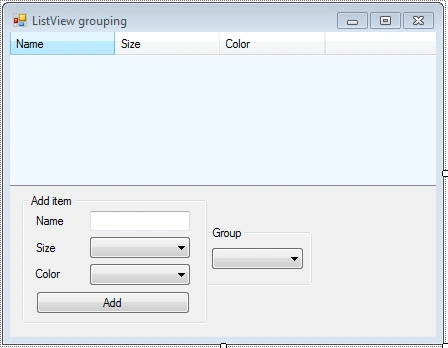
Drop-down list items:
- Size: Small, Medium, Large
- Color: Red, Yellow, Green, Blue, Violet
- Group: By name, By size, By color
Our grouping function:
private void GroupItem(ListViewItem item)
{
// This flag will
tell us if proper group already exists
bool
group_exists = false;
// Check each
group if it fits to the item
foreach (ListViewGroup group in
this.listView.Groups)
{
// Compare group's header to selected subitem's text
if
(group.Header == item.SubItems[this.groupBox.SelectedIndex].Text)
{
// Add item to
the group.
//
Alternative is: group.Items.Add(item);
item.Group = group;
group_exists = true;
break;
}
}
// Create new
group if no proper group was found
if
(!group_exists)
{
// Create group and specify its header by
// getting
selected subitem's text
ListViewGroup
group = new ListViewGroup(item.SubItems[this.groupBox.SelectedIndex].Text);
// We need to
add the group to the ListView first
this.listView.Groups.Add(group);
item.Group = group;
}
}
Make sure some items are selected from the start:
this.sizeBox.SelectedIndex = 0;
this.colorBox.SelectedIndex = 0;
this.groupBox.SelectedIndex = 0;
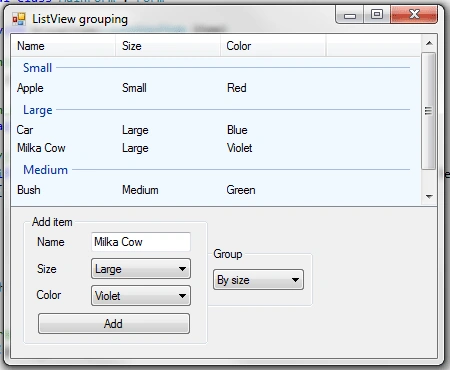
Add an event handler to the SelectedIndexChanged event, which occurs when different type of grouping is selected :
this.groupBox.SelectedIndexChanged += (object o, EventArgs
e) =>
{
// Clear group
collection
this.listView.Groups.Clear();
// Loop through
all existing items to group them properly
foreach (ListViewItem item in
this.listView.Items)
{
GroupItem(item);
}
};
Event handler for a click on the "Add" button:
this.add.Click += (object
o, EventArgs e) =>
{
// Display messagebox if
textbox with name is empty
if (this.nameBox.Text == "")
{
MessageBox.Show("No
name was specified.", "Name
missing!",
MessageBoxButtons.OK,
MessageBoxIcon.Error);
}
else
{
// ListViewItem has a useful constructor that
// allows us
to add collection of subitems
// in form of
a string array
robert MirandaPosted Aug 22, 2014, 3:20 AM
if i need to group it with continent and country how to make it?
robert MirandaPosted Aug 22, 2014, 3:19 AM
how to make it for multiple groping?
lan lanPosted Jun 10, 2013, 12:25 PM
thankz bro help me a lot
Nathan JansenPosted Feb 6, 2013, 4:33 AM
I am sorry, i am naab! I got it working. :D?
Nathan JanseneditedPosted Feb 6, 2013, 3:53 AMEdited Feb 6, 2013, 3:55 AM
if (group.Header == item.SubItems[this.groupBox.SelectedIndex].Text) Hi! What does 'groupBox' refer to? there is no such item. Sorry for english. Thanks to many!
Anand KhatriPosted Dec 13, 2012, 5:06 AM
Thnaks a lot
samPosted Jun 30, 2011, 6:51 AM
nice article.. may be this can be helpful too, http://winform-net.blogspot.com/2011/06/automatic-listview-grouping.html