


Article Overview
This article provides a concise and comprehensive overview of gRPC in ASP.NET Core, for the developers looking to adopt modern and high performing communication in the system. The document introduces gRPC fundamentals within the .NET ecosystem, explain the communication modes such as Unary, Server Streaming, Client Streaming, and Bidirectional Streaming. This article also offer a brief overview of the Protocol Buffer (.proto) file that defines the service contracts and data structures for the application. This article could be solid foundation for .NET developers exploring gRPC for the first time and experts as well.
Introduction to gRPC
gRPC is high-performing Remote Procedure Call (RPC) framework developed by Google, which helps to enable efficient communication between distributed systems. It is built on the top of HTTP2 and Protocol Buffers (protobuf). gRPC offers features such as strong typing, code generation and support for multiple programming languages including C# in .NET Core. Traditional REST APIs uses the JSON over HTTP1, gRPC leverages the binary serialization and multiplexed streams to deliver lower latency, smaller message sizes, and better resource utilization. gRPC is natively supported starting from.NET Core 3.0, which makes it a good choice for the building microservices, internal APIs, and real-time applications where the performance matters.
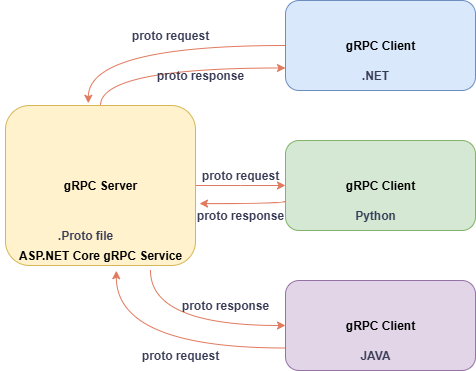
Introduction to Proto Buffer file
Protocol Buffer (. proto) file acts as a core contract definition in gRPC that describes the structure of the message and the interface of services in a language-agnostic way.
It has strongly typed data structures (like class and records in C#) that specify the fields and their types.
It supports RPC methods, with request andd response message types and the communication patters (e.g., unary, streaming etc.)
Example of Protocol buffer file:
syntax = "proto3";

option csharp_namespace = "GrpcService1";

package greet;

// The greeting service definition.
service Greeter {
  // Sends a greeting
  rpc SayHello (HelloRequest) returns (HelloReply);
}

// The request message containing the user's name.
message HelloRequest {
  string name = 1;
}

// The response message containing the greetings.
message HelloReply {
  string message = 1;
}
Syntax Declaration
It specifies the version of the Protocol Buffers syntax being used. We use proto3 for modern gRPC applications.
syntax = "proto3";Package Declaration
This is optional but it is recommended. It avoids the naming conflicts.
package greet;Import Statements
It allows reusing the definitions from other proto files:
import "google/protobuf/empty.proto";Messaging Types
It defines the data structure of class or records. Each fields has a type, name ad a unique numeric tag:
message HelloRequest {
  string name = 1;
}
Scalar/Primitive types: string, int32, bool, etc.
Composite types: Other message types, Enums, or repeated (arrays) fields.
Service Definition
It is an RPC Interface, it consists of available methods, their request/response types, and communication patterns
service Greeter {
  rpc SayHello (HelloRequest) returns (HelloResponse);
  rpc SayHelloStream (stream HelloRequest) returns (stream HelloResponse);
}
It supports Unary, Server Streaming, Client Streaming, and Bidirectional Streaming.
When we import (.proto) file using the Protocol Buffer compiler with the gRPC plugin for C#, it automatically generates strongly typed C# classes for both the client and server. Which ensures the type of security, it reduces the boilerplate code, enforces the clear contract between the services (i.e. Client and Server). In microservice architecture contract-first approach is the good for system reliability.
Step by Step Implementation of GRPC client and Server architecture
Before you start building gRPC services in ASP.NET Core, make sure your development environment meets the following requirements:
.NET 8 SDK
Visual Studio 2022
ASP.NET Core runtime
Create a new ASP.NET Core gRPC Service Project in Visual Studio 2022
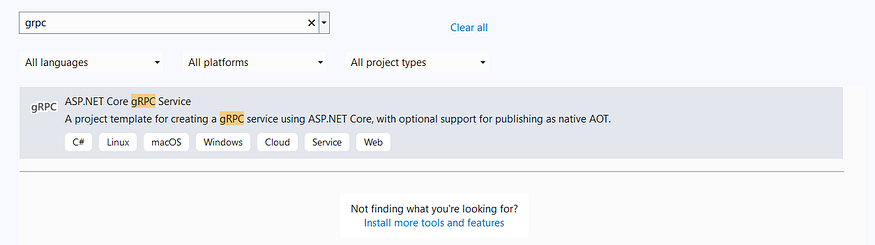
Add new nuget package Grpc.Aspnetcore.Server

There is greet.proto and GreeterService file already on the project. In the Protos folder, right-click → Add → New Item. Search for “Protocol Buffer File” and name it employee.proto.
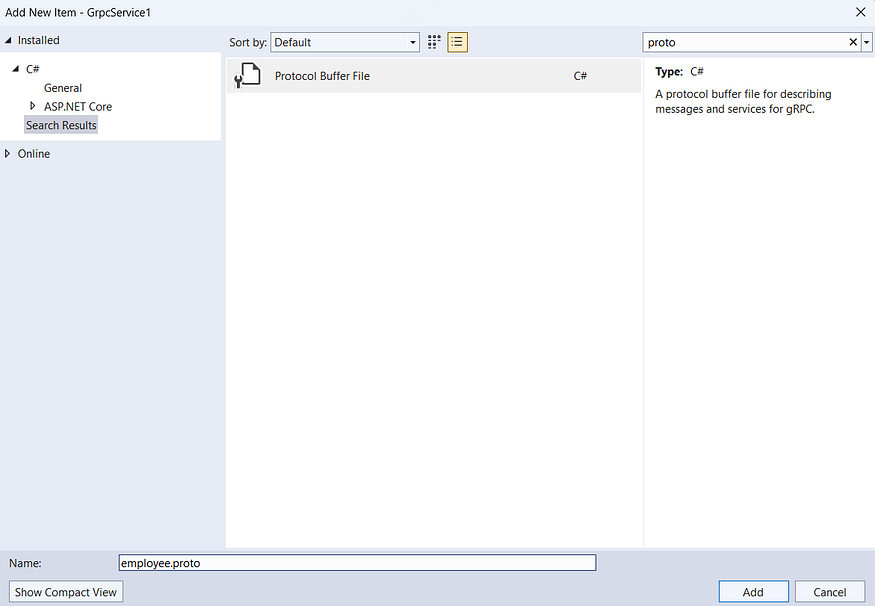
Inside the proto file, paste the following code.
syntax = "proto3";

option csharp_namespace = "GrpcService1";

package employee;

// The employee service definition.
service EmployeeService {
  // Saves an employee
  rpc SaveEmployee (SaveEmployeeRequest) returns (SaveEmployeeResponse);

  // Gets all employees
  rpc GetAllEmployees (GetAllEmployeesRequest) returns (GetAllEmployeesResponse);
}

// Employee message
message Employee {
  int32 id = 1;
  string name = 2;
  string email = 3;
  string department = 4;
}

// The request message for saving an employee
message SaveEmployeeRequest {
  Employee employee = 1;
}

// The response message for saving an employee
message SaveEmployeeResponse {
  bool success = 1;
  string message = 2;
  Employee employee = 3;
}

// The request message for getting all employees
message GetAllEmployeesRequest {
  // Empty request
}

// The response message for getting all employees
message GetAllEmployeesResponse {
  repeated Employee employees = 1;
}
In the Services folder, add a new class: EmployeeService.cs
using Grpc.Core;
using static GrpcService1.EmployeeService;

namespace GrpcService1.Services
{
    public class EmployeeService : EmployeeServiceBase
    {
        private readonly ILogger<EmployeeService> _logger;
        // In-memory storage for employees
        private static readonly List<Employee> _employees = new List<Employee>();
        // Simple counter for generating IDs
        private static int _idCounter = 1;

        public EmployeeService(ILogger<EmployeeService> logger)
        {
            _logger = logger;
        }

        public override Task<SaveEmployeeResponse> SaveEmployee(SaveEmployeeRequest request, ServerCallContext context)
        {
            try
            {
                if (request.Employee == null)
                {
                    return Task.FromResult(new SaveEmployeeResponse
                    {
                        Success = false,
                        Message = "Employee data not provided"
                    });
                }

                // Create a new employee with a generated ID
                var employee = new Employee
                {
                    Id = _idCounter++,
                    Name = request.Employee.Name,
                    Email = request.Employee.Email,
                    Department = request.Employee.Department
                };

                // Add to our in-memory collection
                _employees.Add(employee);

                _logger.LogInformation($"Employee saved successfully with ID: {employee.Id}");

                return Task.FromResult(new SaveEmployeeResponse
                {
                    Success = true,
                    Message = "Employee saved successfully",
                    Employee = employee
                });
            }
            catch (Exception ex)
            {
                _logger.LogError($"Error saving employee: {ex.Message}");
                return Task.FromResult(new SaveEmployeeResponse
                {
                    Success = false,
                    Message = $"Error occurred while saving: {ex.Message}"
                });
            }
        }

        public override Task<GetAllEmployeesResponse> GetAllEmployees(GetAllEmployeesRequest request, ServerCallContext context)
        {
            try
            {
                var response = new GetAllEmployeesResponse();
                response.Employees.AddRange(_employees);

                _logger.LogInformation($"Retrieved {_employees.Count} employees");
                return Task.FromResult(response);
            }
            catch (Exception ex)
            {
                _logger.LogError($"Error retrieving employees: {ex.Message}");
                throw new RpcException(new Status(StatusCode.Internal, $"Error occurred: {ex.Message}"));
            }
        }
    }
In program.cs, register the service.
app.MapGrpcService<EmployeeService>();Also, verify your .csproj file includes the protobuf definition:
<Protobuf Include="Protos\employee.proto" GrpcServices="Server" />Create the gRPC Client (Console App)
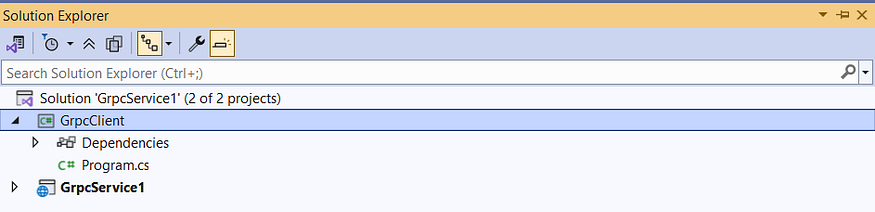
Right-click the solution → Add → New Project.
Choose Console App, name it GrpcClient, and target .NET 8.
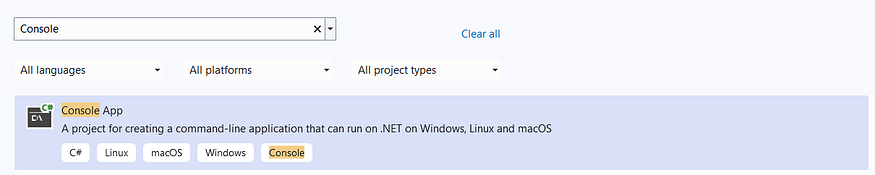
Install required NuGet Packages
Google.Protobuf
Grpc.AspNetCore
Grpc.Net.Client
Grpc.Net.ClientFactory
Grpc.Tools
Sharing the .proto file with the Client
In GrpcClient, right-click → Add → Service Reference.
Choose gRPC → Browse → select .proto from GrpcService1/Protos
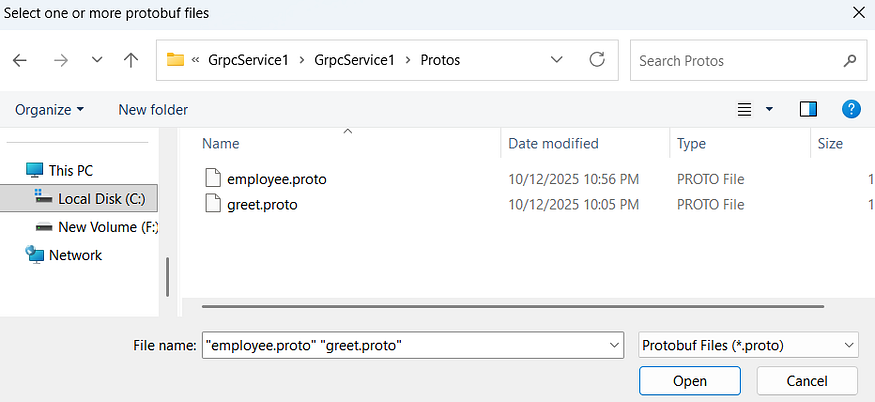
Then imported service dependency should be like this:

This adds the following to your GrpcClient.csproj:
<Protobuf Include="..\GrpcService1\Protos\employee.proto" GrpcServices="Client">
  <Link>Protos\employee.proto</Link>
</Protobuf>
<Protobuf Include="..\GrpcService1\Protos\greet.proto" GrpcServices="Client">
  <Link>Protos\greet.proto</Link>
</Protobuf>
Call the gRPC Services from the client.
Replace the contents of Program.cs in GrpcClient with:
using Grpc.Net.Client;
using GrpcService1;
using System.Text;

// Create a channel
var channel = GrpcChannel.ForAddress("https://localhost:7150");

// Call the original Greeter service
var greeterClient = new Greeter.GreeterClient(channel);
Console.WriteLine("Hello from GRPC Client");
Console.WriteLine("Please Enter Your Name:");
string name = Console.ReadLine() ?? "Missing Your Name !!";
var greeterResponse = await greeterClient.SayHelloAsync(new HelloRequest { Name = name });
Console.WriteLine(greeterResponse);

// Demonstrate the new Employee service
Console.WriteLine("\n--- Employee Service Demo ---\n");

// Create Employee service client
var employeeClient = new EmployeeService.EmployeeServiceClient(channel);

try
{
    // Save an employee
    Console.WriteLine("Saving employees...");

    // Save first employee
    var employee1 = new Employee
    {
        Name = "John Doe",
        Email = "[email protected]",
        Department = "Engineering"
    };

    var saveResponse1 = await employeeClient.SaveEmployeeAsync(new SaveEmployeeRequest
    {
        Employee = employee1
    });

    Console.WriteLine($"Employee saved: {saveResponse1.Success}, Message: {saveResponse1.Message}");
    Console.WriteLine($"Employee ID assigned: {saveResponse1.Employee?.Id}");

    // Save second employee
    var employee2 = new Employee
    {
        Name = "Jane Smith",
        Email = "[email protected]",
        Department = "Marketing"
    };

    var saveResponse2 = await employeeClient.SaveEmployeeAsync(new SaveEmployeeRequest
    {
        Employee = employee2
    });

    Console.WriteLine($"Employee saved: {saveResponse2.Success}, Message: {saveResponse2.Message}");
    Console.WriteLine($"Employee ID assigned: {saveResponse2.Employee?.Id}");

    // Get all employees
    Console.WriteLine("\nRetrieving all employees...");
    var getAllResponse = await employeeClient.GetAllEmployeesAsync(new GetAllEmployeesRequest());

    Console.WriteLine($"Retrieved {getAllResponse.Employees.Count} employees:");
    foreach (var emp in getAllResponse.Employees)
    {
        Console.WriteLine($"ID: {emp.Id}, Name: {emp.Name}, Email: {emp.Email}, Department: {emp.Department}");
    }
}
catch (Exception ex)
{
    Console.WriteLine($"Error occurred: {ex.Message}");
}

Console.WriteLine("\nPress Enter to exit...");
Console.ReadLine();
The URL (https://localhost:7150) must match the server’s applicationUrl in Properties/launchSettings.json.
"applicationUrl": "https://localhost:7150;http://localhost:5063"Right-click the solution → Properties.
Under Common Properties → Startup Project, select Multiple startup projects.
Set both GrpcService1 and GrpcClient to Start.
Press F5 to run.
You’ll see the client prompt for input, call the server, and display results — all over HTTP/2 with binary protobuf encoding!
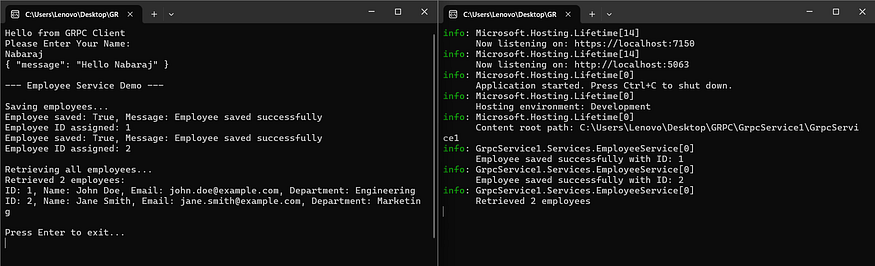
You’ve now built a complete gRPC client-server system in ASP.NET Core:
Defined services using .proto contracts
Implemented server logic with dependency injection and logging
Consumed services from a .NET console client
Shared contracts without code duplication
gRPC actually shines in microservices, internal APIs, and performance-critical scenarios. While this example uses in-memory data, you can easily plug in a database (e.g., Entity Framework Core) for persistence.
Source code available in Github
Cheers!
Join the conversation! Your thoughts help the community grow.