

Introduction and Background
In the previous posts, I have shown how you can use MonoDevelop IDE of Mono Project to get started programming C# applications on Linux environment and for the operating system I used Linux distro, Ubuntu operating system. However, since all of the topics are covered already and I am just skimming through the snippets and small portions of the data that I can share, this is another post in the series before I continue to write a guide for this, in a compiled form. In this post, I am going to talk about cryptographic support provided in Mono itself, for Ubuntu.
However, you can always write your own compiled modules that run the cryptographic services and you can also write your own modules that represent the procedures and steps shown in the certified algorithms for cryptography. But, in this post I will talk about the built-in classes and objects provided to you for these services.
I have also talked about security tweaks a lot before, and I would like you to read my previous posts about security in .NET framework too, A few tips for security in .NET framework. Since this is much more about Ubuntu and C# programming using Mono Project, I recommend that you read the previous posts in this series of articles.
So basically this is another post in the series of Ubuntu programming using C# language; Mono Project has been a great tool for C# geeks. In this post I am going to talk about the hashing algorithms, and what else Mono Project has for us!
Security APIs in Mono
No wonder Mono is influenced based on .NET’s philosophy and C# language, but still it lacks many things when it comes to the core APIs, such as security API. It does not have a full package of the APIs in it. For example, on .NET framework the support has been increased to SHA256, SHA512 and more, whereas on Mono there are not many flavors currently added and you only have to stick to either one of the provided, or you would have to manage the base algorithms and write your own implementation of the algorithms, which, definitely, would be hard job! Until Mono introduces some new algorithms, let’s stick to the provided ones and learn about them, how to use them and what they can serve us with.
In Mono APIs, you get two namespaces for security algorithms. The algorithms can be for simple encryption and decryption or it may be for the password hashing purposes. Now, these two are different in many ways, however they are categorized under “Cryptography” in computer science.
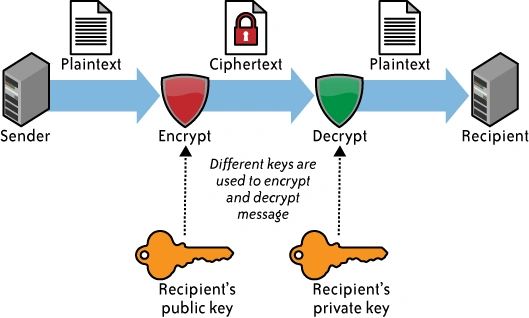
- Encrypting/decrypting: is a process in which you encode the data in such a way, that a special secret key is required to bring the data back in its original form. It is used while securing the data from potential spywares, because each time you have to access the data, you need to pass a special secret key with it.
- Hashing: is a process, typically used for passwords, but is not only restricted to passwords. Hashing is a technique in which data is encrypted, in such a way that it is impossible to be converted back to its original form.
Mono namespaces provide you with objects that allow you to work around with these functions and add a layer of security to your applications. Now, let us first of all, talk about password hashing and then we will get into the encryption and decryption techniques provided in Mono runtimes for developers.
During the article, I will only focus on the objects provided in System.Security.Cryptography, however you can still use Mono.Security.Cryptography, but the recommended one is the native .NET framework’s cryptography namespace.
Hashing the passwords
Hashing the passwords has been widely used in every network based application, or online application. Hashing is a process that is not just restricted to the passwords only, as I have already said, the hashing has been widely used to determine the file consistency. Most of the software packages are introduced with MD5 or SHA hash values, they are used to determine if the file is in its real form or if it has been tampered with on its way to your machine. This ensures that the software package that you are installing is actually the “safe” package and has not been mixed with any malware or spyware content. The code from open source communities, such as Ubuntu, Linux and other open-source projects are widely exposed to such attacks, and if you install such packages they make expose your private data and even ask you for some revenue, that happens in cases of ransomware. Linux.Encoder.1 was one of such viruses, that encrypted the user data and then asked them to pay revenue to get their data back. However, hashing is a very simple task in .NET framework at least.
Usually, there are many algorithms provided in every framework that can be used in your applications, most commonly used are:
- MD5
- SHA-128
- SHA-256
- SHA-512
- So on…
Now, before I move any further, I should warn that you should never ever use MD5 for hashing the passwords. MD5 algorithm is very weak and a simple rainbow table attack would expose the passwords. In many cases, you should use SHA-128, or SHA-512. But the recommended one is SHA-256, because of the digest that it creates and the security that it has. I would personally recommend that you use SHA-256, if you want to store a small size of digest (hashed password string; in hex), otherwise, my personal advice is to store SHA-512.
The benefit of having SHA-512 over SHA-256, is that you can minimize the chances of collisions while generating the hashes for the passwords. A collision would typically occur when the hash results are similar for different values. The thing is that the hash function would return a hashed string to a limited size, but it can get an input of any size. Bigger files of larger byte arrays may result in a collision. So, to overcome the collision you may want to generate a hash of bigger size.
Now, talking of hashing the passwords, let me share how to hash the passwords in C#. The procedure is actually similar, if you have a code for .NET on Windows, same would be used on Mono on Ubuntu. Have a look below:
- // Function to hash the passwords
- public static string HashPassword(string message)
- {
- // Create a new instance of the SHA-256,
- // you should use SHA256Managed instead of SHA256 object.
- using(var algo = new SHA256Managed())
- {
- var bytes = System.Text.Encoding.UTF8.GetBytes(message);
- var hashedBytes = algo.ComputeHash(bytes);
- // The hash has been computed, to convert those bytes to string
- // I will use the following code, you may use your own
- // code to convert the byte array to string
- System.Text.StringBuilder builder = new System.Text.StringBuilder();
- foreach(byte bite in hashedBytes)
- {
- builder.Append(bite.ToString("x2"));
- }
- // Return it to the caller, to write it.
- return builder.ToString();
- }
- }
So, basically, what I have done is that I have just used that algorithm and I have got what I was expecting from it. Now, the way we call it defines how we use it. In this sample, I will be calling it to write the hash of it, to the screen and nothing else.
- Console.WriteLine("Enter the string to work on:");
- // Get the message
- string message = Console.ReadLine();
- // Hash the password.
- string hashedStr = Crypto.HashPassword(message);
- Console.WriteLine("Hashed string is: " + hashedStr);
Basically, we have already created the function that does the thing for us. So we are only calling it in this code. So, if I run the above code it would be something like this.
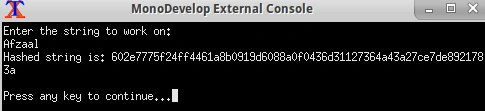
Figure 1: Working of the hashing algorithm on the word, “Afzaal”.
You would store this hashed string in your database when you want to save it. Never save the passwords or sensitive information that you do not want to get back in the actual form, in plain-text form.
Adding some salt to the hash
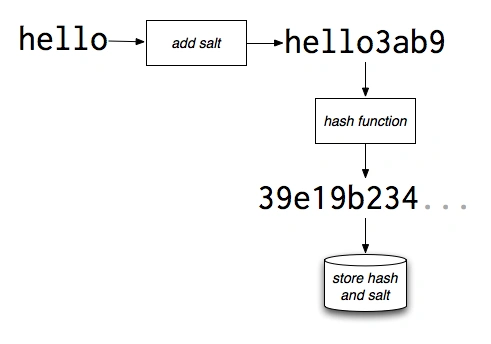
Now since we are talking about hashing the passwords, it is necessary to add a specific string text to the actual string, which acts as salt to the data. The procedure is very much simple and straightforward, you simply add extra string to the actual string and then find the hash for it. Where you add the salt is your choice, you can append it, prepend it, or insert it at the medians or what-so-ever, that is your choice.
- HashPassword (password + salt); // OK
- HashPassword (salt + password); // OK
- HashPassword (salt + password + salt); // OK
But only thing that you should consider is that you should use the same method to get the hash again, because if you calculate hash differently, their hash value would be different.
Chico HeningtonPosted Jan 24, 2016, 8:20 PM
Yes using Rfc2898DeriveBytes is secure, allows a password, and a specified salt
Chico HeningtonPosted Jan 23, 2016, 9:49 PM
On the encryption and deception you could also use a password derive byte to pass a password in for added security
Santhakumar MunuswamyPosted Jan 23, 2016, 2:03 AM
Thanks for nice share
Ankit BansalPosted Jan 22, 2016, 12:52 AM
keep sharing..thanks