

Introduction
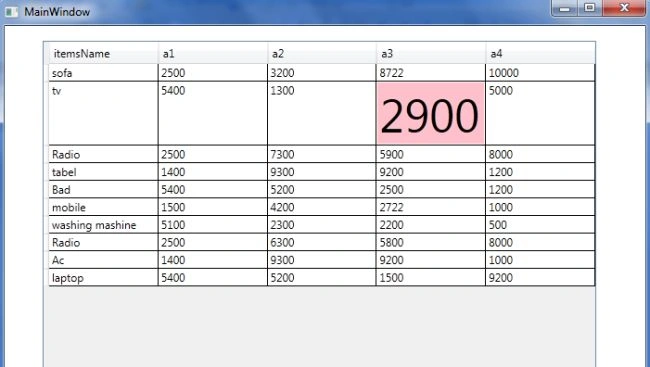
This article describes how to highlight a DataGrid cell on a MouseOver event. Here I use styles for highlighting the DataGrid cell containing some element upon a MouseOver event. This is easily done using a property called a trigger in WPF.
Triggers in Styles
A Trigger defines a list of actions to be fired when the specified condition is matched. There are two types of triggers in WPF.
- Property Triggers : Property trigger get fired when a property gets a specified value.
- Event Triggers : Event trigger defines a mechanism through that triggers animated change in a property.
Step 1
The simplest way to create a WPF Application is with Microsoft Visual Studio 2010:
- Open Visual Studio 2010.
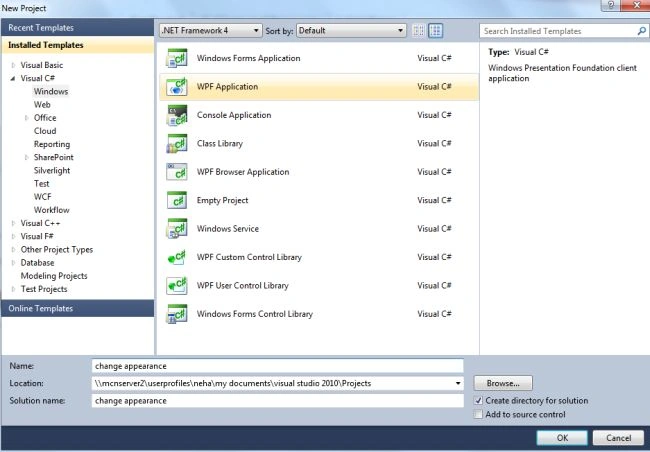
- Launch the New Project dialog box.
- Select the WPF project type with a WPF application template.
- Assign the project name and click "OK" to create the new project.
Step 2
Now we use a DataGrid tool from the toolbox as in the following:
- Go to the "View" -> "Toolbox".
- Then Drag and Drop a DataGrid on the design view.
- Add the following source code in MainWindow.xaml:
<Grid>
<Grid.RowDefinitions>
<RowDefinition Height="84" />
<RowDefinition Height="370" />
</Grid.RowDefinitions>
<DataGrid AutoGenerateColumns="True" Height="441"
HorizontalAlignment="Left" Margin="41,16,0,0" Name="itemSales"
VerticalAlignment="Top" Width="597" ColumnWidth="*" CanUserAddRows="False" Grid.RowSpan="2" />
</Grid>
Step 3
- Now go the MainWindows.cs and write the following code:
using System;
using System.Collections.Generic;
using System.Linq;
using System.Text;
using System.Windows;
using System.Windows.Controls;
using System.Windows.Data;
using System.Windows.Documents;
using System.Windows.Input;
using System.Windows.Media;
using System.Windows.Media.Imaging;
using System.Windows.Navigation;
using System.Windows.Shapes;
using System.Collections.ObjectModel;
namespace Change_apperence
{
/// <summary>
/// Interaction logic for MainWindow.xaml
/// </summary>
public partial class MainWindow : Window
{
public MainWindow()
{
InitializeComponent();
}
private void Window_Loaded(object sender, RoutedEventArgs e)
{
itemSales.ItemsSource = new ProductsSalesCollection();
}
}
public class itemsSales
{
public string itemsName { get; set; }
public int a1 { get; set; }
public int a2 { get; set; }
public int a3 { get; set; }
public int a4 { get; set; }
}
public class ProductsSalesCollection : ObservableCollection<itemsSales>
{
public ProductsSalesCollection()
{
Add(new itemsSales() { itemsName = "sofa", a1 = 2500, a2 = 3200, a3 = 8722, a4 = 10000 });
Add(new itemsSales() { itemsName = "tv", a1 = 5400, a2 = 1300, a3 = 2900, a4 = 5000 });
Add(new itemsSales() { itemsName = "Radio", a1 = 2500, a2 = 7300, a3 = 5900, a4 = 8000 });
Add(new itemsSales() { itemsName = "tabel", a1 = 1400, a2 = 9300, a3 = 9200, a4 = 1200 });
Add(new itemsSales() { itemsName = "Bad", a1 = 5400, a2 = 5200, a3 = 2500, a4 = 1200 });
Add(new itemsSales() { itemsName = "mobile", a1 = 1500, a2 = 4200, a3 = 2722, a4 = 1000 });
Add(new itemsSales() { itemsName = "washing mashine", a1 = 5100, a2 = 2300, a3 = 2200, a4 = 500 });
Add(new itemsSales() { itemsName = "Radio", a1 = 2500, a2 = 6300, a3 = 5800, a4 = 8000 });
Add(new itemsSales() { itemsName = "Ac", a1 = 1400, a2 = 9300, a3 = 9200, a4 = 1000 });
Add(new itemsSales() { itemsName = "laptop", a1 = 5400, a2 = 5200, a3 = 1500, a4 = 9200 });
}
}
}
Step 4
-
Again open the WindowMain.xaml and add code for the style.
<Window.Resources>
<Style TargetType="{x:Type DataGridCell}">
<Style.Triggers>
<Trigger Property="IsMouseOver" Value="True">
<Setter Property="Background" Value="pink"></Setter>
<Setter Property="FontSize" Value="50"></Setter>
</Trigger>
</Style.Triggers>
</Style>
</Window.Resources>
-
The final source code of the WindowsMain.xaml is:
<Window x:Class="change_apperence.MainWindow"
xmlns="http://schemas.microsoft.com/winfx/2006/xaml/presentation"
xmlns:x="http://schemas.microsoft.com/winfx/2006/xaml"
Title="MainWindow" Height="459" Width="707" Loaded="Window_Loaded">
<Window.Resources>
<Style TargetType="{x:Type DataGridCell}">
<Style.Triggers>
<Trigger Property="IsMouseOver" Value="True">
<Setter Property="Background" Value="pink"></Setter>
<Setter Property="FontSize" Value="50"></Setter>
</Trigger>
</Style.Triggers>
</Style>
</Window.Resources>
<Grid>
<Grid.RowDefinitions>
<RowDefinition Height="84" />
<RowDefinition Height="370" />
</Grid.RowDefinitions>
<DataGrid AutoGenerateColumns="True" Height="441"
HorizontalAlignment="Left" Margin="41,16,0,0" Name="itemSales"
VerticalAlignment="Top" Width="597" ColumnWidth="*" CanUserAddRows="False" Grid.RowSpan="2" />
</Grid>
</Window>
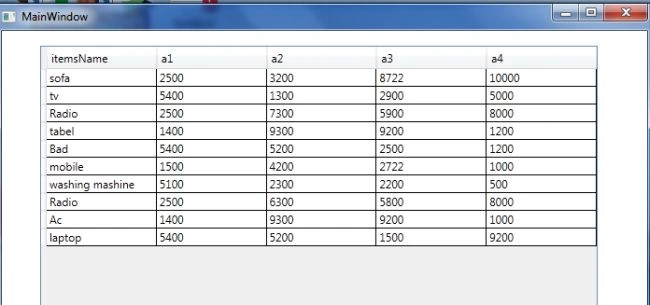
Output:
Press F5:
Now move the cursor over the DataGrid cells:
Arjun DhilodPosted Aug 28, 2013, 7:30 AM
very nice